
The Frustration of Sending Resumes Into the Void
If you’ve ever applied to dozens of jobs and heard nothing back, you know how discouraging it feels. I’ve been there — refreshing my email, second-guessing my experience, and wondering what I was doing wrong. The truth? In many cases, it’s not about being unqualified. It’s about not being optimized.
Most companies today use Applicant Tracking Systems (ATS) to filter resumes before a human recruiter even sees them. That means your resume needs to “speak the language” of the job description. That’s exactly where a Resume Keyword Checker becomes a game changer.
Discovering the Power of Keyword Matching
When I first started tailoring my resume manually, I would read the job description, highlight important terms, and try to adjust my resume accordingly. It was time-consuming and honestly, easy to miss critical keywords.
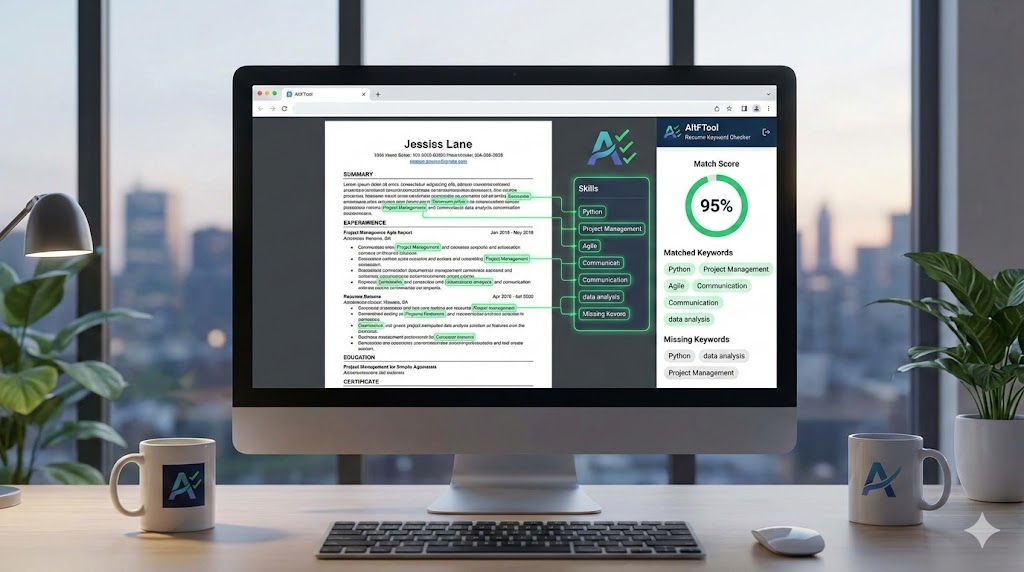
Using the Resume Keyword Checker extension completely changed my workflow. Instead of guessing, I could instantly compare my resume with the job description. The Keyword Matching Engine analyzes both texts and identifies which terms are aligned and which are missing. Seeing that side-by-side clarity made optimization much easier and far more strategic.
Understanding Your ATS Score
One of the most eye-opening features for me was the ATS Score Calculation. The extension provides a percentage-based match score, showing how closely my resume aligns with the job description.
Before using it, I had no idea whether my resume was “good enough” for ATS systems. Now, I get a clear numeric indicator. If my score is low, I know I need to improve alignment. If it’s high, I feel more confident hitting that “Apply” button.
It turns resume editing into a measurable process instead of an emotional guessing game.
Found & Missing Keywords: The Real Advantage
What makes this tool especially helpful is how it highlights Found & Missing Keywords. It doesn’t just give a score — it tells you exactly what you’re missing.
For example, I once applied for a role that emphasized “cross-functional collaboration” and “data-driven decision making.” Even though I had that experience, I hadn’t used those exact phrases. The tool flagged them as missing. After incorporating those terms naturally into my resume, my ATS score improved significantly.
It’s not about stuffing keywords — it’s about aligning your real experience with the employer’s language.
Auto Extraction Saves Time
Another feature I genuinely appreciate is Auto Extract from Page. Instead of copying and pasting long job descriptions manually, I can extract content directly from supported job portals with a click.
When you’re applying to multiple roles in a day, small time-savers like this make a big difference. It keeps the process smooth and efficient.
Clean, Private, and Secure
One concern many job seekers have is privacy. I personally feel more comfortable knowing that this Resume Keyword Checker runs entirely locally within the browser. There are no external APIs, no resume uploads, and no third-party data sharing.
Everything — from keyword analysis to ATS score calculation — happens on your device. Even the Analysis History is stored locally, allowing you to review past comparisons without worrying about your data being exposed.
For professionals who value confidentiality, this is a huge plus.
Simple and Practical User Flow
The best part? It’s incredibly easy to use.
You open the extension popup, paste your resume and job description (or extract automatically), click “Analyze Match,” and instantly see your results. Then you refine your resume based on the highlighted suggestions and re-run the analysis if needed.
It turns resume optimization into a structured, repeatable process instead of trial and error.
Why It Matters in 2026
The hiring landscape continues to evolve, and ATS systems are becoming more sophisticated. Recruiters receive hundreds — sometimes thousands — of applications for a single role. If your resume isn’t keyword-optimized, it might never reach human eyes.
A Resume Keyword Checker helps bridge that gap. It ensures your skills, qualifications, and achievements are presented in a way that both machines and recruiters understand.
In today’s competitive job market, optimization isn’t optional — it’s essential.

AI Automation Guide 2026: Work Smarter, Faster & Better
Artificial intelligence and automation are changing the way people work, manage information, communicate, and complete…

Tool Reviews: Find the Best Tools for Every Need
Every single morning, millions of people open their laptops to a screen crammed with open…

The Best Audio Editing Software 2026: Music, Podcasts & More
Good audio can completely change how a song, podcast, video, or voice recording feels.Audio Editing…

Tool Reviews 2026: Explore, Compare & Find Better Tools
Finding the right digital tool can save time, simplify repetitive tasks, and make everyday work…

The Best No-Code Automation Tools Simplify Workflows & Save Time
A lot of everyday work follows the same pattern. No-Code Automation Someone fills out a…

The Best Vivo V80 5G Expected Price, Camera & Features
The Vivo V80 5G is one of the upcoming smartphones attracting attention in India’s premium…
Final Thought
Looking back at my job search journey, I wish I had started using a Resume Keyword Checker sooner. It transformed the way I approach applications. Instead of sending the same generic resume everywhere, I now customize each submission strategically. The difference in response rate has been noticeable.
If you’re serious about increasing interview calls and making your resume ATS-friendly, this tool isn’t just helpful — it’s necessary.
Frequently Asked Questions
Disclaimer : This article is based on personal experience and general insights into resume optimization practices. Results may vary depending on industry, role, and individual qualifications. Always ensure your resume reflects your true skills and experience authentically.
#ResumeTips #ATSOptimization #JobSearch2026 #CareerGrowth #ResumeBuilding #ALTFTool #Carrerbook #Anslation

