
In 2026, online reading has become a daily habit — whether it’s blogs, research papers, tutorials, or news articles. But remembering important information from long webpages can be challenging. That’s why Super Simple Highlighter by Altftool.com is becoming one of the most useful Chrome extensions for productivity.
It allows users to permanently highlight selected text on any webpage and keeps those highlights saved even after reloading the page — all without using any cloud storage or external servers.
What Makes It Different?
Unlike many highlighting tools that require login or sync data online, Super Simple Highlighter works completely locally in your browser.
Your highlights are:
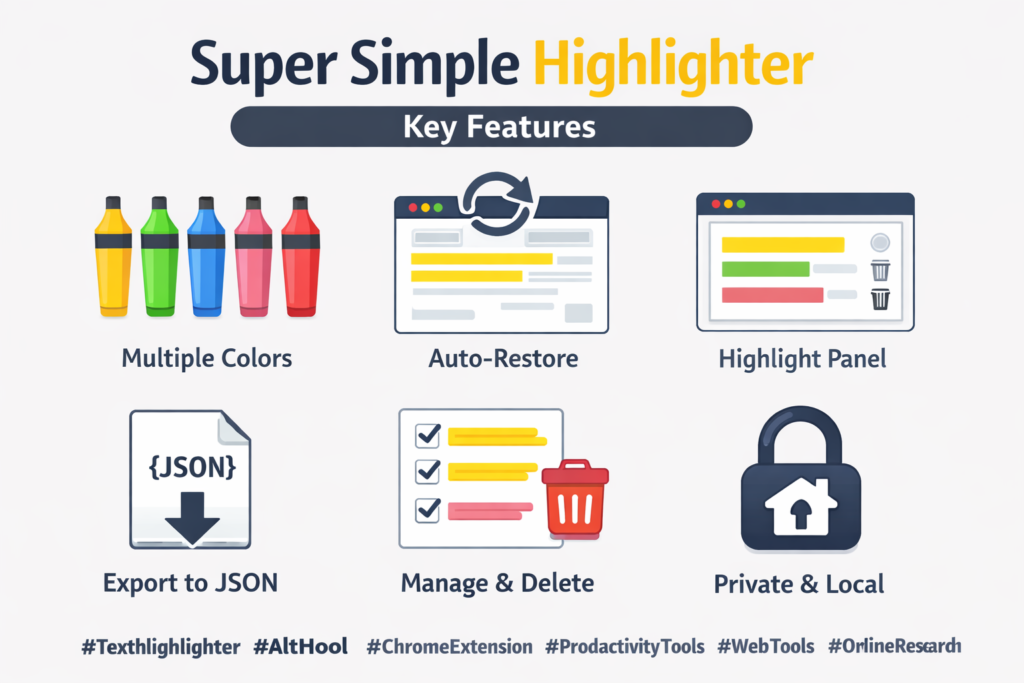
• Private
• Secure
• Stored in chrome.storage.local
• Not shared with any server
This makes it ideal for users who value data privacy.
Key Features
Super Simple Highlighter is designed to be simple yet powerful.
Smart Highlighting
You can enable or disable highlight mode easily using the extension popup, context menu, or keyboard shortcut. This gives full control while browsing.
Multiple Colors
The extension supports yellow, green, blue, pink, and red highlights so you can categorize information based on importance.
Automatic Restore
One of its best features is auto-restore. When you reload the page, all highlights appear automatically without any extra effort.
Highlight Management
From the popup panel, you can:
• View all saved highlights
• Scroll directly to highlighted text
• Delete unwanted highlights
• Export highlights as a JSON file
This makes managing notes very convenient.
How It Works
Using Super Simple Highlighter is very easy:
Open any webpage → Enable highlight mode → Select a color → Highlight text → Reload page to see saved highlights.
You can manage or export highlights anytime from the extension panel.
Who Should Use It?
This extension is perfect for:
• Students taking online notes
• Researchers reading articles
• Bloggers collecting references
• Professionals reviewing documents
• Anyone who reads long web content
If you spend a lot of time reading online, this tool can improve your productivity and organization.
Final Words
If you are searching for the best free text highlighter Chrome extension in 2026, Super Simple Highlighter by Altftool.com is a smart and secure choice.
It is lightweight, private, easy to use, and completely free. No accounts, no tracking, no complicated setup — just simple and effective highlighting.
Start highlighting smarter today and make your web reading more productive.
FAQs
#TextHighlighter #Altftool #ChromeExtension #ProductivityTools #StudyTools #WebTools #OnlineNotes #FreeExtension #Carrerbook #Ansation
AI Automation Guide 2026: Work Smarter, Faster & Better
Artificial intelligence and automation are changing the way people work, manage information, communicate, and complete…

Tool Reviews: Find the Best Tools for Every Need
Every single morning, millions of people open their laptops to a screen crammed with open…

The Best Audio Editing Software 2026: Music, Podcasts & More
Good audio can completely change how a song, podcast, video, or voice recording feels.Audio Editing…

Tool Reviews 2026: Explore, Compare & Find Better Tools
Finding the right digital tool can save time, simplify repetitive tasks, and make everyday work…

The Best No-Code Automation Tools Simplify Workflows & Save Time
A lot of everyday work follows the same pattern. No-Code Automation Someone fills out a…

The Best Vivo V80 5G Expected Price, Camera & Features
The Vivo V80 5G is one of the upcoming smartphones attracting attention in India’s premium…


