

Creating a professional README file is essential for any project. A well-structured README helps users understand your project, its features, and how to use it. However, writing Markdown manually can be time-consuming and confusing for beginners.
That’s where Altftool.com README Generator Chrome Extension makes things simple and efficient.
What is Altftool README Generator?
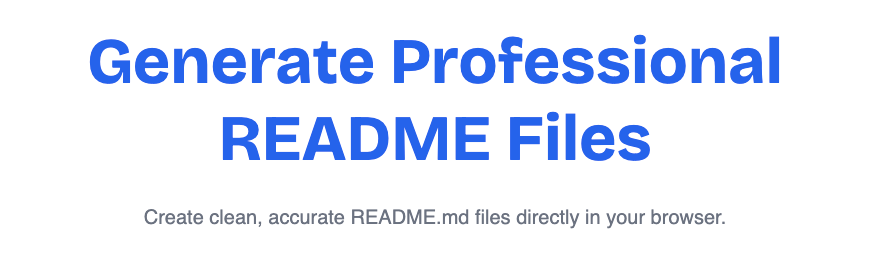
Altftool README Generator is a lightweight Chrome extension designed to convert raw project descriptions into clean, structured Markdown files. Instead of worrying about formatting, headings, and bullet points, you just provide your project details and the tool handles the rest.
The extension works completely offline, stores preferences locally, and does not use any external APIs. This ensures privacy, speed, and reliability.
Why a Good README Matters
A clear README file improves the overall presentation of your project. It makes your GitHub repository look professional and helps others quickly understand your work.
With proper formatting, your README can include a title, description, and organized feature list — all structured in a clean Markdown layout. Using a generator saves time and reduces formatting errors.
Key Features of Altftool README Generator
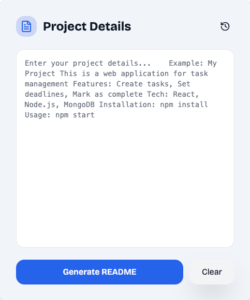
The extension allows you to paste your project description into a simple input box with minimum character validation to ensure meaningful content.
You can choose between Standard and Minimal templates depending on whether you prefer a detailed or clean layout. Once selected, the tool automatically extracts the title, description, and bullet-point features from your text and converts them into proper Markdown format.
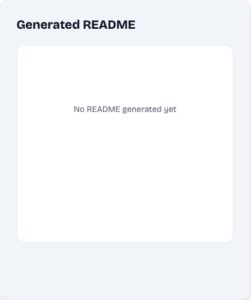
A live preview panel shows the generated README instantly, so you can review it before exporting. You can then copy it with one click or download it directly as a README.md file.
There is also a clear function to reset everything instantly, along with an options page where you can set your default template and theme preference.
How It Works
Using the extension is straightforward. After clicking the extension icon, you paste your project description into the textarea. Then you select your preferred template and click “Generate README.”
The formatted Markdown appears immediately in the preview panel. From there, you can either copy the content to your clipboard or download it as a file. If needed, you can clear the input and start again within seconds.
Who Should Use This Tool?
This tool is ideal for students, beginner developers, freelancers, and open-source contributors. Anyone who wants to create structured documentation without learning advanced Markdown formatting will find it helpful.
It is especially useful for GitHub users who want their repositories to look clean and professional without spending extra time on manual formatting.
Feature Overview Table
| Feature | Availability |
|---|---|
| Free to Use | Yes |
| Works Offline | Yes |
| Live Preview | Yes |
| Template Options | Standard & Minimal |
| Copy to Clipboard | Yes |
| Download as README.md | Yes |
| Data Collection | No |
Why Choose Altftool in 2026?
In 2026, productivity and privacy both matter. Many online README generators require internet access or may store user data. Altftool’s extension works fully offline and keeps everything inside your browser.
It is fast, simple, beginner-friendly, and focused on helping you create professional documentation in seconds.
FAQs
Conclusion
If you want a fast, private, and easy way to generate professional README files, Altftool README Generator Chrome Extension is one of the best free tools available in 2026.
It saves time, reduces formatting effort, and helps you present your projects in a clean and structured way.
#ReadmeGenerator #Altftool #ChromeExtension #MarkdownTool #DeveloperTools #GitHubProjects #ProductivityTools #FreeExtension #Carrerbook #Anslation
AI Automation Guide 2026: Work Smarter, Faster & Better
Artificial intelligence and automation are changing the way people work, manage information, communicate, and complete…

Tool Reviews: Find the Best Tools for Every Need
Every single morning, millions of people open their laptops to a screen crammed with open…

The Best Audio Editing Software 2026: Music, Podcasts & More
Good audio can completely change how a song, podcast, video, or voice recording feels.Audio Editing…

Tool Reviews 2026: Explore, Compare & Find Better Tools
Finding the right digital tool can save time, simplify repetitive tasks, and make everyday work…

The Best No-Code Automation Tools Simplify Workflows & Save Time
A lot of everyday work follows the same pattern. No-Code Automation Someone fills out a…

The Best Vivo V80 5G Expected Price, Camera & Features
The Vivo V80 5G is one of the upcoming smartphones attracting attention in India’s premium…


