
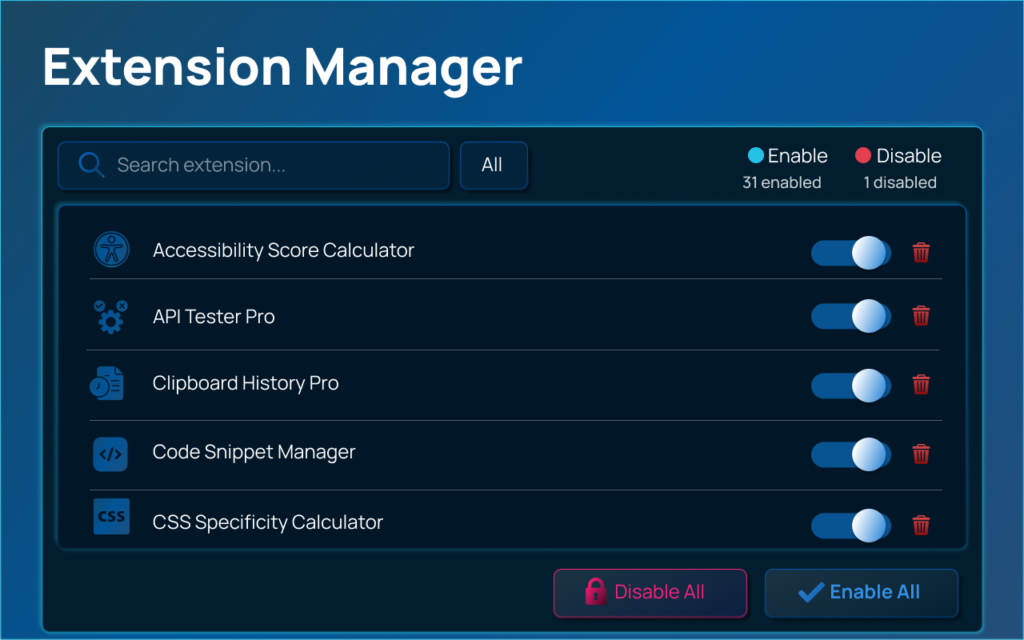

Extension Manager
Managing multiple browser extensions can quickly become overwhelming. Too many active extensions can slow down your browser, create clutter, and even cause performance issues. That’s where Extension Manager by AltFTool comes in. Designed to simplify extension control, this tool helps users enable, disable, and organize browser extensions with ease. In this detailed review, we’ll walk through how to use Extension Manager step by step, explore its features, and share practical tips to get the most out of it.
What Is Extension Manager?
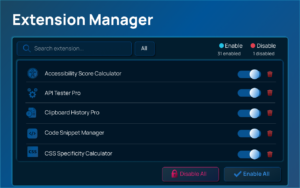
Extension Manager is a browser-based tool developed by AltFTool that allows users to efficiently manage installed extensions from a single, clean interface. Instead of navigating through complicated browser settings, you can quickly control which extensions are active and which are not. This not only improves workflow but can also enhance browser speed and productivity.
How to Install Extension Manager
Getting started is simple. First, visit the official extension store for your browser and search for Extension Manager by AltFTool. Click on “Add to Browser” and confirm the installation. Once installed, the extension icon will appear in your browser toolbar. Clicking on the icon opens the dashboard where all your installed extensions are listed.
The installation process is quick and does not require additional configuration, making it accessible even for beginners.
Step-by-Step Guide to Using Extension Manager


After installation, open the Extension Manager dashboard by clicking its icon. You will see a list of all installed extensions displayed in a structured format.
To enable or disable an extension, simply toggle the switch next to its name. This action instantly activates or deactivates the selected extension without needing to open browser settings.
If you want to temporarily disable multiple extensions, you can quickly turn them off one by one from the same dashboard. This is especially useful when you want to improve browser performance or test compatibility issues.
Some versions may also allow grouping or organizing extensions based on usage. If available, you can create different working modes such as “Work Mode” or “Personal Mode” and enable only the necessary extensions for each scenario.
Key Features That Stand Out
One of the most impressive aspects of Extension Manager is its simplicity. The interface is clean and user-friendly, making it easy to navigate. Performance optimization is another benefit. By quickly disabling unnecessary extensions, you can reduce memory usage and speed up browsing.
The tool also enhances productivity by giving you full control over extension activity. Instead of permanently uninstalling tools you occasionally use, you can disable them and activate them whenever needed.
Tips to Get the Most Out of Extension Manager
To maximize productivity, regularly review your installed extensions and disable the ones you rarely use. Keeping fewer extensions active reduces potential conflicts and improves browser stability.
Create a habit of enabling only task-specific extensions when working on certain projects. For example, activate SEO tools only when optimizing content, and disable them afterward.
Also, periodically check for extension updates to ensure compatibility and security.
Pros and Cons
Extension Manager’s biggest advantage is its ease of use and time-saving functionality. It eliminates the need to manually navigate browser settings every time you want to manage extensions. It is lightweight, efficient, and beginner-friendly.
However, like any tool, its functionality may depend on browser compatibility and updates. Some advanced customization features may vary depending on the version.
Final Thoughts
Extension Manager by AltFTool is a practical solution for anyone who uses multiple browser extensions daily. It simplifies extension control, improves browsing efficiency, and helps maintain a clutter-free workflow. Whether you are a student, developer, marketer, or casual user, this tool can significantly streamline your browsing experience. If you are looking for an easy way to manage your extensions without technical complications, Extension Manager is worth trying.
AI Automation Guide 2026: Work Smarter, Faster & Better
Artificial intelligence and automation are changing the way people work, manage information, communicate, and complete…

Tool Reviews: Find the Best Tools for Every Need
Every single morning, millions of people open their laptops to a screen crammed with open…

The Best Audio Editing Software 2026: Music, Podcasts & More
Good audio can completely change how a song, podcast, video, or voice recording feels.Audio Editing…

Tool Reviews 2026: Explore, Compare & Find Better Tools
Finding the right digital tool can save time, simplify repetitive tasks, and make everyday work…

The Best No-Code Automation Tools Simplify Workflows & Save Time
A lot of everyday work follows the same pattern. No-Code Automation Someone fills out a…

The Best Vivo V80 5G Expected Price, Camera & Features
The Vivo V80 5G is one of the upcoming smartphones attracting attention in India’s premium…

Disclaimer : This review is based on general usage experience and publicly available information about the Extension Manager tool. Features and functionality may vary depending on browser version and future updates. Users are encouraged to verify details directly from the official source before making decisions.
#ExtensionManager #AltFTool #BrowserExtensions #ProductivityTools #TechReview #ExtensionManagement #DigitalWorkflow #Carrerbook #Anslation

