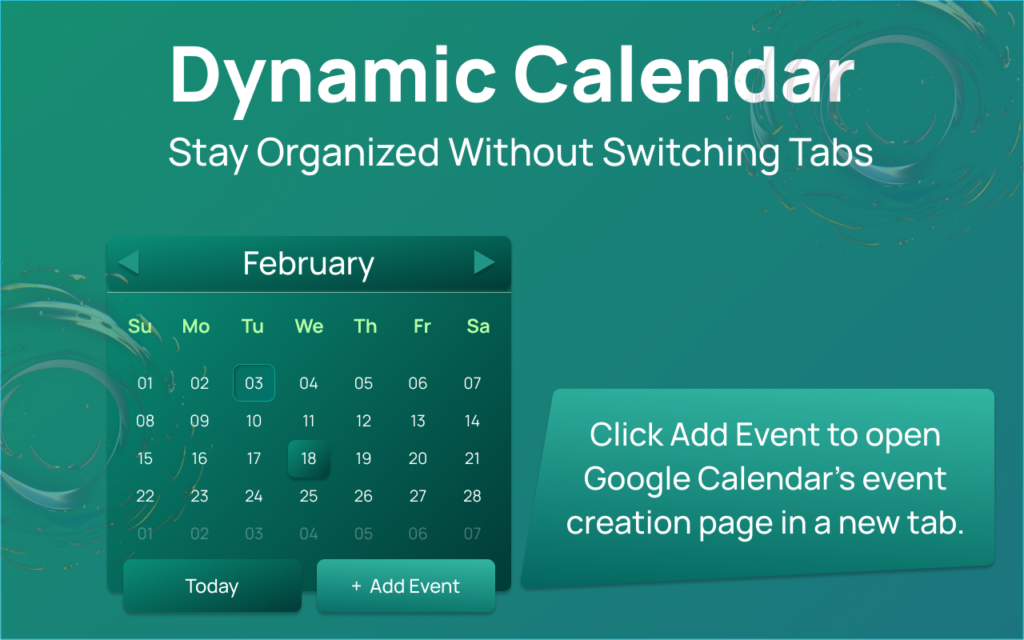
In a world full of complex productivity tools, sometimes all you need is something simple, clean, and reliable. The Altftool Dynamic Calendar Extension is designed exactly for that purpose — a lightweight Chrome popup calendar that helps you quickly view dates, navigate months, and jump straight to event creation without distractions.
Overview

Dynamic Calendar is a Chrome extension popup that displays a fully rendered monthly calendar grid. When you click the extension icon, a clean and visually appealing calendar opens instantly. It shows the current month and year, highlights today’s date, and allows smooth navigation between months.
Unlike heavy scheduling apps, this extension focuses purely on visual calendar viewing. It does not store events or sync with external services — making it fast, secure, and clutter-free.
Core Features
The extension keeps things simple yet functional:
- Monthly Calendar View – Displays a complete 6-row (42-cell) calendar grid, including padding days from previous and next months for a full layout view.
- Month Navigation – Easily switch between months using Previous and Next buttons.
- Today Highlight – Automatically highlights the current system date when viewing the current month.
- Today Button – Instantly return to the current month with one click.
- Add Event Button – Opens Google Calendar’s event creation page in a new tab for quick scheduling.
- Clean UI Design – Mint gradient background, responsive layout, subtle hover effects, and neatly styled footer buttons.
How It Works
Using Dynamic Calendar is effortless:
- Click the extension icon to open the popup.
- View the current month with today’s date highlighted.
- Navigate between months using Previous or Next.
- Click “Today” to reset to the current month.
- Select “Add Event” to open Google Calendar’s event creation page.
Everything updates instantly, ensuring a smooth user experience.
Honest Clarification
Dynamic Calendar does not:
- Store events
- Sync with Google Calendar
- Access user data
It is purely a visual monthly calendar viewer with navigation controls and a shortcut to create events.
AI Automation Guide 2026: Work Smarter, Faster & Better
Artificial intelligence and automation are changing the way people work, manage information, communicate, and complete…

Tool Reviews: Find the Best Tools for Every Need
Every single morning, millions of people open their laptops to a screen crammed with open…

The Best Audio Editing Software 2026: Music, Podcasts & More
Good audio can completely change how a song, podcast, video, or voice recording feels.Audio Editing…

Tool Reviews 2026: Explore, Compare & Find Better Tools
Finding the right digital tool can save time, simplify repetitive tasks, and make everyday work…

The Best No-Code Automation Tools Simplify Workflows & Save Time
A lot of everyday work follows the same pattern. No-Code Automation Someone fills out a…
The Best Vivo V80 5G Expected Price, Camera & Features
The Vivo V80 5G is one of the upcoming smartphones attracting attention in India’s premium…

Final Thoughts
The Altftool Dynamic Calendar Extension proves that productivity tools don’t have to be complicated. With its clean design and straightforward functionality, it’s perfect for users who simply want quick date access without data syncing or heavy integrations. Simple, secure, and efficient — exactly what a browser calendar should be.
Disclaimer : The Altftool Dynamic Calendar Extension is an independent browser tool designed for visual calendar viewing only. It does not store, sync, or manage events and is not officially affiliated with or endorsed by Google Calendar. All trademarks belong to their respective owners.
#DynamicCalendar #Altftool #ChromeExtension #ProductivityTool #MinimalTech #Carrerbook #Anslation