
In 2026, speed is everything. Whether you’re a blogger, developer, designer, or digital marketer, opening 15 tabs just to quickly check how websites look is honestly exhausting. I’ve been there — juggling between research tabs, client websites, inspiration pages, and productivity tools. That’s exactly why I started using the altFtool Website Preview Pro extension, and it completely changed the way I browse.
This tool isn’t just another Chrome add-on. It’s a simple but powerful way to instantly generate a website screenshot preview without opening multiple tabs. Let me walk you through how it works and why it has quietly become one of my favorite productivity tools.
What Is Website Preview Pro by altFtool?
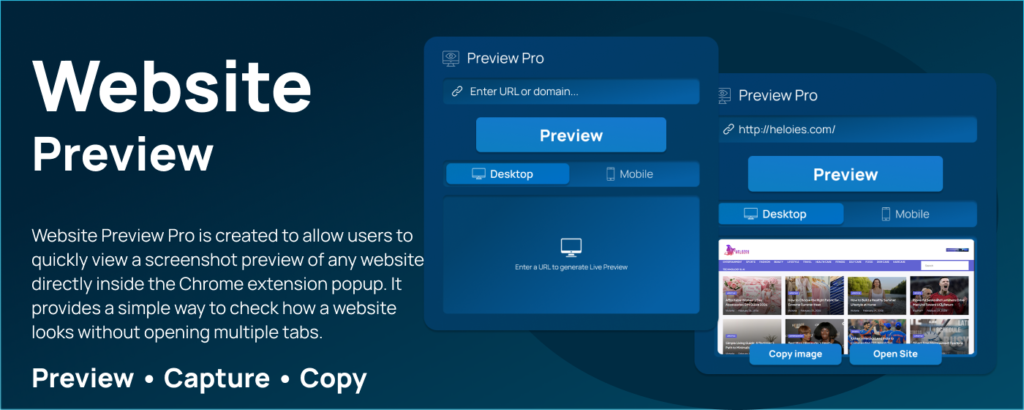
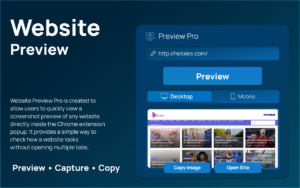
Website Preview Pro is a Chrome extension created to help users instantly generate a screenshot preview of any website directly inside the extension popup window. Instead of opening a site in a new tab and waiting for it to load fully, you simply enter the URL and get a quick visual snapshot right there.
For someone like me who constantly checks blog layouts, landing pages, or competitor sites, this feature saves so much time. It’s clean, fast, and doesn’t clutter your browser.
Why I Started Using It
As someone who works online daily, I often need to:
- Check how a website homepage looks
- Preview client websites before meetings
- Review competitor landing pages
- Verify if a site design matches branding guidelines
Earlier, this meant opening new tabs, waiting for loading time, then closing them again. Multiply that by 20 times a day — it adds up.
With altFtool’s Website Preview Pro, I can generate a website preview instantly inside the popup. No tab overload. No distraction. Just a clean screenshot view.
Key Features That Make It Useful
Instant Website Screenshot Preview
Just paste the URL and click “Generate Preview.” Within seconds, the screenshot appears inside the extension popup. It feels smooth and efficient.
Preview Inside the Popup Window
This is honestly my favorite part. The preview doesn’t open in a new tab. It stays neatly inside the extension interface, keeping my workflow distraction-free.
Recent Preview History
The extension automatically saves previously previewed URLs. This means if I need to revisit a site, I don’t have to retype it again.
One-Click Reload from History
With just one click, I can reload and generate the preview again from the recent history list. Super convenient when comparing updates.
Open in New Tab Option
If I want a deeper look, there’s an option to open the site in a new tab. It gives flexibility without forcing extra steps.
Local Settings Saved
All settings and history are stored locally. It feels lightweight and privacy-conscious, which is important to me.
Step-by-Step: How to Generate a Website Preview Instantly
Using Website Preview Pro is incredibly beginner-friendly. Here’s exactly how I use it:
Step 1: Open the Extension
Click the altFtool icon from the Chrome toolbar to open the popup window.
Step 2: Enter the Website URL
Paste or type the website link into the input field.
Step 3: Click “Generate Preview”
Once you click the button, the extension processes the URL.
Step 4: View the Screenshot Preview
Within seconds, the website screenshot appears directly inside the popup.
Step 5: Access It Later
The URL automatically saves in your recent preview history for quick access next time.
It’s honestly that simple. No technical knowledge required.
Who Should Use Website Preview Pro?
From my experience, this extension is perfect for:
- Bloggers and content creators
- Web designers
- SEO specialists
- Digital marketers
- Developers
- Students learning web design
- Anyone who researches multiple websites daily
If you value speed and clean workflow, this tool makes sense.
How It Improved My Productivity
Since using this extension, I’ve noticed:
- Fewer open tabs
- Less browser clutter
- Faster website research
- Smoother client review process
Sometimes small tools create the biggest impact. Website Preview Pro feels like one of those tools — simple idea, real productivity boost.

AI Automation Guide 2026: Work Smarter, Faster & Better
Artificial intelligence and automation are changing the way people work, manage information, communicate, and complete…

Tool Reviews: Find the Best Tools for Every Need
Every single morning, millions of people open their laptops to a screen crammed with open…

The Best Audio Editing Software 2026: Music, Podcasts & More
Good audio can completely change how a song, podcast, video, or voice recording feels.Audio Editing…

Tool Reviews 2026: Explore, Compare & Find Better Tools
Finding the right digital tool can save time, simplify repetitive tasks, and make everyday work…

The Best No-Code Automation Tools Simplify Workflows & Save Time
A lot of everyday work follows the same pattern. No-Code Automation Someone fills out a…

The Best Vivo V80 5G Expected Price, Camera & Features
The Vivo V80 5G is one of the upcoming smartphones attracting attention in India’s premium…
Final Thought
In a world where we constantly multitask online, tools that reduce friction are priceless. Website Preview Pro by altFtool may sound simple, but it solves a real everyday problem — quickly checking how a website looks without disrupting your workflow.
If you’re someone who works with websites regularly, this extension is absolutely worth trying. It saves time, keeps your browser organized, and makes research feel effortless. Sometimes productivity isn’t about big systems — it’s about smart, small improvements.
Frequently Asked Questions (FAQ) – Website Preview Pro by altFtool
Disclaimer : This blog is based on personal experience and understanding of the altFtool Website Preview Pro extension. Features and functionality may vary depending on updates or browser compatibility. Always review the official extension details before use.
#WebsitePreview #ChromeExtension #altFtool #ProductivityTools #WebDesign #DigitalMarketing #BloggingTools #SEO2026 #Carrerbook #Anslation

