
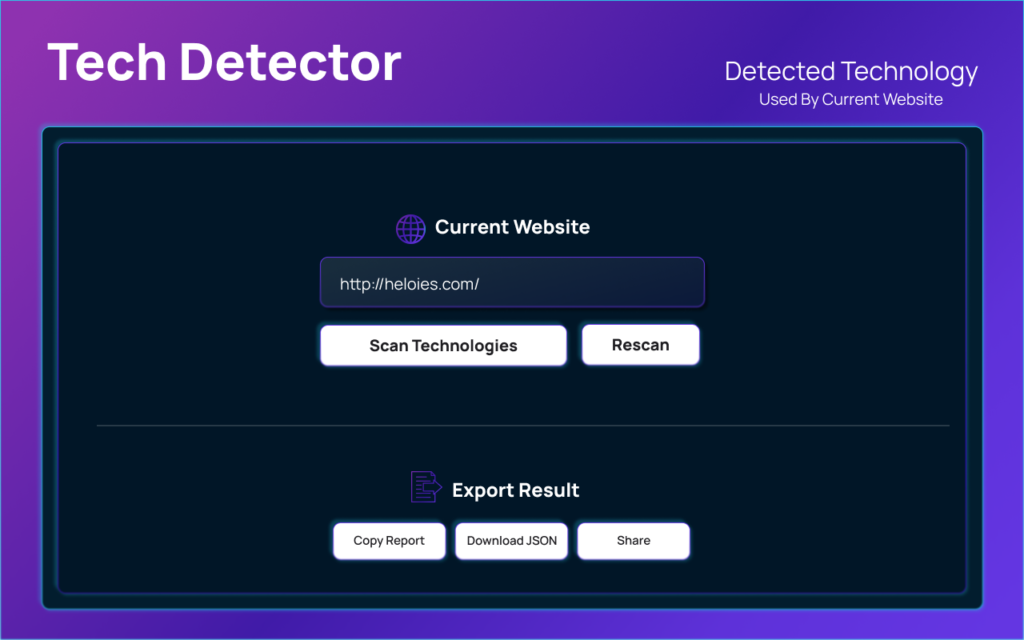
In today’s competitive digital world, understanding what powers a website can give you a serious edge. Whether you are researching competitors, learning new frameworks, or analyzing trends, having the right tool makes all the difference. Tech Detector Pro, an AltF Tools extension, is designed to help you instantly identify the technologies behind any website. With just one click, you can uncover the frameworks, CMS platforms, analytics tools, and other technologies that make a website function smoothly.
What Is Tech Detector Pro?
Tech Detector Pro is a browser extension developed under the AltF Tools ecosystem that scans websites and reveals their underlying technology stack. Instead of manually inspecting source code or using multiple platforms, this extension simplifies the entire process. It works directly within your browser and provides categorized insights in a clean, easy-to-understand interface.
From front-end frameworks to backend technologies, the tool helps users gain quick technical insights without requiring advanced coding knowledge.
Key Features of Tech Detector Pro
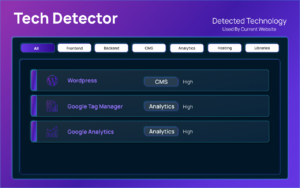
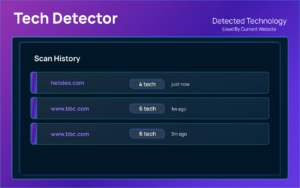
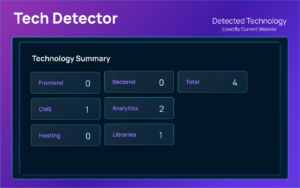
Below are the core features that make this extension powerful and practical:
- Detects front-end frameworks such as React, Vue, Angular, and more
- Identifies CMS platforms like WordPress, Shopify, or custom builds
- Reveals analytics and tracking tools used on the website
- Shows JavaScript libraries and UI frameworks
- Detects hosting services and CDN providers
- Categorized results for better readability
- Simple and user-friendly dashboard
- Quick one-click website scanning
- Lightweight extension with fast performance
- Helpful for competitive and technical research
Step-by-Step Guide: How to Use Tech Detector Pro
Using Tech Detector Pro is simple and requires no technical setup. Follow these steps:
- Install the Tech Detector Pro extension from the Chrome Web Store.
- Pin the extension to your browser toolbar for easy access.
- Open any website you want to analyze.
- Click on the Tech Detector Pro icon.
- Start the scan (if required).
- View the categorized list of detected technologies.
- Use the insights for research, learning, or competitive analysis.
Within seconds, you’ll have a structured breakdown of the website’s technology stack.
Who Can Use Tech Detector Pro?
This extension is designed for a wide range of users:
Web Developers – To analyze competitor stacks and discover new frameworks.
Digital Marketers – To understand the tools competitors are using for analytics or performance tracking.
Startup Founders – To research how successful platforms are built.
Students & Learners – To study real-world implementations of technologies.
Agencies & Consultants – To gather insights before pitching clients.
Tech Enthusiasts – To explore how websites function behind the scenes.
You don’t need to be a coding expert to benefit from it. The extension makes complex technology detection accessible to everyone.
Why It Stands Out
What makes Tech Detector Pro different is its simplicity and focus. Many website analysis tools can feel overwhelming or overly technical. This AltF Tools extension keeps things streamlined. It provides clear, categorized information without unnecessary clutter, making it ideal for quick research sessions.
Because it runs directly in your browser, it eliminates the need to visit external websites for analysis. This makes the process faster and more convenient.
Practical Use Cases
You can use Tech Detector Pro for:
- Competitive research before launching a website
- Learning which tech stacks are popular in your industry
- Identifying plugins and analytics tools competitors rely on
- Understanding how high-performing websites are structured
- Supporting technical documentation and reporting
Final Thought
Tech Detector Pro is a smart and efficient solution for anyone who wants to understand website technologies without diving deep into raw code. As part of the AltF Tools ecosystem, it brings convenience, clarity, and speed to website analysis. Whether you are a developer, marketer, or student, this extension can significantly improve how you research and learn from existing websites.

AI Automation Guide 2026: Work Smarter, Faster & Better
Artificial intelligence and automation are changing the way people work, manage information, communicate, and complete…

Tool Reviews: Find the Best Tools for Every Need
Every single morning, millions of people open their laptops to a screen crammed with open…

The Best Audio Editing Software 2026: Music, Podcasts & More
Good audio can completely change how a song, podcast, video, or voice recording feels.Audio Editing…

Tool Reviews 2026: Explore, Compare & Find Better Tools
Finding the right digital tool can save time, simplify repetitive tasks, and make everyday work…

The Best No-Code Automation Tools Simplify Workflows & Save Time
A lot of everyday work follows the same pattern. No-Code Automation Someone fills out a…

The Best Vivo V80 5G Expected Price, Camera & Features
The Vivo V80 5G is one of the upcoming smartphones attracting attention in India’s premium…
Disclaimer : This blog is for informational and educational purposes only. Features and performance may vary based on updates or browser compatibility. Users should review the extension’s permissions and privacy policy before installation.
#TechDetectorPro #AltFTools #WebsiteAnalysis #TechStack #ChromeExtension #WebDevelopment #DigitalMarketingTools #Carrerbook #Anslation

