

If your browser feels slow, unresponsive, or cluttered, the problem may not be your internet connection. In many cases, it is the number of installed extensions running in the background. While extensions are powerful tools, too many active at once can consume memory, increase load times, and reduce overall performance.
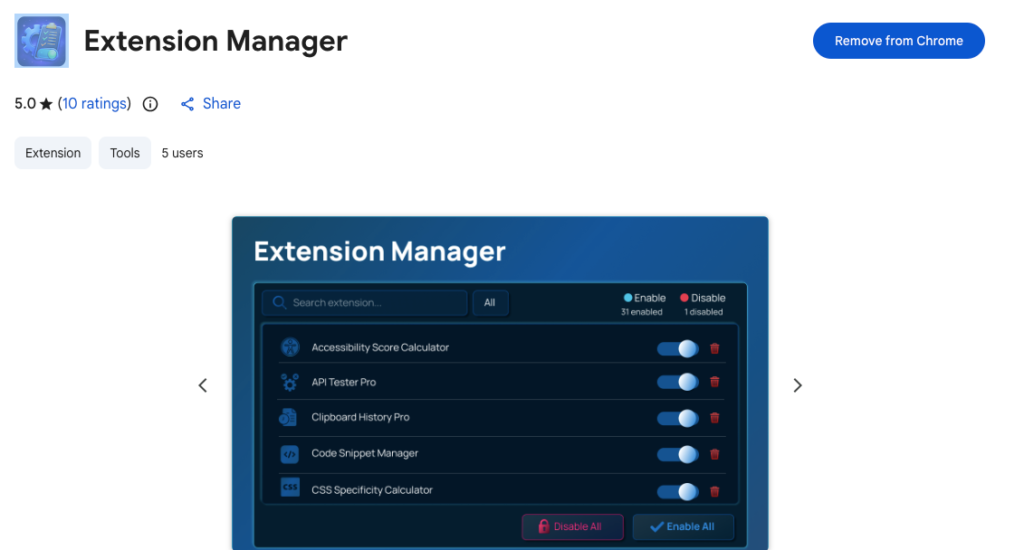
That is where Extension Manager makes a difference. Designed to be lightweight, fast, and purely functional, it gives you full control over your browser extensions from one centralized dashboard. Instead of navigating through complex internal settings, you can manage everything in seconds.
If your goal is to improve browser speed without uninstalling everything permanently, this is the smarter way to do it.
Why Extensions Slow Down Your Browser
Every enabled extension can use memory, run background scripts, or interact with web pages. When multiple extensions are active at the same time, they compete for system resources. Over time, this can result in:
- Slower page loads
- Higher memory consumption
- Reduced browser responsiveness
- Conflicts between extensions
The solution is not necessarily removing all extensions. It is managing them properly.
What Is Extension Manager
Extension Manager provides a centralized dashboard to manage all installed browser extensions in one place. It is built for speed and simplicity. There are no unnecessary design elements or complicated menus. It focuses entirely on helping you control your browser environment efficiently.
Unlike the default internal extension page, this manager offers faster access, real-time search, bulk controls, and better organization. If you use many extensions for work, development, research, or productivity, this tool becomes essential.
Core Features That Improve Performance
1. Enable and Disable with One Click
You can instantly toggle any extension on or off. This is one of the fastest ways to improve browser performance. If you are not using a specific extension at the moment, simply disable it.
When needed again, enable it just as quickly.
2. Real-Time Search
Finding a specific extension among dozens can be frustrating. The real-time search feature allows you to locate extensions by name or description instantly.
This is especially helpful for developers, marketers, and power users who manage a large extension library.
3. Bulk Actions for Instant Optimization
One of the most powerful features is bulk control:
- Enable all extensions
- Disable all extensions
This is extremely useful for troubleshooting. If your browser is slow or behaving unexpectedly, you can disable everything at once and re-enable extensions one by one to identify the issue.
It is also helpful when you need maximum performance temporarily, such as during testing or heavy browsing sessions.
4. Smart Filtering
You can filter extensions by:
- All
- Enabled
- Disabled
This makes it easy to see what is currently active and what is not. Clear visibility leads to better decisions and better performance management.
5. Direct Uninstall Option
Remove unwanted extensions directly from the manager interface. No need to navigate through multiple settings pages. Keeping only necessary extensions reduces background load and improves browser efficiency.
6. System Protection Awareness
Some extensions are required by your organization or browser policy. Extension Manager automatically identifies those that cannot be disabled. This prevents accidental changes to critical or policy-enforced extensions.
It keeps you informed without compromising system requirements.
Keyboard Shortcuts for Faster Control
Speed matters. That is why Extension Manager includes keyboard shortcuts:
- Open Manager: Ctrl + Shift + E (Windows/Linux) or Command + Shift + E (Mac)
- Focus Search: Press / or Ctrl + F
- Close Manager: Press Esc
These shortcuts eliminate unnecessary clicks and make extension management part of your natural workflow.
Built for Performance
Extension Manager is developed using Manifest V3 and vanilla JavaScript. This ensures:
- Minimal memory footprint
- No unnecessary background activity
- Faster performance compared to traditional extension management pages
It does not run in the background when not in use. That means it does not contribute to the performance problems it is designed to solve.
When compared to the default internal manager, it provides a noticeably faster and more efficient experience, especially for users with many installed extensions.
Privacy and Permissions Explained Clearly
Trust is important when installing any extension.
Data Privacy
Extension Manager:
- Does not track browsing history
- Does not collect personal data
- Does not communicate with external servers
- Works entirely locally on your machine
Your data remains on your device at all times.
Permissions
The extension requires:
- Management permission to list, enable, disable, and uninstall extensions
- Storage permission to save your interface preferences
These permissions are directly related to its core functionality and nothing more.
How to Use It to Boost Browser Speed
Here are practical steps to improve performance immediately:
- Open Extension Manager.
- Disable all non-essential extensions.
- Re-enable only those required for your current task.
- Remove extensions you no longer use.
- Regularly review enabled extensions to prevent overload.
This simple habit can significantly reduce browser resource usage and improve responsiveness.

AI Automation Guide 2026: Work Smarter, Faster & Better
Artificial intelligence and automation are changing the way people work, manage information, communicate, and complete…

Tool Reviews: Find the Best Tools for Every Need
Every single morning, millions of people open their laptops to a screen crammed with open…

The Best Audio Editing Software 2026: Music, Podcasts & More
Good audio can completely change how a song, podcast, video, or voice recording feels.Audio Editing…

Tool Reviews 2026: Explore, Compare & Find Better Tools
Finding the right digital tool can save time, simplify repetitive tasks, and make everyday work…

The Best No-Code Automation Tools Simplify Workflows & Save Time
A lot of everyday work follows the same pattern. No-Code Automation Someone fills out a…

The Best Vivo V80 5G Expected Price, Camera & Features
The Vivo V80 5G is one of the upcoming smartphones attracting attention in India’s premium…
Final Thought
A fast browser is not just about hardware or internet speed. It is about control. The more organized and intentional you are with your extensions, the smoother your browsing experience becomes.
Extension Manager provides that control in a clean, lightweight, and privacy-focused way. Instead of letting extensions slow down your system, you decide when and how they run. That shift in control makes all the difference.
If you rely on multiple extensions daily, managing them intelligently is no longer optional. It is essential for performance.
This article is for informational purposes only. Features and functionality described are based on the current version of Extension Manager and may change with future updates. Users should review extension permissions and details before installation to ensure compatibility with their browser environment.
#ExtensionManager #BrowserSpeed #ChromeExtensions #ProductivityTools #WebPerformance #BrowserOptimization #TechTools #DigitalProductivity #ALTFTOOL #Extansion #ManifestV3 #LightweightExtension #Anslation #Carrerbook

