
Working with text sounds easy until you have to change the same sentence Marketing Tools into five different formats.
Maybe you wrote a heading in lowercase and need it in title case. Or you have a list of words that needs to become camelCase before you can use it in code. Perhaps you need snake_case for a database field, kebab-case for a URL, or PascalCase for a class name.
Doing all of that manually is possible, but it gets annoying very quickly.
A Text Case Converter makes the process much simpler. Instead of changing capitalization and separators by hand, you can place your text into one workspace and convert it into common writing and developer naming formats in just a few clicks.
Whether you’re writing an article, preparing content, cleaning up text, or working on a software project, a text case converter can save those small amounts of time that add up during a busy day.
What Is a Text Case Converter?
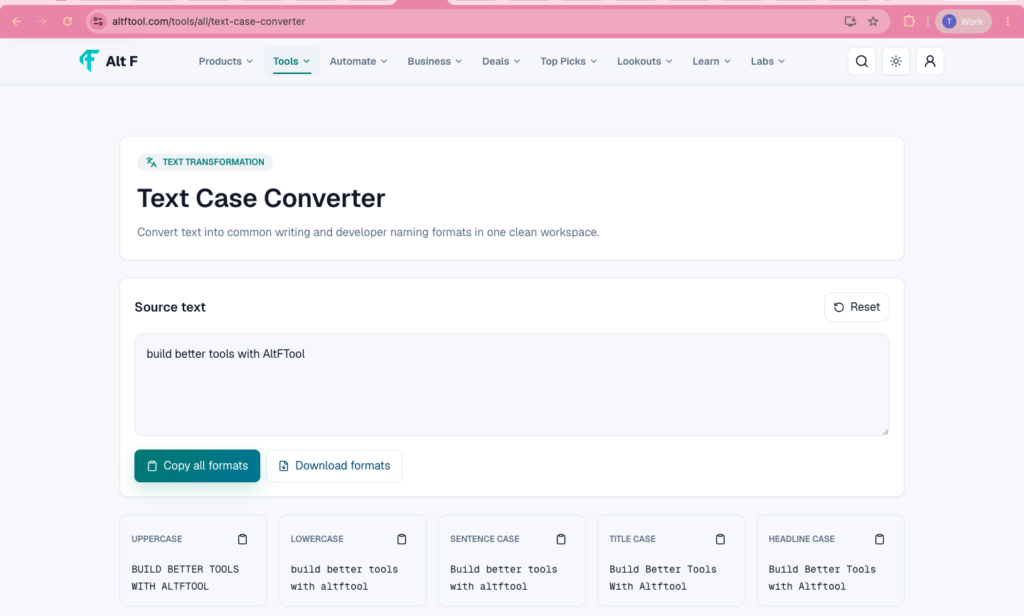
A Text Case Converter is an online tool designed to change the format of your text without requiring you to rewrite it.
You enter your original text, choose the case or naming style you need, and the tool transforms it for you.
For example, a phrase such as:
“text case converter”
could become:
- text case converter — lowercase
- TEXT CASE CONVERTER — uppercase
- Text Case Converter — title case
- Text Case Converter — sentence-style capitalization
- textCaseConverter — camelCase
- TextCaseConverter — PascalCase
- text_case_converter — snake_case
- text-case-converter — kebab-case
The exact formats available can vary between tools, but the basic idea remains the same: write once and convert whenever you need a different format.
Why Use a Text Case Converter?

Changing a few words manually doesn’t seem like a big job.
The problem comes when you’re working with dozens, hundreds, or even thousands of words.
Imagine preparing a list of product names for a website. You may need one version for a heading, another for a URL, another for a variable name, and another for a database field.
Copying and changing every item manually leaves plenty of room for mistakes.
A converter takes care of the repetitive part.
It can be particularly useful for:
- Writers
- Bloggers
- Developers
- Designers
- Content creators
- SEO professionals
- Students
- Digital marketers
- Data and documentation teams
You don’t need to be a programmer to benefit from it.
Common Text Cases You May NeedCommon Text Cases You May Need
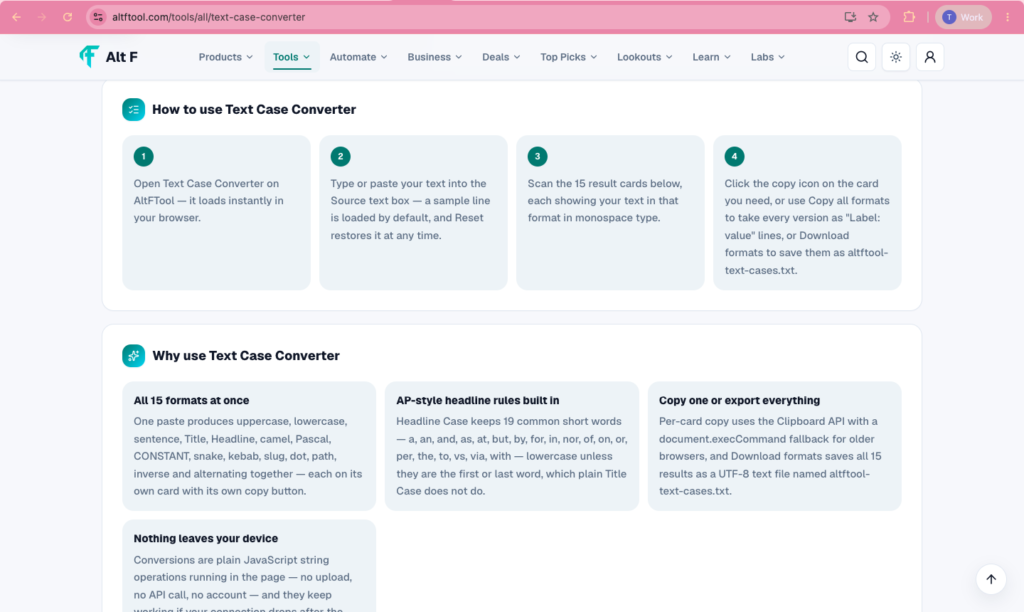
Different situations call for different text formats. Understanding the most common ones makes it easier to choose the right conversion.
Lowercase
Lowercase converts letters to their small-letter form.
For example:
HELLO WORLD
becomes:
hello world
This can be useful when you want consistent text or need to prepare content for a particular format.
UPPERCASE
Uppercase changes every letter into capital letters.

For example:
hello world
becomes:
HELLO WORLD
It is commonly used for labels, headings, emphasis, and certain formatting requirements.Title Case
Title case capitalizes the main words in a phrase.
For example:
the best text case converter
becomes:
The Best Text Case Converter
It is often useful for article titles, headings, product names, and other presentation-focused text.
Sentence Case
Sentence case gives text a more natural writing style by capitalizing the beginning of a sentence.
For example:
this is a simple text converter
becomes:
This is a simple text converter
This can be handy when text has been copied from a source where capitalization is inconsistent.
Developer Naming Formats
Text case converters become even more useful when you’re working with code.
Developers frequently need to turn ordinary words into naming conventions used by different programming languages, frameworks, APIs, and databases.
camelCase
In camelCase, the first word normally starts with a lowercase letter, while the following words begin with capital letters.
Example:
user profile name
becomes:
userProfileName
This style is common for variables and functions in many programming environments.
PascalCase
PascalCase is similar to camelCase, except the first word also begins with a capital letter.
Example:
user profile name
becomes:
UserProfileName
It is often used for classes, components, types, and other code elements depending on the language or project.
Other Developer Formats

Depending on the converter, you may also find formats such as:
- CONSTANT_CASE
- dot.case
- path/case
- Header-Case
- StudlyCaps
- alternating case
Having these formats available in one place can be much faster than converting names manually.
How a Text Case Converter Makes Everyday Work Easier
The biggest advantage is convenience.
You don’t have to remember exactly how every naming convention works. You also don’t need to repeatedly edit capitalization, remove spaces, or add separators.
For example, imagine you have this phrase:“customer account settings”A developer might need:customerAccountSettingsA database field might use:customer_account_settingsA URL could use:customer-account-settingsA heading might be:Customer Account SettingsThe words haven’t changed. Only their format has.A good converter handles those changes automatically.
Useful for Developers
Developers deal with naming constantly.
Variables, functions, classes, database fields, API parameters, CSS classes, file names, and routes can all follow different conventions.
A case converter can make these small tasks faster.

Instead of typing:
customerAccountSettings
then manually creating:
you can convert the same source phrase into the format you need.
This is especially helpful when working with large lists of names.
Useful for Writers and Bloggers
Text case tools aren’t only for code.
Writers frequently copy text from different sources, and capitalization isn’t always consistent.
One paragraph might use title case, another might be all uppercase, and another might have random capitalization.
A converter can help standardize the text before you publish it.
For bloggers, it can also be useful when creating:
- Article headings
- Subheadings
- Product names
- Categories
- Tags
- Content outlines
- Social media copy
It is a small tool, but it can make repetitive formatting much less frustrating.
Useful for SEO Work

SEO professionals also work with large amounts of text.
Keywords, URLs, page titles, headings, tags, and content structures may all require different formatting.
For example, a keyword list might originally look like this:
best marketing tools
digital marketing software
marketing automation tools
You might want to turn those keywords into a consistent title format for content planning or convert them into URL-friendly text.
Instead of manually editing every phrase, a case converter can handle the repetitive formatting.
It doesn’t replace SEO research or strategy, but it can make the preparation stage faster.
Why One Workspace Is Better
Having different tools for different text formats can become frustrating.
You might use one website for uppercase conversion, another for camelCase, and another for snake_case.
Switching between tabs isn’t difficult, but it creates unnecessary steps.
A clean workspace that brings common writing and developer formats together is much more convenient.
You can paste your text once, choose the format you need, and continue working.
That simplicity is often the most useful feature.
Text Case Conversion Saves More Time Than You Think
A single conversion might save only a few seconds.
But think about doing it repeatedly throughout a workday.Five seconds here.Ten seconds there.A minute spent fixing inconsistent capitalization.Another few minutes changing names for a project.
Those small tasks can add up.
Automation doesn’t always have to involve complicated software. Sometimes, removing a repetitive manual step is enough to make a workflow feel noticeably smoother.

What Makes a Good Text Case Converter?
Not every converter offers the same experience.
A useful tool should make the conversion process straightforward.
A clean interface matters because you don’t want to spend more time figuring out the tool than you would have spent changing the text yourself.
It is also helpful when multiple formats are available in one workspace.
Another important factor is accuracy. If you’re converting developer names, even a small formatting mistake can cause problems when the result is used in code.
A good tool should also make it easy to copy or use the converted result.
The simpler the workflow, the better.
Do You Need to Install Anything?
One advantage of a browser-based text case converter is convenience.
You can open the tool when you need it without installing a separate application or adding another program to your computer.
This makes it useful for quick tasks.
You might be working on a laptop, checking content from another device, or switching between different projects. A browser-based workspace can fit naturally into that workflow.
Text Case Converter for Large Text Lists
Case conversion becomes particularly useful when dealing with lists.

For example, imagine you have dozens of product names, keywords, feature names, or database fields.
Changing every item manually can take time and increase the chance of inconsistent formatting.
A converter gives you a faster starting point.
You can prepare your source text, convert it into the desired style, and then copy the result into your project.
For larger projects, this kind of simple automation can be surprisingly valuable.
Common Mistakes When Changing Text Cases Manually
Manual formatting seems easy, but mistakes happen.
You might accidentally leave one word lowercase in a title. You might forget an underscore in a variable name. You could use a space where a hyphen is required.
These errors aren’t always obvious at first glance.
They become especially annoying when you’re working with technical names because inconsistent formatting can cause confusion or even break a workflow.
Using a converter reduces the amount of repetitive editing you have to do yourself.
Who Should Use a Text Case Converter?
Almost anyone who regularly works with text can find a use for one.
For developers, it can simplify variable, class, function, and database naming.
For writers, it can help clean up inconsistent capitalization.
For bloggers, it can make headings, titles, and content formatting easier.
For SEO professionals, it can help organize keywords and create consistent naming formats.
For students, it can be useful when preparing assignments, notes, or project files.
For designers, it can help maintain consistent naming across files, components, and projects.
The tool is simple enough for beginners but useful enough for people who deal with text every day.
FAQ’S
- What is a Text Case Converter?
A Text Case Converter changes text into formats like uppercase, lowercase, title case, camelCase, snake_case, and more. - Why use a Text Case Converter?
It saves time and helps you quickly format text without manually changing every letter. - Can I convert text to camelCase?
Yes, you can convert regular text into camelCase for coding, variable names, and other developer tasks. - Does it support Title Case and Sentence Case?
Yes, common formats such as Title Case, Sentence case, UPPERCASE, and lowercase are supported. - Who can use a Text Case Converter?
Writers, bloggers, students, marketers, designers, and developers can all use it for quick text formatting.