
Introduction: My Honest Take After Using Both
As someone who regularly writes blogs, technical documentation, and structured web content, I’ve used everything from heavy traditional editors to lightweight browser tools. Over time, I realized that the real difference isn’t just about features — it’s about workflow. Recently, I started using the ALTFTool Markdown Converter extension, and it genuinely changed how quickly I create and publish formatted content. So let’s talk honestly: Markdown Converter vs. Traditional Editors — what’s actually better?
The Problem With Traditional Editors
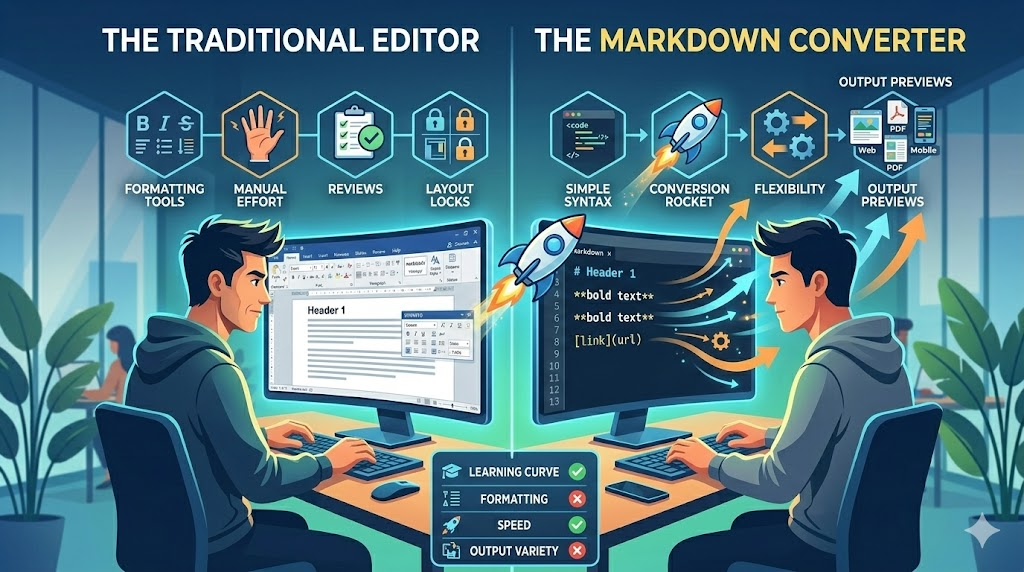
Traditional editors like desktop word processors or full IDEs are powerful — no doubt about that. But sometimes they feel like overkill. When I open a traditional editor just to format a simple blog section or convert Markdown to HTML, I’m forced to deal with extra menus, formatting toolbars, file saving prompts, and sometimes even performance lag.
Another issue? Switching tools. If I write in Markdown somewhere else, I often need a separate website or converter to generate HTML. That extra step breaks focus.
That’s where lightweight Markdown tools stand out.
What Makes Markdown Converter Different?
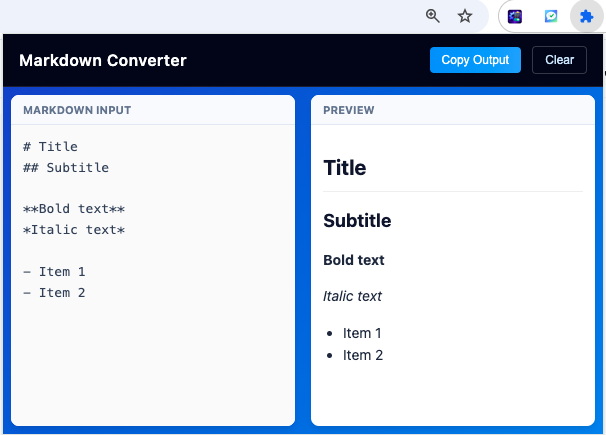
The ALTFTool Markdown Converter is designed for simplicity. When I click the extension icon, the editor opens instantly inside the browser popup. No loading screens. No separate tabs. No external websites.
What impressed me most is the live preview feature. As I type Markdown on the left panel, the formatted HTML appears on the right in real time. There’s no need to press a convert button — it just works automatically. That instant feedback makes formatting faster and more accurate.
Everything happens locally in the browser, which also means better privacy and faster performance.
Features That Actually Matter in Daily Use
After using it consistently, here are the features I personally found most useful:
- Live Preview: Seeing headings, lists, and formatting appear instantly saves editing time.
- Full Header Support (H1–H6): Perfect for structuring blog posts properly.
- Bold, Italic & Inline Code: Essential for both bloggers and developers.
- Ordered & Unordered Lists: Clean and correctly formatted every time.
- Blockquotes Support: Makes highlighting text super easy.
- Link Conversion: Markdown links instantly become clickable HTML.
- Horizontal Rule (—): Quick visual separation.
- HTML Escaping: Prevents raw HTML injection, which is great for security.
- Copy Output Button: One click and the HTML is ready for WordPress, CMS, or website.
- Clear Option: Reset everything instantly without refreshing.
These might seem small, but together they create a very smooth writing experience.
Ease of Use: Step-by-Step Experience
The user flow is extremely straightforward:
First, I click the extension icon.
Then, I type Markdown in the left panel.
The preview appears automatically on the right side.
When I’m satisfied, I click Copy Output.
If I want to start fresh, I hit Clear.
That’s it. No complicated setup. No account sign-ups. No exporting files.
So, What’s Actually Better?
If you’re writing long research papers with complex formatting, traditional editors still have their place. They offer advanced layout tools, collaboration features, and deep customization.
But if your goal is:
- Converting Markdown to HTML quickly
- Writing clean structured blog content
- Generating formatted output without distractions
- Saving time
Then a Markdown Converter extension is honestly more efficient.
For my workflow — especially when publishing web content — the Markdown Converter feels faster, cleaner, and less distracting.
Who Should Use a Markdown Converter?
From my experience, this tool is perfect for:
- Developers writing documentation
- Bloggers formatting posts
- Technical writers
- Students learning Markdown
- Anyone managing website content
If your work involves structured text and HTML output, it saves serious time.
AI Automation Guide 2026: Work Smarter, Faster & Better
Artificial intelligence and automation are changing the way people work, manage information, communicate, and complete…

Tool Reviews: Find the Best Tools for Every Need
Every single morning, millions of people open their laptops to a screen crammed with open…

The Best Audio Editing Software 2026: Music, Podcasts & More
Good audio can completely change how a song, podcast, video, or voice recording feels.Audio Editing…

Tool Reviews 2026: Explore, Compare & Find Better Tools
Finding the right digital tool can save time, simplify repetitive tasks, and make everyday work…

The Best No-Code Automation Tools Simplify Workflows & Save Time
A lot of everyday work follows the same pattern. No-Code Automation Someone fills out a…

The Best Vivo V80 5G Expected Price, Camera & Features
The Vivo V80 5G is one of the upcoming smartphones attracting attention in India’s premium…

Final Thoughts
After using both traditional editors and the ALTFTool Markdown Converter, I’ve realized something important: productivity isn’t about having more features — it’s about having the right ones. The lightweight nature, real-time preview, and instant copy functionality make this extension a practical everyday tool.
Traditional editors are powerful, but for quick Markdown-to-HTML conversion, the extension simply feels smarter and faster.
Sometimes, simplicity wins.
Frequently Asked Questions
Disclaimer : This article is based on personal experience using Markdown tools and is intended for informational purposes only. User preferences may vary depending on workflow needs and technical requirements.
#MarkdownConverter #ALTFTool #ProductivityTools #WebDevelopment #BloggingTools #TechWriting #HTMLConversion #Carrerbook #Anslation

