Have you ever had a brilliant idea for a project, only to get stuck the moment you sat down to actually make it .You are not alone. For a long time, turning a creative vision into a polished final product was tough. If you wanted to design a sleek graphic, edit a crisp video, or build a website layout, you usually needed two things: years of specialized technical training and a massive budget for complex software.
Fortunately, the digital landscape has completely transformed.
Today, creativity is built directly into our daily digital routine. Whether you are running a small business, managing a blog, building a personal brand on social media, or just trying to put together a sharp presentation for work, the barrier to entry has never been lower. You do not need to be a seasoned professional to create something that looks amazing. You just need the right creative tools.
In this guide, we will break down what creative tools actually are, why they matter, the best options available today, and how you can pick the perfect toolkit to level up your workflow.
What Are Creative Tools?
At their core, creative tools are software applications, mobile apps, and cloud-based platforms designed to help you generate, edit, format, and polish visual or written content.
They span a wide spectrum of disciplines, including:
- Graphic Design: Crafting logos, social media posts, banners, and flyers.
- Photo Editing: Retouching photographs, adjusting lighting, and manipulating images.
- Video Production: Trimming clips, adding transitions, syncing audio, and generating captions.
- Digital Illustration: Painting, sketching, and graphic art.
- UI/UX & Web Design: Wireframing, website prototyping, and app interface layout.
- Content & Copywriting: Brainstorming ideas, structuring articles, and editing prose.
The beauty of modern creative tools is accessibility. A decade ago, most tools required heavy downloads and high-end computer hardware. Today, many of the best platforms run directly in your web browser. This means you can start a design on your laptop at work, make a quick edit on your tablet during your commute, and publish it right from your phone.
Why Are Creative Tools So Essential Today?
It is easy to assume that creative tools are just about making things look pretty. While aesthetics matter, the true value of these digital platforms goes much deeper.
1. They Save You Massive Amounts of Time
Starting from a completely blank canvas is intimidating and slow. Modern creative platforms eliminate this friction by offering pre-built templates, smart layout grids, reusable brand kits, and automated formatting. Tasks that used to take hours—like resizing a banner for five different social media platforms—now take seconds.
2. They Democratize Design
Good design should not be reserved for giant corporations with huge design teams. Intuitive creative tools give small business owners, teachers, freelancers, and hobbyists the ability to present their work professionally. When your content looks clean and well-structured, your audience takes your message more seriously.
3. They Make Experimentation Risk-Free
Digital tools remove the fear of making mistakes. Don’t like a color scheme? Swap it with one click. Want to try a completely different font? Undo your last step and try another. This freedom to experiment helps you learn faster and discover unique visual styles you might never have tried otherwise.
4. They Streamline Team Collaboration
Gone are the days of emailing Project_v1_final_FINAL2.pdf back and forth with clients or team members. Modern platforms are built for real-time collaboration, allowing multiple people to comment, edit, and review projects simultaneously in the cloud.
The Top Digital Creative Tools You Should Know
With thousands of apps on the market, finding the right tool can feel overwhelming. To help you narrow it down, here is a breakdown of the most reliable and widely used creative platforms across different categories.
+------------------+--------------------------+------------------------------+
| Tool             | Best For                 | Skill Level                  |
+------------------+--------------------------+------------------------------+
| Canva            | Quick graphics & graphics| Beginner                     |
| Adobe Photoshop  | Advanced photo editing   | Intermediate to Professional |
| Figma            | Web & app interface UI   | Intermediate to Professional |
| Adobe Express    | Speed & simple templates | Beginner                     |
| CapCut           | Social media video edit  | Beginner to Intermediate     |
| Procreate        | Digital illustration     | Beginner to Professional     |
+------------------+--------------------------+------------------------------+
1. Canva: The All-in-One Design Platform for Non-Designers
If you need to create visual content quickly and have zero design background, Canva is usually the best place to start.
Canva relies on a simple drag-and-drop interface backed by a massive library of templates, stock photos, fonts, and graphics. You can use it for everything from Instagram stories and YouTube thumbnails to PDF workbooks and pitch decks.
- Key Strength: Unmatched ease of use and a huge selection of free templates.
- Best Used For: Quick turnarounds, everyday social media graphics, and simple business collateral.
2. Adobe Photoshop: The Industry Standard for Image Manipulation
Where Canva focuses on speed and simplicity, Adobe Photoshop focuses on precision and total control. It is the heavy-duty engine behind professional photography, high-end digital art, and complex photo manipulation.
Photoshop lets you work with unlimited layers, precise mask selections, custom color grading, and advanced retouching brushes. It does have a steeper learning curve, but if you need to transform an image completely, nothing quite matches its depth.
- Key Strength: Deep, pixel-level control over every aspect of an image.
- Best Used For: Professional photography touch-ups, complex visual compositions, and detailed raster artwork.
3. Figma: The Collaborative Powerhouse for Web and Interface Design
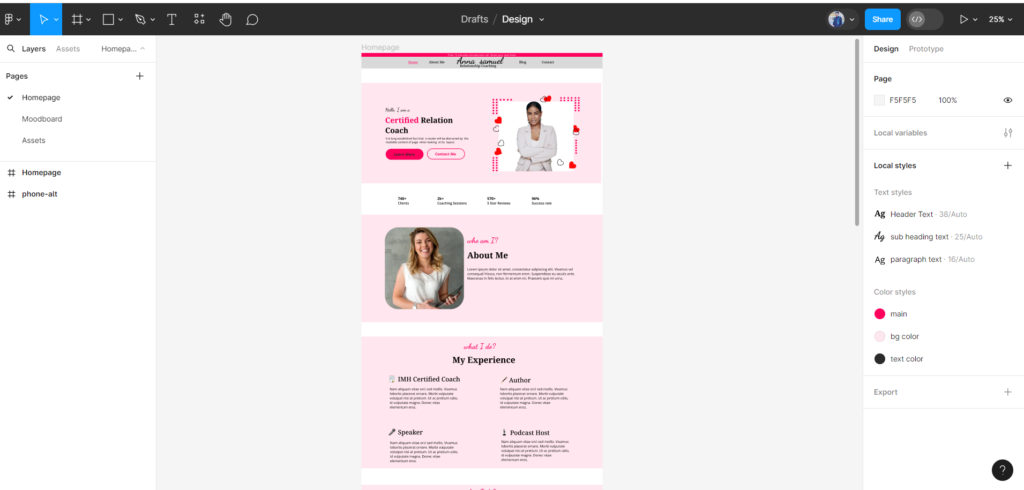
If you are planning to build a mobile app, design a website, or create interactive user flows, Figma is the industry darling.
Figma operates entirely in the browser and functions like a shared whiteboard for digital designers. Multiple team members can jump into the same canvas at the same time, design UI elements, build interactive prototypes, and leave live feedback.
- Key Strength: Real-time multi-user collaboration and robust prototyping features.
- Best Used For: Website wireframing, app interface design, and design system management.
4. Adobe Express: Light-Speed Content Creation
Adobe Express sits nicely between the simplicity of Canva and the creative power of Adobe’s professional suite.
It gives users access to a curated selection of Adobe Stock assets, royalty-free fonts, and quick action tools (like one-click background removal or quick video trimming). It is ideal for creators who want Adobe-quality assets without opening a complex editing workspace.
- Key Strength: Seamless access to Adobe fonts and stock assets in a simple, fast interface.
- Best Used For: Rapid social media graphics, quick image edits, and simple video clips.
5. CapCut: Effortless Video Editing for the Social Media Era
Video content dominates the internet today, but traditional desktop video editors can feel clunky and slow for fast-paced short-form content.
CapCut changed the game by offering a streamlined editor built specifically for short-form video (Reels, TikToks, Shorts, and promo clips). It comes packed with auto-caption generators, trending effects, seamless transitions, and background audio tools that make video editing feel intuitive rather than tedious.
- Key Strength: Automated captioning, smart background removal, and mobile-friendly workflow.
- Best Used For: Short-form video clips, vlog edits, and social media reels.
6. Procreate: The Ultimate Digital Canvas for Artists
For illustrators, sketch artists, and digital painters who use an iPad, Procreate is practically essential.
It replicates the tactile feeling of traditional painting and drawing on a digital screen. With realistic brush engine physics, pressure sensitivity, gesture controls, and smooth layer management, it allows artists to create full-scale illustrations without carrying around physical art supplies.
- Key Strength: Ultra-responsive brush engine and intuitive touch controls.
- Best Used For: Hand-drawn lettering, character design, digital painting, and sketching.
How AI Is Reshaping Modern Creative Workflows

It is impossible to talk about digital creative tools today without mentioning Artificial Intelligence. AI features are being built directly into almost every design and editing app available.
Here is how AI is practically helping creators today:
- Generative Fill & Expansion: Tools can now extend the background of a photo or remove unwanted objects seamlessly using generative prompts.
- Automated Audio & Video Syncing: AI tools can clean up background noise from podcast audio, remove silent pauses in videos, or transcribe voice recordings into accurate subtitles in seconds.
- Brainstorming & Copy Generation: AI writing tools help creators overcome “blank page syndrome” by generating outlines, headline variations, and rough drafts that can be refined by hand.
A Quick Reality Check on AI: While AI is fantastic for speeding up technical steps and sparking initial ideas, it cannot replace human judgment, taste, or storytelling. Relying 100% on AI leads to generic, soulless content. Treat AI as a helpful assistant, but keep your personal voice, style, and final decision-making front and center.
How to Choose the Right Tool for Your Needs
With so many options out there, how do you build a workflow that actually works for you without overcomplicating things?
Ask yourself these four simple questions:
- What is your primary output? If 80% of your work is text and static social graphics, you don’t need a heavy video editor or an interface design platform. Match the tool to your main medium.
- What is your actual skill level? Be honest with yourself. If you are a complete beginner, starting with a complex app like Photoshop might frustrate you to the point of giving up. Start simple with tools like Canva or Adobe Express, build your confidence, and upgrade when you hit the limitations of those platforms.
- What is your budget? Many excellent creative tools offer generous free plans. Always test out the free version of a tool before committing to a monthly subscription. Pay only when a subscription features directly saves you time or generates revenue.
- Will you be working alone or with a team? If you need to share assets, get sign-offs, or collaborate in real-time, prioritize cloud-first tools with strong team features like Figma or Canva for Teams.
4 Rookie Mistakes to Avoid When Using Creative Tools

Even with the best software in hand, it is easy to fall into a few common productivity traps:
1. Tool Hopping (Collecting Too Many Apps)
It is easy to get shiny object syndrome and sign up for ten different creative apps. But constantly switching between apps creates digital clutter and ruins your focus. Pick 2 or 3 core tools that cover your primary needs and master them before adding anything else.
2. Over-Relying on Unaltered Templates
Templates are fantastic starting points, but if you publish a template exactly as it comes out of the box, your work will look just like thousands of other posts on the internet. Always customize the colors to match your brand, tweak the typography, swap in your own imagery, and add your personal touch.
3. Skipping the Basic Tutorials
Most design platforms offer free 5-minute onboarding video guides. Skipping them might save you five minutes today, but it will cost you hours of frustration down the road. Learning basic keyboard shortcuts and layer management techniques will double your editing speed.
4. Prioritizing Style Over Clarity
It is fun to play with drop shadows, glowing effects, cool transitions, and wild fonts. But fancy effects should never obscure your actual message. Good design is clear, organized, and easy to consume. Keep it simple first, then add subtle visual flair where it genuinely helps convey your point.
The Future of Digital Creativity: What’s Next?

As technology continues to evolve, creative tools will become even more conversational, intuitive, and connected. We will see deeper integration between creative platforms, allowing content to move effortlessly from text drafts to graphic assets and finished video files without manual exports.
Furthermore, cloud storage and web browser performance will continue to close the gap between lightweight web apps and heavy desktop software. You won’t need a $3,000 computer to produce high-end content; a decent internet connection and a simple browser will be enough.
At the end of the day, no matter how advanced software gets, the tool is only as good as the idea behind it. Technology handles the tedious mechanics of production, leaving you free to focus on what actually matters: your unique perspective, story, and imagination.
Ready to Get Started?
You don’t need to master every app on this list to start creating meaningful work.
Pick one tool that aligns with your immediate goals—whether that’s making a video on CapCut, designing a graphic on Canva, or sketching an idea on Procreate—and spend 15 minutes exploring its features today. Practice consistently, keep experimenting, and let your creative confidence grow naturally over time.