Every single morning, millions of people open their laptops to a screen crammed with open tabs, glowing notification dots, and desktop icons. We have task management apps to track our tasks, project management apps to track our task managers, and communication apps to talk about the work happening in both. Tool Reviews: Find the Best Tools for Every Need can help you discover powerful tools that simplify workflows, improve productivity, and make everyday digital work more manageable.
We are living through a software boom. Whatever obscure daily problem you face—whether it’s tracking client invoices, transcribing podcasts, scheduling posts across four social platforms, or mapping out study notes—there is almost certainly an app built specifically to solve it.
The challenge isn’t access. The challenge is overwhelm.
With thousands of tools competing for your attention and monthly budget, choosing software has become a chore in itself. Every landing page makes the exact same promises: 10x your output, eliminate chaos, save ten hours every week. But once you step past the marketing copy, you often find a clunky interface, hidden paywalls, and a tool that creates more work than it saves.
Building a great digital setup isn’t about collecting popular apps. It’s about exercising restraint and picking software that works quietly in the background so you can focus on what actually matters.
The Reality of “App Overload”

Marketing departments are remarkably good at selling a dream. They show clean screenshots, sleek video demos, and impressive logos from companies that allegedly use their product.
What marketing page never shows you is what the software actually feels like to use on an exhausting Thursday afternoon:
- The Onboarding Slump: Spending three hours configuring views, inviting colleagues, and setting up templates before you can write a single note.
- The Notification Cascade: Being bombarded by pings, banner pop-ups, and weekly email summaries that break your concentration every ten minutes.
- The Lock-In Trap: Discovering six months down the line that exporting your files requires a custom script or a high-tier enterprise plan.
- The Silent Subscription Leak: Watching $12 and $29 monthly fees quietly tick away on your credit card for apps you haven’t opened since last month.
Evaluating digital tools with a critical eye is about protecting your time, attention, and money from unnecessary friction.
A Simple 4-Step Framework for Choosing Software
Instead of signing up for every free trial recommended on social media, run potential tools through this practical four-step test.
       ┌──────────────────────────────────────────────┐
       │     1. IDENTIFY THE SINGLE BOTTLENECK        │
       │     What exact friction are you fixing?      │
       └──────────────────────┬───────────────────────┘
                              │
                              ▼
       ┌──────────────────────────────────────────────┐
       │     2. LIST 2-3 CORE NON-NEGOTIABLES         │
       │     Ignore extra feature fluff entirely.     │
       └──────────────────────┬───────────────────────┘
                              │
                              ▼
       ┌──────────────────────────────────────────────┐
       │     3. CHECK INTEGRATIONS & COMPATIBILITY    │
       │     Will it talk to your daily main apps?    │
       └──────────────────────┬───────────────────────┘
                              │
                              ▼
       ┌──────────────────────────────────────────────┐
       │     4. CONDUCT A 14-DAY FIELD TEST           │
       │     Put real, live work through the system.  │
       └──────────────────────┬───────────────────────┘
1. Identify the Single Bottleneck

Never shop for software when you are feeling generally disorganized. Wait until you can point to a specific, repeatable problem in your daily routine.
- Too broad: “I need to manage my time better.”
- Actionable: “I waste 20 minutes every evening hunting through email threads to find client feedback on graphics.”
2. List Your 2-3 Non-Negotiable Features
Ignore the long list of extra features touted on pricing tiers. Write down the two or three things you must be able to do every day. If a tool handles those core tasks effortlessly, it passes.
3. Check Integrations First
Software should fit into your existing routine, not force you to rebuild it from scratch. Verify that the new tool connects cleanly with your primary email provider, calendar, or main cloud storage. If moving information requires manual copying and pasting, keep looking.
4. Conduct a 14-Day Field Test
Don’t evaluate software using fake test files or imaginary scenarios. Import a real project, use the app for two full weeks, and observe how it feels. Pay attention to mobile responsiveness, loading speeds, and how many steps it takes to execute basic commands.
Understanding the Core Categories of Your Tech Stack

To keep your digital environment lean, it helps to understand where different types of software fit into your overall workflow.
+---------------------+-----------------------------------+------------------------------------+
| App Category        | Primary Purpose                   | Common Trap to Avoid               |
+---------------------+-----------------------------------+------------------------------------+
| Task & Workspace    | Organizes ideas, goals & projects | Over-customizing colors & views    |
| AI & Automation     | Handsoff repetitive, manual tasks | Blindly trusting AI output         |
| Marketing & SEO     | Analyzes trends & audience data   | Getting buried in raw metrics      |
| Design & Creative   | Produces graphics, audio & video  | Overpaying for expert-only tools   |
| Communication       | Centralizes team discussions      | Allowing notifications to ruin focus|
| Operations & Finance| Tracks billing, tax & cash flow   | Sacrificing data security for UI   |
+---------------------+-----------------------------------+------------------------------------+
1. Task & Workspace Management
These apps range from visual checklist boards (like Trello) to customizable relational databases (like Notion or ClickUp). They store notes, assign responsibilities, and monitor project status.
- The Rule: If maintaining your project management tool takes more effort than completing the actual tasks inside it, your setup is too complex.
2. AI and Workflow Automation
Automation engines (like Zapier or Make) alongside generative AI tools reduce mechanical administrative burden by linking isolated systems together.
- The Rule: Let automation take care of repetitive data movement, but keep human oversight on client-facing communication and final creative decisions.
3. Marketing & Analytics

Keyword trackers, email distribution lists, and social media scheduling platforms convert digital performance data into actionable steps.
- The Rule: Pick tools that provide direct, clear answers on what action to take next, rather than platforms that drown you in vanity metrics.
4. Design & Creative Production
From drag-and-drop template editors (like Canva) to deep professional production suites (like Figma or Adobe), creative software brings visual communication to life.
- The Rule: Choose software that matches your skill level. A simple tool that lets you produce a good graphic in five minutes beats advanced software that takes three weeks to learn.
5. Communication & Remote Collaboration
Messaging rooms, virtual meeting spaces, and shared documents keep distributed teams connected across time zones.
- The Rule: Tools should decrease the need for constant status updates, not create an endless stream of disruptive pings throughout your workday.
6. Operations, Invoicing & Finance
Financial tools organize client billing, monitor operational expenses, handle tax accounting, and track payments.
- The Rule: Data security, precision, and alignment with your local tax authority matter infinitely more than a colorful visual dashboard.
Free Tiers vs. Paid Subscriptions: Making the Call
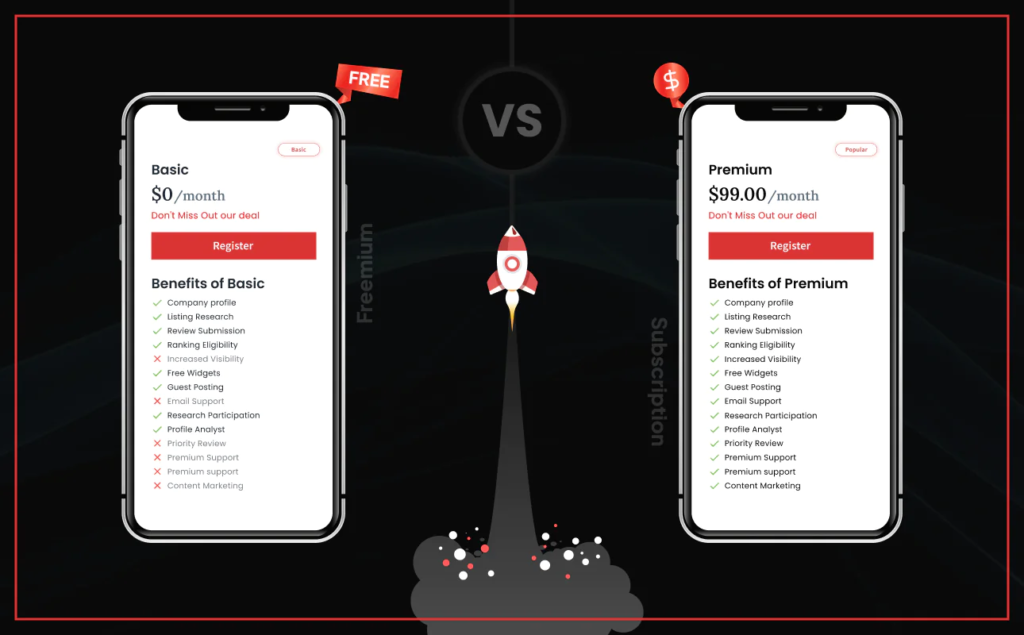
       FREE PLANS                        PAID PLANS
┌─────────────────────────┐       ┌─────────────────────────┐
│ • Excellent for testing │       │ • Unlimited volume/caps │
│ • Individual usability  │  vs   │ • Priority human support│
│ • Usage & storage caps  │       │ • Advanced security     │
│ • Community forums      │       │ • Team permissions      │
└─────────────────────────┘       └─────────────────────────┘
The Value of Free Plans
Free plans are better than ever. For students, solos, or small projects with straightforward needs, a free plan often provides all the utility required. They also offer a zero-risk environment to test software in real conditions.
When to Upgrade
Upgrading to a paid tier makes sense under three clear conditions:
- It removes a genuine operational roadblock: You frequently run into file storage caps, user invite limits, or export watermarks that hold back daily progress.
- It saves expensive billable hours: If a $20/month software subscription saves you three hours of tedious manual effort every week, it pays for itself almost instantly.
- It protects sensitive information: You require advanced team security features, granular permission controls, or automated cloud backups.
4 Expensive Mistakes to Avoid
- Buying for an “Idealized” Version of Yourself: Don’t purchase complex enterprise software for workflows you haven’t built yet. Start with simple tools, and let your software grow naturally alongside your actual demands.
- Falling for Annual Discount Offers: A 25% discount for paying an entire year upfront looks great on paper, but it turns into a net loss if you stop using the software six weeks later. Pay month-to-month until an app proves its long-term value.
- Ignoring Export Flexibility: Always check how easy it is to export your data. If a tool locks your notes, records, or files inside a proprietary format that cannot be easily downloaded, you risk getting trapped.
- Subscription Hoarding: Small monthly fees compound quickly. Audit your active software subscriptions every three months, cancel anything you haven’t opened in thirty days, and eliminate overlapping tools.
Aim for a Frictionless Digital Workspace

Technology is at its absolute best when it stays out of your way. The ultimate goal of software selection isn’t to build a flashy, hyper-connected system of twenty different apps. It is to build a workspace that lets you get your work done with minimal stress.
By focusing on real bottlenecks, testing apps under practical conditions, and ruthlessly cutting away digital clutter, you ensure your software remains a helpful partner rather than another daily chore.
FAQs
1. How many digital tools do I actually need?
Stick to a handful. A calendar, a task list, a place for notes, and a messaging app will handle nearly everything without cluttering your daily routine.
2. When should I start paying for a tool’s upgraded plan?
Upgrade only when a free tier limit directly blocks your work. If a paid feature saves you more billable hours than the subscription costs, it pays for itself.
3. Are all-in-one apps better than separate single-purpose tools?
Not necessarily. All-in-one platforms require hours of complicated setup, while simple single-purpose apps usually work brilliantly straight out of the box.
4. Is the discount on an annual subscription worth taking?
Only after you’ve used the app every week for two full months on a monthly plan. A 20% discount is a total waste if you abandon the app six weeks later.
5. What’s the easiest way to catch sneaky software charges?
Set a calendar reminder every three months to scan your bank statements. If you spot a charge for an app you haven’t opened in thirty days, cancel it instantly.