AI conversations can be incredibly useful. You might use an AI & Automation assistant to brainstorm ideas, write emails, solve problems, summarize documents, or work through personal projects. Over time, though, those conversations can contain much more information than you realize.
A simple chat may include AI & Automation an email address, phone number, home address, account details, passwords, API keys, or other private information. The problem is that these details can be easy to miss when you’re preparing a conversation export to store, share, or reuse.That is where an AI Conversation Privacy Scanner can be helpful.
The tool is designed to review an AI Automation conversation export and identify potentially sensitive information, including personal data and credentials, before you do anything with the file. Instead of manually reading through a long conversation line by line, you can use the scanner as an extra privacy check.
One particularly useful feature is that processing stays inside the browser tab. Your conversation does not need to be uploaded to a remote service for the scan.
What Is an AI Automation Conversation Privacy Scanner?
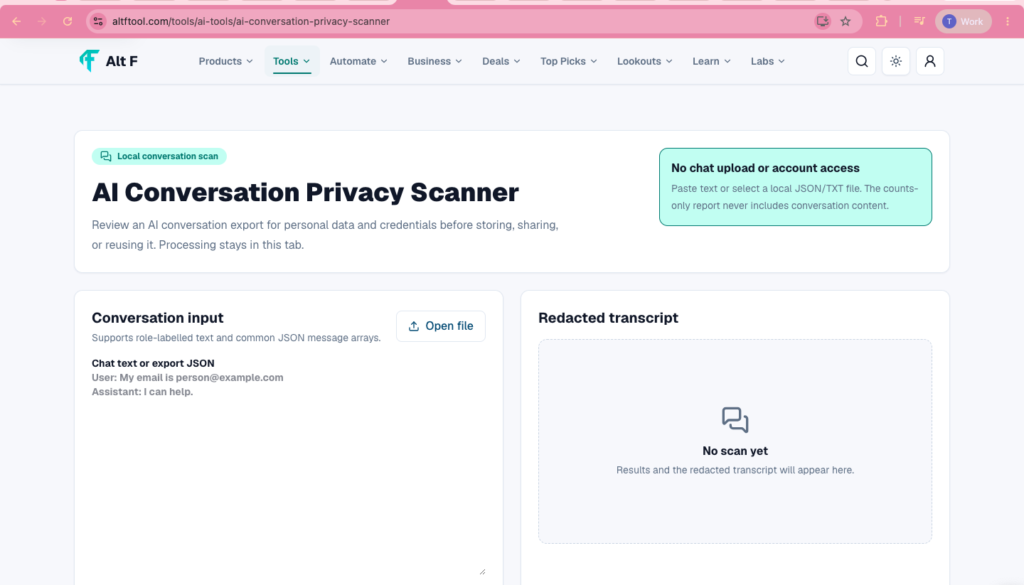
An AI Conversation Privacy Scanner is a privacy-focused tool for checking exported AI conversations before they are stored, shared, or reused.
AI chat exports can become surprisingly large. A conversation that starts as a simple question may eventually include work information, contact details, technical configuration, or other private content.
When you are dealing with a long export, finding every sensitive detail manually can take time.
The scanner provides another layer of review by looking through the conversation for information that could potentially expose personal data or credentials.
It is especially useful when you are preparing an AI conversation for someone else to review or when you want to keep an organized archive of your chats without accidentally storing information that should have been removed first.
Why Should You Check an AI & Automation Conversation Before Sharing It?
It is easy to forget what has been included in an old conversation.
For example, you might have pasted a piece of code into an AI assistant months ago. That code could contain a token or credential. You may have shared contact information while asking the AI to draft a message. You may even have included personal details while asking for advice.
When the conversation is fresh in your mind, these details are easier to notice. Months later, they can blend into hundreds or thousands of lines of conversation.
This becomes especially important when an AI export is being:
- Shared with a colleague
- Added to a project archive
- Used for research
- Reused as reference material
- Stored for future use
- Sent to another person for review
A quick privacy scan can help you catch information you might otherwise overlook.
What Kind of Information Can It Help Find?

Personal data can include information that identifies or relates to a person. Depending on the conversation, this might include contact information or other details that you would rather not distribute.Credentials are another important category. These can include information used to access systems, applications, accounts, or services.
For example, someone working on a programming problem might paste configuration details into a chat. Someone preparing a business document might include contact information. Someone troubleshooting an application could include authentication-related information.
The scanner focuses on two broad areas: personal data and credentials.
A conversation might contain such information without you intentionally treating it as sensitive.
The scanner gives you an opportunity to review these potential issues before the conversation goes somewhere else.
How the AI Conversation Privacy Scanner Works
The basic idea is straightforward.
First, you provide an AI conversation export to the scanner. The tool reviews the conversation for potential personal data and credentials.
Once the scan is complete, you can review the results and decide what needs attention.
The important point is that the processing stays in the current browser tab.
That means the conversation can be analyzed directly in your browser rather than being sent to a separate online service for processing.
For privacy-conscious users, this can make the workflow more comfortable because the conversation remains within the local browser session during the scan.
Processing Stays in Your Browser Tab
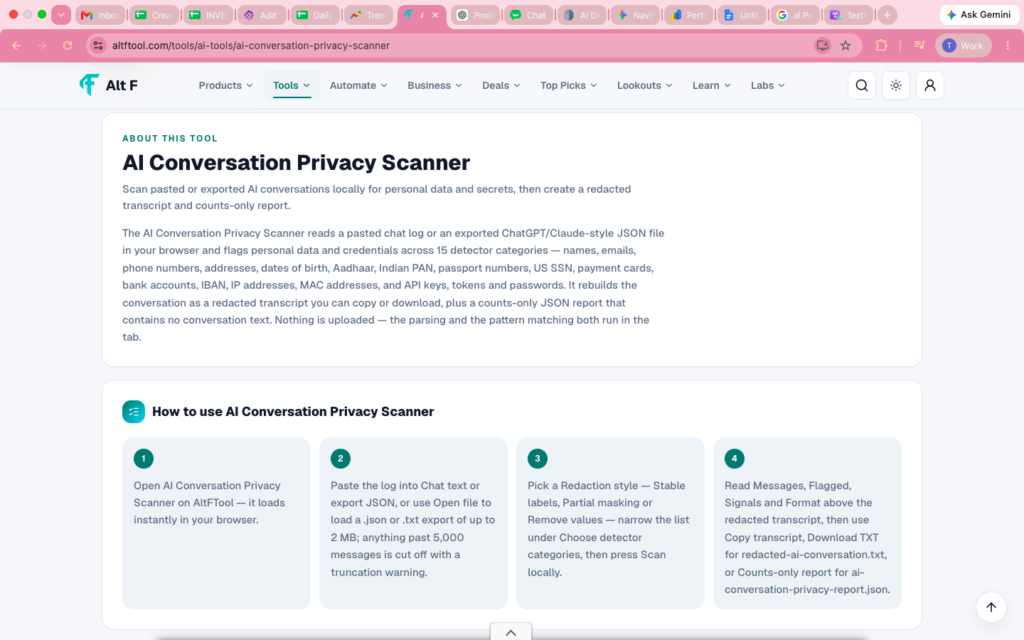
One of the most notable aspects of the tool is its browser-based processing approach.
When dealing with private conversations, where the information is processed matters almost as much as what the tool detects.
If you’re reviewing an AI export containing personal or confidential information, you may not want to upload that material to another service simply to perform a privacy check.With this scanner, processing stays in the tab.
This makes the tool particularly suitable for situations where privacy is a priority and you want to perform a quick local review before sharing or storing an AI conversation.
Of course, keeping processing in the browser does not automatically make every workflow risk-free. You should still handle the original conversation export carefully and avoid sharing sensitive files unnecessarily.
When Should You Use the Scanner?
There isn’t just one situation where a privacy scanner can be useful.You can make it part of your normal workflow whenever an AI conversation is leaving your personal workspace.
For example, imagine you’ve had a long conversation with an AI assistant while working on a project. The conversation contains useful brainstorming and technical explanations, so you want to share the export with a teammate.Before sending it, run a privacy scan.Another example is archiving.
Perhaps you want to save several AI conversations as part of your project documentation. Before adding them to a shared folder, scanning them can help you identify information that doesn’t belong in the archive.The same idea applies when reusing old AI conversations for another project.
AI Chats Can Contain More Personal Information Than You Think
People tend to type into AI assistants the same way they might write notes to themselves.
They may paste examples, screenshots, snippets of code, contact information, or personal context without thinking too much about how that information could appear later.
A conversation can therefore become a collection of different types of information.
The longer the conversation becomes, the harder it can be to remember everything that was included.

One reason privacy checks are useful is that AI conversations often feel informal.
This is why a dedicated review step can be valuable.
Instead of relying entirely on memory, you have a tool that helps you look for potential privacy problems before the export is shared or reused.
A Useful Step Before Sharing AI Exports
Think of the scanner as a final checkpoint.
You don’t necessarily need to change the way you use AI. You simply add one step before an exported conversation moves into a different environment.
A simple workflow could look like this:
Create the conversation → Export it → Run a privacy scan → Review potential issues → Remove sensitive information if needed → Share or store the cleaned version
This approach can be particularly helpful for teams, developers, researchers, writers, and anyone who regularly works with AI conversation exports.
Why Credentials Deserve Extra Attention
Personal information matters, but credentials can be especially important because they may provide access to something else.

A credential accidentally included in a conversation could potentially expose an account, application, development environment, or other protected resource.
That’s why developers and technical users should be particularly careful when exporting AI chats.
Code snippets and configuration files can sometimes contain sensitive values. Even when the conversation was originally created for debugging, those values may remain in the exported history.
A privacy scan can act as a reminder to check the conversation before it leaves your control.
Still, if you discover a real credential in an export, don’t simply assume that deleting the text from the copy solves the underlying problem. Depending on the credential, you may also need to revoke or rotate it.
Who Can Benefit From an AI Conversation Privacy Scanner?
The tool can be useful for almost anyone who works regularly with AI conversations.
Developers
Developers frequently paste code, configuration snippets, error messages, and technical information into AI chats. A privacy review can help identify credentials or other sensitive values before an export is shared.
Businesses and Teams
Teams may share AI conversations internally for collaboration, documentation, or research. Scanning an export before distributing it can provide an additional privacy check.
Writers and Content Creators
Writers may use AI conversations for brainstorming, editing, research, and content planning. A scan can help identify personal information accidentally included in long conversations.
Researchers and Students

AI chats can become part of research or study workflows. Before storing or sharing those conversations, reviewing them for sensitive information can be a sensible precaution.
Everyday AI Users
You don’t have to work in technology to benefit from the idea. If you regularly use AI and occasionally export your conversations, a privacy check can help you understand what you’re actually sharing.
What to Do After a Scan
A scan is only useful if you review the results carefully.
If the tool highlights something, look at the surrounding conversation and determine whether the information really needs to remain there.
If it is unnecessary, remove or redact it before sharing the export.
For credentials, take the issue seriously. If an actual secret has been exposed, consider changing or revoking it according to the service involved.
You should also remember that automated scanners are not a replacement for human judgment. A tool can help identify potential problems, but you should still read the flagged content and decide what is appropriate to share.
Privacy Should Be Part of Your AI Workflow

AI tools have become part of everyday work for many people. As conversations become longer and more useful, they can also become repositories of information that was never intended for public or wider distribution.
That doesn’t mean you should avoid using AI.
Instead, it means privacy should become part of the workflow.
Before an AI conversation is stored, shared, or reused, take a moment to review what is actually inside it. A privacy scanner can make that review faster and easier.