
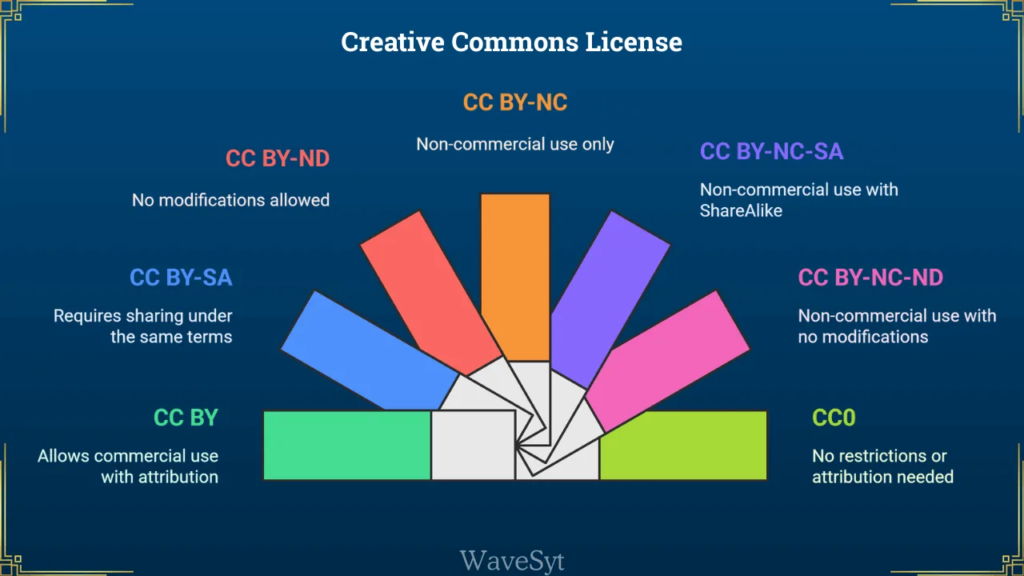
Navigating modern copyright law can feel like wandering through a legal minefield without a map. Whether you write articles, compose music, record podcasts, capture fine art photography, Creative or publish open datasets, protecting your hard work while allowing others to share it legally requires a crystal-clear permissions strategy.
The Creative Commons License Picker streamlines copyright licensing into two fundamental choices, helping creators release original digital works with total confidence and zero legal jargon.
What Is the Creative Commons License Picker?
The Creative Commons License Picker is an interactive open-web utility hosted on AltFTool. It removes guesswork by mapping two simple permission questions onto the official Creative Commons 4.0 International license suite and the CC0 Public Domain Designation.
[ Your Original Work ]
|
+—————-+—————-+
| |
Allow Commercial Use? Public Domain?
/ \ |
(Yes) (No) [ CC0 Waiver ]
/ \ / \
Adapts? Adapts? Adapts? Adapts?
/ | \ / | \ / | \ / | \
[BY][SA][ND][NC][NC-SA][NC-ND] (6 Main Licenses)
Instead of requiring you to decipher dense legal prose, the interactive tool evaluates your intentions, determines the perfect license match, flags potential legal pitfalls, and generates copy-paste-ready attribution text using the industry-standard TASL (Title, Author, Source, License) pattern in both plain text and semantic HTML with rel=”license” tags.
Understanding the Core License Framework
Every Creative Commons 4.0 license relies on four distinct permission modules combined to create six standardized licenses:
- Attribution (BY): Reusers must give appropriate credit, provide a link to the license, and indicate if changes were made.
- ShareAlike (SA): Reusers can remix, transform, or build upon the material, but must distribute their contributions under the exact same license.
- NonCommercial (NC): Reusers can copy, distribute, display, and perform the work—plus build derivatives—for non-commercial purposes only.
- NoDerivatives (ND): Reusers can copy and distribute the original work in any medium, but cannot distribute modified versions or adaptations.
| License Name | Shortcode | Allows Commercial Use? | Allows Adaptations? | Approved for Free Cultural Works? |
| Public Domain Dedication | CC0 | Yes | Yes | Yes |
| Attribution | CC BY | Yes | Yes | Yes |
| Attribution-ShareAlike | CC BY-SA | Yes | Yes (Under same terms) | Yes |
| Attribution-NonCommercial | CC BY-NC | No | Yes | No |
| Attribution-NoDerivatives | CC BY-ND | Yes | No | No |
| Attribution-NonCommercial-ShareAlike | CC BY-NC-SA | No | Yes (Under same terms) | No |
| Attribution-NonCommercial-NoDerivatives | CC BY-NC-ND | No | No | No |
Step-by-Step Guide: How to Use the Tool
Using the interactive picker on AltFTool takes under two minutes. Follow this direct four-step procedure to generate your custom license badge and attribution code:
1.Open the Tool on AltFTool:Instant browser launch.
Navigate directly to the Creative Commons License Picker page on AltFTool. The application loads instantly inside your browser without registering an account or downloading external software.
2.Define Your Usage Permissions:Answer two core questions.
Toggle your desired settings for commercial permissions and adaptations:
- Question 1: “May others use the work commercially?” (Select Yes or No).
- Question 2: “May others share adaptations of the work?” (Select Yes, No, or Yes as long as others share alike).
- Alternative: Check the CC0 box if you intend to waive all copyright protection worldwide.
3.Input Work Metadata:Build accurate attribution credits.
Select your creative medium—Photograph, Article, Music, Dataset, or Source Code—and complete the metadata fields:
- Title of the work (e.g., Alpine Sunrise)
- Creator / Author Name (e.g., Jane Doe)
- Source URL (e.g., https://example.com/photos/alpine-sunrise)
4.Review Warnings and Copy Output:Deploy attribution to your site.
Review the Free Cultural Works status badge and safety warnings. Click Copy Attribution for plain-text credit, or click Copy HTML to get embeddable code complete with microdata and rel=”license” anchors.
Essential Features and Safety Warnings
The AltFTool License Picker protects creators by highlighting common misunderstandings before you publish your content under a binding open license:
1. Irrevocability Warning
Once you apply a Creative Commons license to a copy of your work, that license cannot be revoked. While you can stop distributing the work yourself at any point, anyone who legally acquired a copy under your CC license retains the right to continue using it under those terms indefinitely.
2. The Vagueness of NonCommercial (NC)
The NC clause restricts reusers from using your work “primarily intended for or directed toward commercial advantage or monetary compensation.” Because court interpretations vary by jurisdiction, what counts as “commercial” can be ambiguous. Applying NC may inadvertently prevent your work from being used by non-profit educational platforms, independent podcasters, or community news organizations.
3. Unsuitability for Software Source Code
Creative Commons licenses are designed for artistic, literary, media, and database assets. They do not include patent grants, dependency considerations, or source-code-specific provisions. If you are releasing software, the tool warns you to choose an established open-source license like MIT, Apache 2.0, or GNU GPL instead.
4. Wikipedia Acceptance (Free Cultural Works)
If your goal is to make your content eligible for inclusion on Wikipedia or Wikimedia Commons, your work must meet the Definition of Free Cultural Works. Only CC0, CC BY, and CC BY-SA qualify. Applying NC or ND clauses automatically disqualifies your work from Wikipedia.
Common Real-World Use Cases
- Photographers Sharing Portfolio Sets: Use CC BY 4.0 or CC BY-SA 4.0 to ensure visual artists and news sites can feature your imagery while giving direct backlink credit to your portfolio site.
- Educators and Open Courseware Writers: Apply CC BY-NC-SA to keep textbooks free for classrooms while preventing commercial publishers from selling your lesson plans for profit.
- Musicians and Sound Designers: Select CC BY-ND if you want independent film editors to use your background tracks in their projects, but want to prevent anyone from remixing or altering your audio composition.
- Open Data Researchers: Use CC0 Public Domain for raw scientific datasets to eliminate legal friction, allowing research institutions worldwide to ingest your data freely into predictive AI models and clinical studies.

