
In today’s digital world, distractions are just one click away. Whether it’s social media, news updates, or random browsing, staying focused during work or study hours can feel almost impossible. That’s exactly where Focus Mode by AltfTool steps in. It’s not just another productivity extension — it’s a simple yet powerful system designed to help you build discipline, reduce interruptions, and protect your deep work time.
The Motive Behind Focus Mode
Focus Mode was created with one clear goal: to help users reduce distractions during important hours. Instead of relying only on self-control, this extension creates a structured environment where selected websites are blocked during a defined time range.
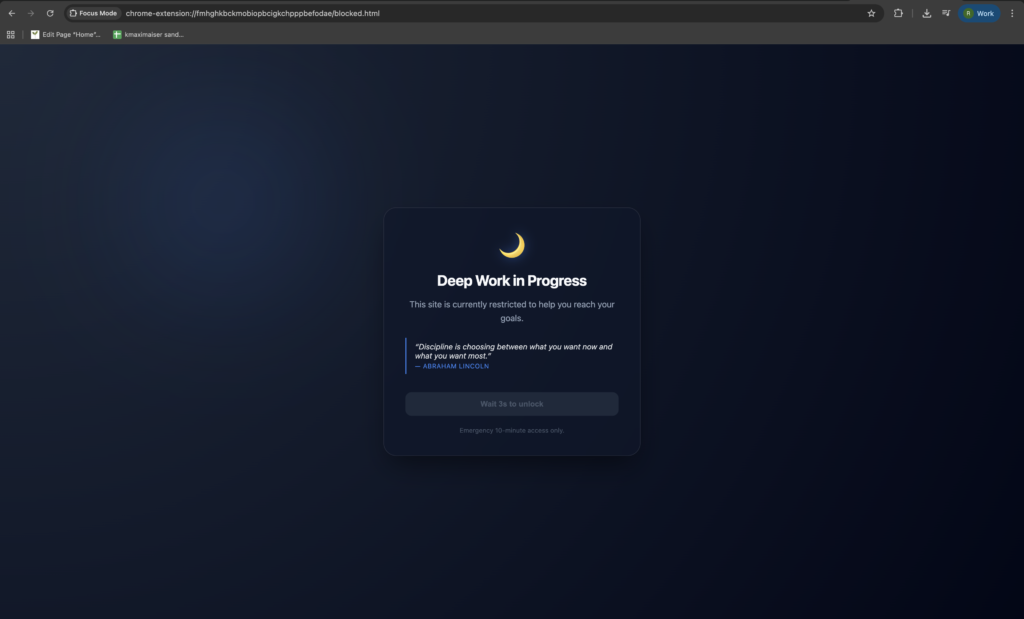
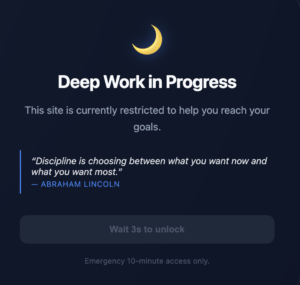
If you try to access a blocked website during your active focus hours, the extension redirects you to a motivational Deep Work page instead. This small interruption makes a big difference. It gently reminds you of your priorities and brings your attention back to what truly matters.
The idea is simple — remove temptation, increase concentration, and boost productivity.
Powerful Features That Support Deep Work
Focus Mode is thoughtfully designed with practical features that make it both flexible and effective.
Toggle-Based Focus Mode
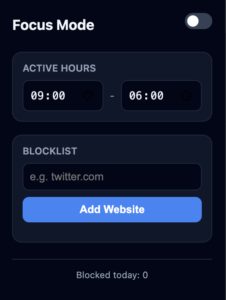
You can easily turn Focus Mode On or Off using a simple switch. No complicated setup, no confusion.
Custom Focus Hours
Set your own working time range — for example, 9:00 AM to 5:00 PM. The extension only activates blocking during these selected hours, giving you full control over your schedule.
Manual Blocklist
Add or remove websites manually. Whether it’s facebook.com, instagram.com, or any other distracting site, you decide what needs to be blocked.
Automatic Tab Monitoring
The extension runs in the background using a service worker, constantly monitoring tabs to ensure blocked sites don’t slip through during focus hours.
Redirect to Motivational Page
Instead of simply showing an error page, Focus Mode redirects you to a custom blocked screen with a motivational message. It’s not about punishment — it’s about encouragement.
3-Second Delay Before Unlock
When you land on the blocked page, there’s a 3-second delay before the unlock button becomes active. That small pause gives you time to rethink whether you really need to access that site.
Emergency 10-Minute Access
Sometimes, you genuinely need temporary access. That’s why Focus Mode provides an emergency 10-minute unlock option. After 10 minutes, the site automatically becomes blocked again.
Daily Blocked Count Tracking
The extension keeps track of how many times sites were blocked during the day. This feature helps you understand your distraction patterns.
Sync Across Devices
All settings are saved using chrome.storage.sync, which means your preferences stay consistent across devices where you’re logged in.
How to Use Focus Mode (Step-by-Step Guide)
Getting started is simple and user-friendly.
First, install the extension and open the popup.
Turn on Focus Mode using the toggle switch.
Set your working hours, such as 09:00 to 17:00.
Add the websites you want to block.
After activation, refresh already opened tabs so the blocking rules apply properly.
Now, during your active focus hours, if you try to open a blocked website, you’ll automatically be redirected to the Focus Mode screen. From there, you can either wait 3 seconds to unlock or use the 10-minute emergency access if absolutely necessary. Once the emergency period ends, the site becomes blocked again automatically.
Why Focus Mode Actually Works
Focus Mode works because it combines structure with flexibility. It doesn’t permanently block websites, nor does it shame you for clicking them. Instead, it creates a mindful pause between impulse and action.
That pause is powerful. Often, distraction is just a habit. When you interrupt that habit, even briefly, you give your brain space to choose productivity instead.
Final Thoughts
Focus Mode by altfTool is more than just a website blocker — it’s a productivity companion. It helps you protect your time, stay disciplined, and build better focus habits without being overly restrictive.
If you struggle with digital distractions during work or study hours, this extension can genuinely transform your daily routine. Sometimes, the smallest changes — like blocking one distracting website — can lead to the biggest improvements in productivity.
AI Automation Guide 2026: Work Smarter, Faster & Better
Artificial intelligence and automation are changing the way people work, manage information, communicate, and complete…

Tool Reviews: Find the Best Tools for Every Need
Every single morning, millions of people open their laptops to a screen crammed with open…

The Best Audio Editing Software 2026: Music, Podcasts & More
Good audio can completely change how a song, podcast, video, or voice recording feels.Audio Editing…

Tool Reviews 2026: Explore, Compare & Find Better Tools
Finding the right digital tool can save time, simplify repetitive tasks, and make everyday work…

Disclaimer : This blog content is created for informational purposes based on the provided feature details of the Focus Mode extension. Productivity results may vary depending on individual usage habits and discipline levels.
#FocusMode #altfTool #ProductivityTools #DeepWork #DeepWork #ChromeExtension #WorkSmart #Carrerbook #Anslation

