Artificial intelligence has moved far beyond being something people only talk about in tech circles. Today, AI & Automation is helping people write emails, analyze information, create images, organize tasks, answer customer questions, and even automate repetitive work.
At the same time, automation is changing how businesses handle everyday processes. Instead of spending hours copying information between apps or completing the same task again and again, teams can use automated workflows to take care of much of the routine work.
What makes 2026 particularly interesting is the growing connection between AI & Automation. AI can understand information and make useful decisions, while automation can turn those decisions into actions.
From AI agents and smart assistants to workflow automation and generative AI tools, there are plenty of ways this technology can make digital work simpler.
What Is AI & Automation?

Artificial intelligence (AI) refers to technology that can perform tasks that normally require human-like abilities, such as understanding language, recognizing patterns, generating content, and analyzing information.
Automation focuses on making tasks happen automatically based on predefined rules, triggers, or instructions.
When the two are combined, you get systems that can both understand a task and help carry it out.
For example, an automated workflow might collect a new customer inquiry, use AI to categorize the request, and then send the information to the appropriate team.
AI & Automation Trends to Watch in 2026
The AI landscape keeps changing, but several areas are becoming increasingly important.
| AI & Automation Trend | What It Does | Common Use |
|---|---|---|
| AI Agents | Perform multi-step tasks with limited manual input | Research, customer support, task management |
| Generative AI | Creates text, images, audio, video, and other content | Content creation and marketing |
| AI-Powered Workflows | Combines AI with automated processes | Business operations |
| Intelligent Assistants | Helps users organize and complete tasks | Productivity and communication |
| No-Code Automation | Creates workflows without traditional programming | Small businesses and teams |
| AI Data Analysis | Finds patterns and summarizes information | Reports and decision support |
| AI Customer Service | Handles common questions and requests | Support teams |
| RPA | Automates repetitive digital processes | Data entry and administration |
| AI-Powered Search | Helps users find and understand information | Research and knowledge work |
| Personal AI Tools | Provides customized assistance for individuals | Planning, writing, learning, and organization |
AI Agents Are Becoming More Practical
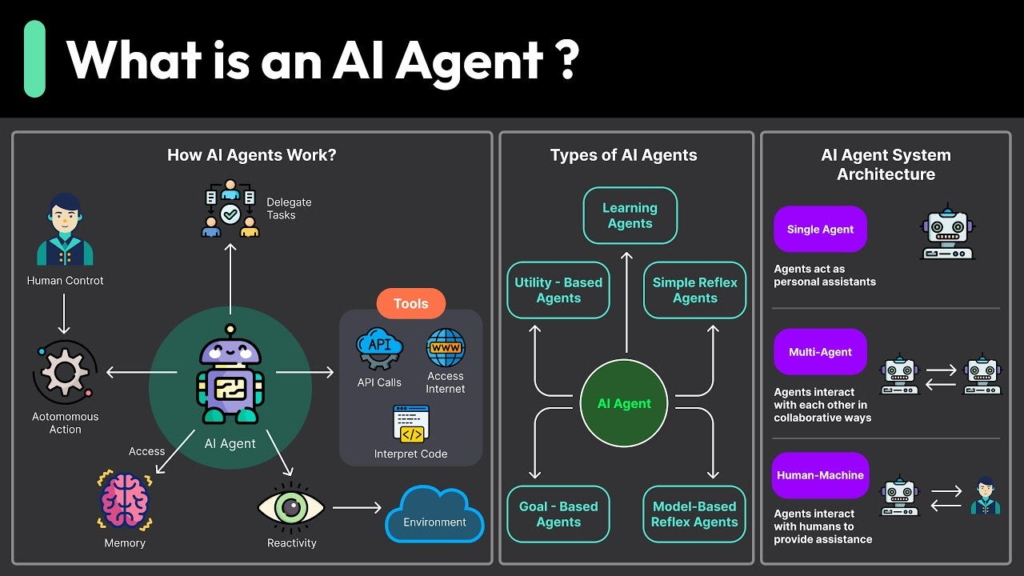
One of the biggest developments in AI & Automation is the rise of AI agents.
Unlike a basic chatbot that mainly responds to individual prompts, an AI agent can be designed to handle a sequence of tasks. Depending on the system, this could include gathering information, organizing results, using connected tools, or preparing an output.
For businesses, agents can be useful for tasks such as research, customer service, scheduling, document processing, and internal support.
The important thing to remember is that an AI agent still needs appropriate instructions, permissions, and oversight. Giving an automated system access to important business tools without proper controls can create unnecessary risks.
Generative AI Continues to Grow
Generative AI has become one of the most recognizable areas of artificial intelligence.
These tools can help create:
- Blog drafts
- Emails
- Social media posts
- Images
- Presentations
- Video concepts
- Product descriptions
- Summaries
- Brainstorming ideas
- Software code
For content creators and marketers, generative AI can speed up the first stage of a project. Instead of starting with a completely blank page, you can use AI to create ideas or a rough draft and then add your own experience, research, and editing.
The human part still matters. Good content needs context, accuracy, originality, and a clear understanding of the audience.
Workflow Automation Saves Repetitive Work

Think about the small digital tasks you repeat every day.
Maybe you receive a form submission, copy the information into a spreadsheet, send an email, create a task, and notify someone on your team.
A workflow automation tool can connect these steps.
A simple workflow might look like:
New form submission → Save customer details → Create task → Send notification
Adding AI can make the workflow more flexible:
New inquiry → AI categorizes inquiry → Workflow sends it to the right team → Customer receives an appropriate response
This combination can be especially useful when a business has many repetitive processes.
No-Code and Low-Code Automation Is Expanding
AI & Automation is no longer limited to professional developers.
No-code and low-code platforms allow users to build workflows through visual interfaces and ready-made integrations.
This can help small businesses, marketers, operations teams, and creators automate tasks without building an entire software system from scratch.
Common examples include:
- Moving information between applications
- Creating tasks automatically
- Sending notifications
- Updating spreadsheets
- Managing leads
- Organizing customer information
- Triggering emails
- Creating reports
Before building a complicated workflow, start with one repetitive process and improve it gradually.
AI for Business Operations

Businesses are using AI & Automation across many departments rather than keeping it limited to a dedicated technology team.
AI can support areas such as:
- Marketing
- Sales
- Customer service
- Human resources
- Finance
- Operations
- Research
- Project management
The best use case depends on the business. A small online store may benefit from automated customer support, while a marketing team may focus more on content research and campaign analysis.
AI-Powered Data Analysis
Large amounts of data can be difficult to understand when you’re looking at rows and rows of numbers.
AI-powered analytics tools can help summarize information, identify patterns, generate explanations, and assist with reports.
For example, a business might use AI to examine sales data and highlight changes in product performance.
However, important business decisions should not rely blindly on an AI-generated summary. Data quality, context, and human review remain essential.
AI Customer Support

Customer service is another area where AI and automation can work together.
An automated support system can handle common questions such as:
- Order status
- Basic product information
- Account questions
- Frequently asked questions
- Appointment information
- General troubleshooting
More complicated requests can then be passed to a human representative.
This approach allows automation to handle routine conversations while employees focus on issues that require judgment or personal attention.
Best AI & Automation Tools by Purpose
There is no single tool that works perfectly for every person or business. The right option depends on what you are trying to automate.
| Purpose | Useful AI/Automation Tool Type | What You Can Do |
|---|---|---|
| Writing | AI writing assistants | Draft, rewrite, summarize, brainstorm |
| Research | AI research tools | Find, organize, and summarize information |
| Images | AI image generators | Create visual concepts and graphics |
| Video | AI video tools | Generate or edit video content |
| Automation | Workflow automation platforms | Connect apps and automate tasks |
| Customer Support | AI chatbot platforms | Answer common customer questions |
| Data | AI analytics tools | Analyze and summarize information |
| Meetings | AI meeting assistants | Transcribe and summarize conversations |
| Productivity | AI assistants | Organize tasks and information |
| Coding | AI coding assistants | Generate, explain, and improve code |
How AI Agents and Automation Work Together
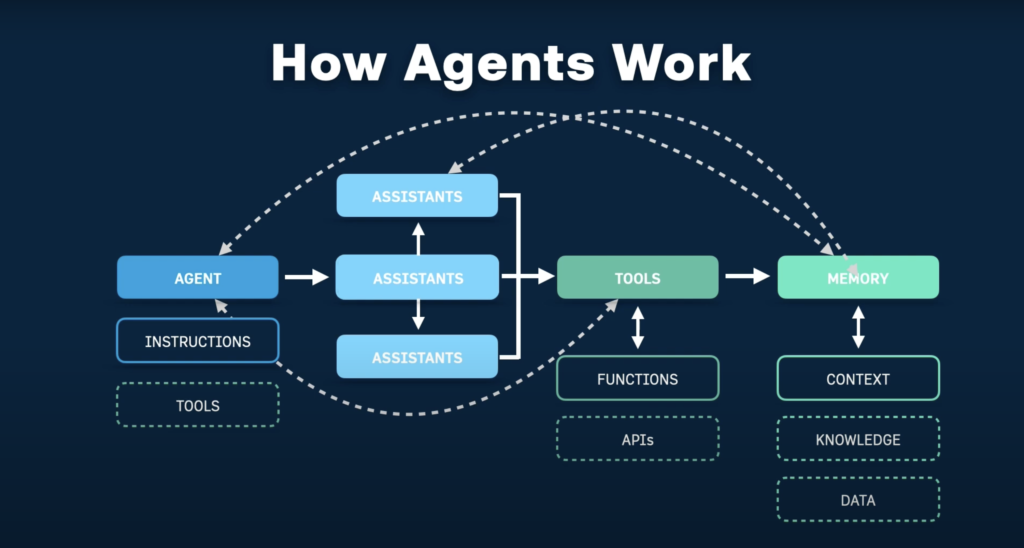
The real value often appears when AI and automation are connected.
Imagine a business receives hundreds of customer inquiries every week.
A basic automated system might simply forward every message to the same inbox.
An AI-powered workflow could take a different approach:
- A customer submits an inquiry.
- AI reads and categorizes the message.
- The automation checks the category.
- The inquiry is sent to the appropriate team.
- A task is created automatically.
- The customer receives a confirmation.
- A human employee handles anything that needs personal attention.
The exact workflow will vary, but the concept is straightforward: AI handles understanding, while automation helps move the work forward.
Benefits of AI & Automation
When implemented thoughtfully, AI and automation can offer several practical benefits.
Less Repetitive Work
Automating routine tasks gives people more time for work that requires creativity, judgment, and communication.
Faster Processes
Automated workflows can perform certain steps immediately instead of waiting for someone to complete them manually.
Better Organization
Connected systems can keep information moving between the tools a team already uses.
More Consistent Workflows
A properly designed workflow can follow the same process each time.
Easier Scaling
Automation can help businesses manage increasing workloads without adding the same amount of manual effort to every process.
Things to Consider Before Automating

Automation sounds appealing, but not every task should be automated.
Before creating a workflow, ask:
- Is this task genuinely repetitive?
- How often does it happen?
- What happens if the automation makes a mistake?
- Does the workflow involve sensitive information?
- Does a human need to approve the final action?
- Can the process be tested safely?
- Is the time saved worth the setup effort?
These questions can prevent a simple automation project from becoming unnecessarily complicated.
AI & Automation for Everyday Life
You don’t have to run a company to benefit from these technologies.
AI and automation can also help with everyday digital tasks.
For example, you could use AI to:
- Plan a trip
- Organize study notes
- Create a meal plan
- Draft an email
- Summarize a long document
- Brainstorm a project
- Learn a new topic
- Organize ideas
Automation can help with things such as reminders, recurring tasks, file organization, and notifications.
The trick is to use technology where it actually makes life easier rather than automating something that takes only a few seconds to do manually.
A Simple Way to Start With AI Automation

If you’re new to AI automation, don’t begin by trying to automate everything.
Start small.
Find a Repetitive Task
Look for something you do several times each week.
Write Down the Process
List every step from beginning to end.
Decide What AI Should Handle
AI may be useful for understanding text, summarizing information, categorizing requests, or generating content.
Decide What Should Be Automated
Use automation for predictable actions such as moving information, creating tasks, sending notifications, or updating records.
Add Human Review Where Needed
Keep a person involved when the result could have an important financial, legal, customer, or business impact.
Test Before Expanding
Run the workflow with a small amount of information first. Look for mistakes and adjust the instructions.
AI & Automation Trends: Quick Comparison
| Area | Traditional Approach | AI & Automation Approach |
|---|---|---|
| Customer inquiries | Manually sort messages | AI categorizes and routes messages |
| Content ideas | Start from scratch | AI assists with brainstorming |
| Data reports | Manually review data | AI summarizes patterns |
| Repetitive data entry | Copy and paste | Automated data transfer |
| Meeting notes | Write notes manually | AI-assisted transcription and summaries |
| Task creation | Create tasks manually | Trigger tasks through workflows |
| Customer FAQs | Human answers every question | AI handles common questions |
| Research | Search and organize manually | AI assists with research and summaries |
What the Future of AI & Automation May Look Like

AI and automation are increasingly becoming connected parts of digital workflows.
Instead of opening several applications and completing every step manually, users may increasingly interact with systems that understand what they are trying to accomplish and coordinate multiple actions.
AI agents, multimodal systems, automated workflows, and personalized assistants are all contributing to this shift.
At the same time, responsible use will remain important. Privacy, security, accuracy, transparency, and human oversight matter just as much as convenience.
Frequently Asked Questions
1. What is AI and automation?
AI helps computers understand, generate, and analyze information, while automation uses technology to perform repetitive tasks with less manual effort.
2. What are the biggest AI and automation trends in 2026?
Key trends include AI agents, generative AI, intelligent assistants, AI-powered workflows, no-code automation, and AI data analysis.
3. What are AI agents used for?
AI agents can help with multi-step tasks such as research, customer support, task management, information processing, and workflow coordination.
4. How can AI automation help businesses?
AI automation can reduce repetitive work, speed up processes, organize information, support customers, and connect different business workflows.
5. How can beginners start using AI automation?
Start with one repetitive task, map out the process, choose an appropriate AI or automation tool, test the workflow, and keep human review where it is important.