

GST (Goods and Services Tax) is an indirect tax charged on the supply of goods and services in India. It is generally included in the price customers pay for products and services. Whether you are a customer, shopkeeper, freelancer, or small business owner, understanding GST calculations can help you check bills, prepare invoices, and estimate the final cost of a purchase.
Calculating GST is easier than it may seem. You only need to know the taxable amount, the applicable GST rate, and whether the price is GST-inclusive or GST-exclusive.
In this guide, you will learn how to calculate GST in India using simple formulas, practical examples, and useful tips.
What Is GST?

GST stands for Goods and Services Tax. It is a consumption-based indirect tax introduced in India on 1 July 2017. It brought several earlier indirect taxes under a common tax framework.
GST is charged on the supply of goods and services. The applicable rate depends on the product or service and the relevant GST classification.
For transactions within the same state, GST is generally divided into:
- CGST (Central Goods and Services Tax): The central government’s share of GST.
- SGST (State Goods and Services Tax): The state government’s share of GST.
- UTGST (Union Territory Goods and Services Tax): Applies instead of SGST in relevant intra-union-territory transactions.
For eligible inter-state supplies, IGST (Integrated Goods and Services Tax) is generally charged instead of CGST and SGST.
Why Is GST Calculation Important?
Knowing how to calculate GST can help individuals and businesses in several ways.
- Understand the final price: Find out how much tax is included in a product or service.
- Check invoices: Verify whether the GST amount on a bill is calculated correctly.
- Prepare business invoices: Calculate the tax component before issuing invoices.
- Plan expenses: Estimate the total cost of purchases and services.
- Avoid calculation mistakes: Reduce errors when adding or removing GST from an amount.
GST Calculation Formula
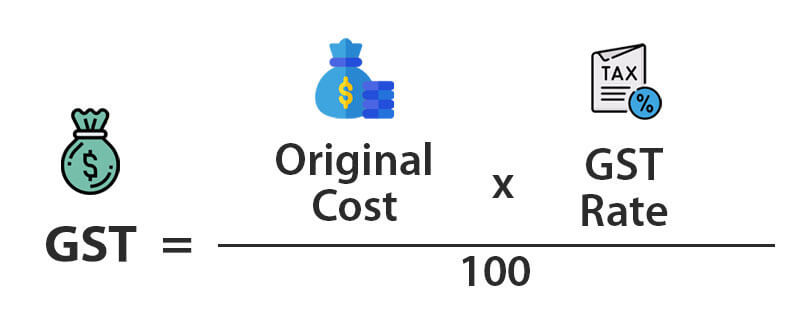
There are two common situations when calculating GST: adding GST to a price and removing GST from a GST-inclusive price.
1. Formula to Add GST
If the price does not include GST, use this formula:
GST Amount = Original Price × GST Rate ÷ 100
Final Price = Original Price + GST Amount
For example, suppose a product costs ₹1,000 before GST and the applicable GST rate is 18%.
GST Amount = ₹1,000 × 18 ÷ 100
GST Amount = ₹180
Final Price = ₹1,000 + ₹180
Final Price = ₹1,180
This means the customer pays ₹1,180, including ₹180 GST.
2. Formula to Remove GST
If the price already includes GST, use this formula to find the original price before tax:
Original Price = GST-Inclusive Price × 100 ÷ (100 + GST Rate)
To calculate the GST portion:
GST Amount = GST-Inclusive Price − Original Price
For example, suppose the final price of a product is ₹1,180, including 18% GST.
Original Price = ₹1,180 × 100 ÷ 118
Original Price = ₹1,000
GST Amount = ₹1,180 − ₹1,000
GST Amount = ₹180
This formula helps you separate the product’s original value from the tax included in its price.
How to Calculate CGST, SGST and IGST
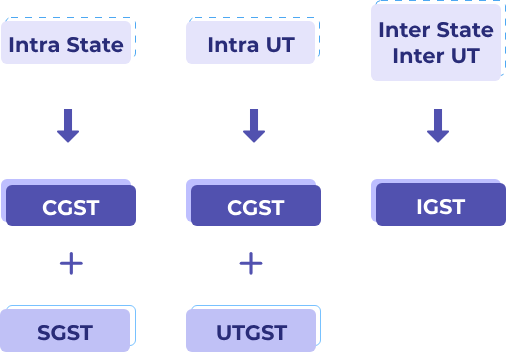
The type of GST charged depends on whether a transaction takes place within the same state or between two different states.
1. CGST and SGST Calculation
When a sale happens within the same state, the total GST is generally divided equally between CGST and SGST.
For example, a business in Madhya Pradesh sells a product worth ₹10,000 to a customer in Madhya Pradesh. Assume the applicable GST rate is 18%.
- Taxable value: ₹10,000
- Total GST: ₹10,000 × 18 ÷ 100 = ₹1,800
- CGST at 9%: ₹900
- SGST at 9%: ₹900
- Final amount: ₹11,800
The invoice shows ₹900 as CGST and ₹900 as SGST.
2. IGST Calculation
When a taxable supply takes place between different states, IGST is generally charged instead of CGST and SGST.
For example, a business in Madhya Pradesh sells a product worth ₹10,000 to a customer in Maharashtra. Assume the applicable GST rate is 18%.
- Taxable value: ₹10,000
- IGST rate: 18%
- IGST amount: ₹1,800
- Final amount: ₹11,800
In this case, the full GST amount is charged as IGST.
The total tax remains ₹1,800 in both examples. Only the type of tax charged changes according to the nature and location of the supply.
GST Calculation Examples at Different Rates
Let’s understand GST calculations using a few simple examples. These examples use assumed rates to explain the formula; always check the applicable rate for the specific product or service.
1: GST at 5%
Suppose a product costs ₹2,000 before GST and the applicable rate is 5%.
- Original price: ₹2,000
- GST amount: ₹2,000 × 5 ÷ 100 = ₹100
- Final price: ₹2,100
2: GST at 12%
Suppose a service or product has a taxable value of ₹5,000 and an applicable GST rate of 12%.
- Original price: ₹5,000
- GST amount: ₹5,000 × 12 ÷ 100 = ₹600
- Final price: ₹5,600
3: GST at 18%
Suppose an electronic product has a taxable value of ₹20,000 and an applicable GST rate of 18%.
- Original price: ₹20,000
- GST amount: ₹20,000 × 18 ÷ 100 = ₹3,600
- Final price: ₹23,600
4: GST at 28%
Suppose a product has a taxable value of ₹10,000 and the applicable GST rate is 28%.
- Original price: ₹10,000
- GST amount: ₹10,000 × 28 ÷ 100 = ₹2,800
- Final price: ₹12,800
These examples show how the same formula works with different GST rates.
How to Use an Online GST Calculator
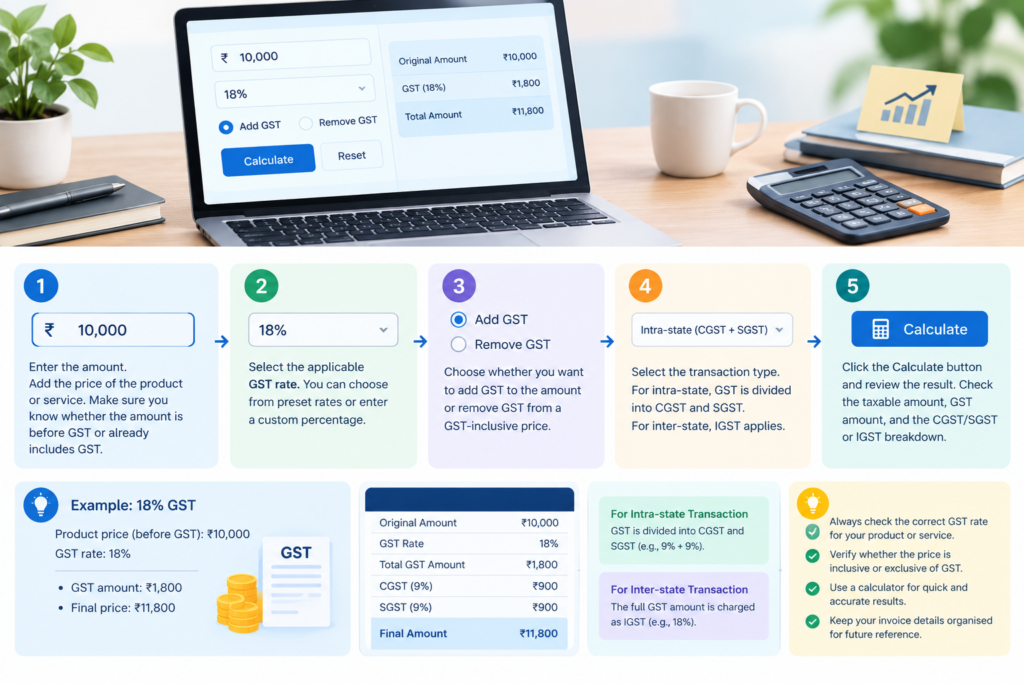
An online GST calculator can make tax calculations quicker and reduce manual errors. It is useful for customers, shopkeepers, freelancers, and business owners who regularly calculate GST.
Follow these simple steps:
- Enter the original amount: Add the product or service price before GST, or enter the GST-inclusive amount if you want to remove tax.
- Select the GST rate: Choose the applicable percentage for your product or service.
- Choose the calculation type: Select whether you want to add GST or remove GST.
- Calculate the amount: Click the calculate option to get the result.
- Check the breakdown: Review the taxable value, GST amount, and final price. If applicable, check the CGST and SGST or IGST split.
An online GST calculator is helpful for quick estimates, but businesses should verify the figures before issuing tax invoices or filing returns.
How to Identify the Correct GST Rate
Choosing the correct GST rate is just as important as calculating the tax correctly. Different goods and services may have different rates, exemptions, or special conditions.
Here are some ways to identify the applicable rate:
- Check the product classification: Find the relevant HSN code for goods or SAC code for services.
- Visit the official GST rate list: Check the applicable rate through the CHIC GST rates portal.
- Review GST notifications: Tax rates and exemptions can change through government notifications.
- Check the type of supply: Understand whether the transaction is intra-state or inter-state.
- Confirm special conditions: Some goods and services may have specific rules or exemptions.
You can check the official rate information on the CHIC GST Rates Portal. CHIC+1
Common GST Calculation Mistakes to Avoid
Even a simple GST calculation can go wrong if you use the wrong rate or formula. Keep these common mistakes in mind:
Using the Wrong GST Rate
Do not assume that every product or service has the same GST rate. Always verify the applicable classification and rate before calculating tax.
Confusing Inclusive and Exclusive Prices
A GST-exclusive price does not include tax, while a GST-inclusive price already contains it. Use the correct formula for each situation.
Adding GST Twice
If the quoted price already includes GST, adding the tax again can result in an incorrect total.
Applying the Wrong Tax Type
For eligible intra-state supplies, CGST and SGST or UTGST generally apply. For eligible inter-state supplies, IGST generally applies.
Forgetting Discounts
When a discount is allowed under the applicable GST valuation rules, it may reduce the taxable value. Check the conditions before calculating GST on a discounted price.
Ignoring Invoice Details
Businesses should check the taxable value, applicable rate, tax amount, GSTIN details where required, and other mandatory invoice information.
Useful Tips for Accurate GST Calculation
A few simple practices can make GST calculations easier and more reliable.
- Always confirm the current GST rate before preparing an invoice.
- Keep the original taxable value separate from the GST amount.
- Use an online calculator when handling multiple calculations.
- Check whether the price already includes GST.
- Verify the CGST, SGST, or IGST breakdown.
- Keep purchase and sales invoices organised for accounting purposes.
- Review official GST notifications when tax rules change.
Who Can Benefit from a GST Calculator?

A GST calculator is useful for different types of users.
Small Business Owners: They can calculate tax on products, services, and customer invoices.
Shopkeepers and Retailers: They can understand the tax component and final selling price of products.
Freelancers: They can estimate GST on eligible professional services and prepare quotations.
Customers: They can check the GST included in a bill and understand the final amount.
Accountants: They can use calculators for quick checks while preparing financial records and invoices.
Online Sellers: They can estimate tax amounts for eligible transactions and review product pricing.
Frequently Asked Questions
1. What is the formula to calculate GST in India?
GST Amount = Taxable Value × GST Rate ÷ 100. Add the GST amount to the taxable value to get the final price.
2. How do I calculate 18% GST on ₹1,000?
Multiply ₹1,000 by 18 and divide by 100. The GST amount is ₹180, making the final price ₹1,180.
3. How can I remove GST from a price?
Use this formula: Original Price = GST-Inclusive Price × 100 ÷ (100 + GST Rate).
4. What is the difference between CGST, SGST and IGST?
CGST and SGST generally apply to eligible transactions within the same state, while IGST generally applies to eligible inter-state transactions.
5. Can I calculate GST using an online calculator?
Yes. Enter the taxable amount, select the applicable GST rate, and choose whether to add or remove GST to calculate the result quickly.