
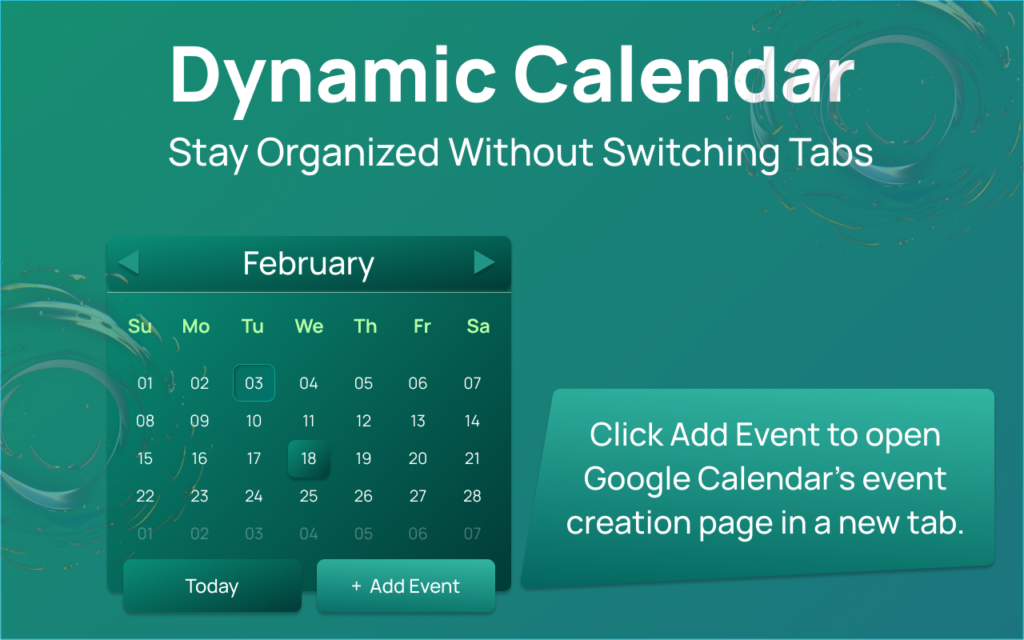
In a world full of complex productivity tools, sometimes all you need is something simple, clean, and reliable. The Altftool Dynamic Calendar Extension is designed exactly for that purpose — a lightweight Chrome popup calendar that helps you quickly view dates, navigate months, and jump straight to event creation without distractions.
Overview

Dynamic Calendar is a Chrome extension popup that displays a fully rendered monthly calendar grid. When you click the extension icon, a clean and visually appealing calendar opens instantly. It shows the current month and year, highlights today’s date, and allows smooth navigation between months.
Unlike heavy scheduling apps, this extension focuses purely on visual calendar viewing. It does not store events or sync with external services — making it fast, secure, and clutter-free.
Core Features
The extension keeps things simple yet functional:
- Monthly Calendar View – Displays a complete 6-row (42-cell) calendar grid, including padding days from previous and next months for a full layout view.
- Month Navigation – Easily switch between months using Previous and Next buttons.
- Today Highlight – Automatically highlights the current system date when viewing the current month.
- Today Button – Instantly return to the current month with one click.
- Add Event Button – Opens Google Calendar’s event creation page in a new tab for quick scheduling.
- Clean UI Design – Mint gradient background, responsive layout, subtle hover effects, and neatly styled footer buttons.
How It Works
Using Dynamic Calendar is effortless:
- Click the extension icon to open the popup.
- View the current month with today’s date highlighted.
- Navigate between months using Previous or Next.
- Click “Today” to reset to the current month.
- Select “Add Event” to open Google Calendar’s event creation page.
Everything updates instantly, ensuring a smooth user experience.
Honest Clarification
Dynamic Calendar does not:
- Store events
- Sync with Google Calendar
- Access user data
It is purely a visual monthly calendar viewer with navigation controls and a shortcut to create events.
The Ultimate Gmail Performance Dashboard by AltF
The Gmail Analytics Extension by AltF Tool is a productivity-focused browser extension designed to provide users with…
How to Organize Your Favorite Websites with Altftool Bookmark Manager
In today’s digital world, we visit dozens of websites every day for work, learning, shopping,…
How to Shorten Long URLs Easily Using Altftool URL Shortener
In today’s digital world, sharing links has become a daily activity. Whether you are sharing…

Master Your Precision: Play Aim Trainer Pro Now
Aim Trainer Pro is a web-based utility hosted on AltFTool designed to help users test and…

Top Email Extractor Extensions for Fast and Easy Email Collection
In today’s digital world, collecting contact information efficiently is essential for marketers, researchers, business owners,…

How to Record Your Screen in One Click Using a Lightweight Chrome Extension
Screen recording has become an essential tool for professionals, educators, developers, and content creators. Whether…

Final Thoughts
The Altftool Dynamic Calendar Extension proves that productivity tools don’t have to be complicated. With its clean design and straightforward functionality, it’s perfect for users who simply want quick date access without data syncing or heavy integrations. Simple, secure, and efficient — exactly what a browser calendar should be.
Disclaimer : The Altftool Dynamic Calendar Extension is an independent browser tool designed for visual calendar viewing only. It does not store, sync, or manage events and is not officially affiliated with or endorsed by Google Calendar. All trademarks belong to their respective owners.
#DynamicCalendar #Altftool #ChromeExtension #ProductivityTool #MinimalTech #Carrerbook #Anslation

