
Staying productivity sounds simple until you actually sit down to work. One person can finish their most important task before breakfast, while another does their best thinking late at night. Add notifications, meetings, social media, emails, and a long to-do list, and even a well-planned day can quickly become messy.
That is where AI Productivity Optimizer comes in.
Instead of throwing another generic productivity routine at you, this tool creates a personalized focus plan based on four simple things: your role, your peak energy time, your biggest distraction, and your main goal.
The idea is straightforward. You answer four questions, and the optimizer turns those answers into a practical productivity method, a daily schedule, and a small list of tools that can help you stay on track.
What Is AI Productivity Optimizer?
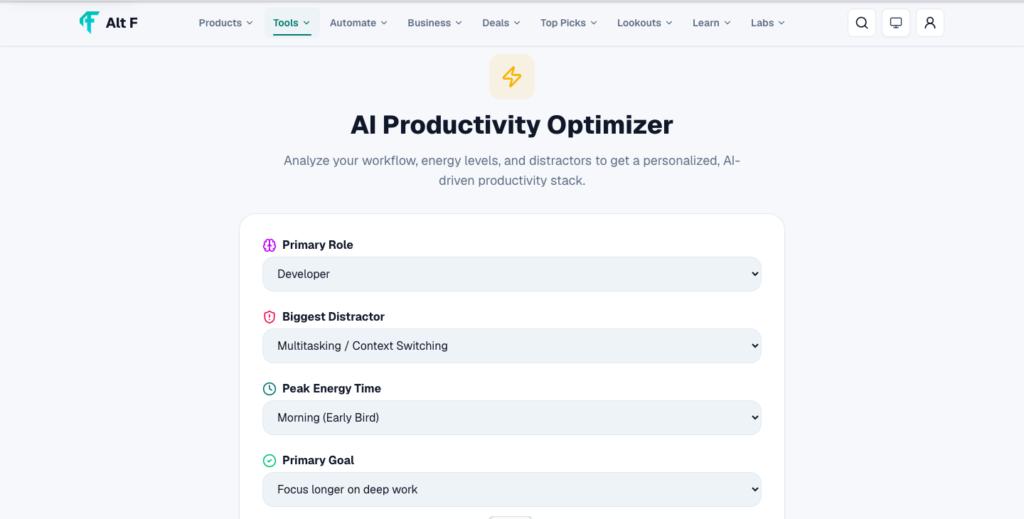
AI Productivity Optimizer is a personalized productivity planning tool designed to help you figure out when and how you should work best.
Rather than telling everyone to wake up at 5 AM, use the same Pomodoro timer, or follow an identical morning routine, it takes your individual working style into account.
You simply provide:
- Your role – such as student, developer, writer, marketer, designer, or business owner
- Your peak energy window – when you naturally feel most focused
- Your biggest distractor – social media, email, meetings, notifications, or something else
- Your main goal – what you actually want to accomplish
Based on those answers, the tool selects a focus method using a fixed set of productivity rules.
The result isn’t just a list of motivational tips. You get a starting framework that tells you how to structure your day around your energy and priorities.
Why Personalized Productivity Matters
One of the biggest problems with productivity advice is that it often assumes everyone works the same way.
They don’t.
A student preparing for exams may need long periods of uninterrupted study. A marketing professional might have a day filled with meetings and quick decisions. A creative writer may need several hours of quiet time before producing their best work.
Even your energy levels can make a huge difference.
If you’re naturally sharp in the morning, putting your hardest task at 10 PM probably isn’t going to work very well. Likewise, if your brain becomes more creative in the evening, forcing yourself to complete deep creative work at 7 AM may leave you frustrated.
AI Productivity Optimizer takes this difference into account.
Instead of asking, “What’s the best productivity system?”, it asks a more useful question:
“Which productivity system makes the most sense for me?”
How the AI Productivity Optimizer Works
The process is intentionally simple.
1. Choose Your Role
Start by identifying what kind of work you normally do.
Your role matters because different types of work require different approaches.
For example, a content writer may need long periods of uninterrupted concentration, while a customer support professional may need a schedule that allows frequent communication.
By knowing your role, the optimizer can create a plan that better matches the nature of your work.
2. Identify Your Peak Energy Window

Next, choose when you usually have the most energy.
You might be a morning person, someone who works best in the afternoon, or someone whose focus improves at night.
This is one of the most useful parts of the process because your most important work can be placed around your strongest mental window.
3. Pick Your Biggest Distractor
Let’s be honest: knowing what you need to do isn’t always the problem.
Actually doing it is.
Maybe you constantly check Instagram. Perhaps email keeps pulling you away from important work. Or maybe your biggest problem is meetings, phone notifications, or simply jumping between too many tasks.
Identifying the biggest distraction helps the optimizer build a plan that addresses the thing most likely to interrupt your focus.
4. Choose Your Main Goal
Finally, tell the optimizer what you’re trying to achieve.
It could be:
- Finish a project
- Study for an exam
- Write more content
- Complete important work
- Improve your focus
- Build a consistent routine
- Make progress on a personal project
This gives the plan a clear destination instead of creating a schedule that looks productive but doesn’t move you closer to your actual goal.
What Happens After You Answer?
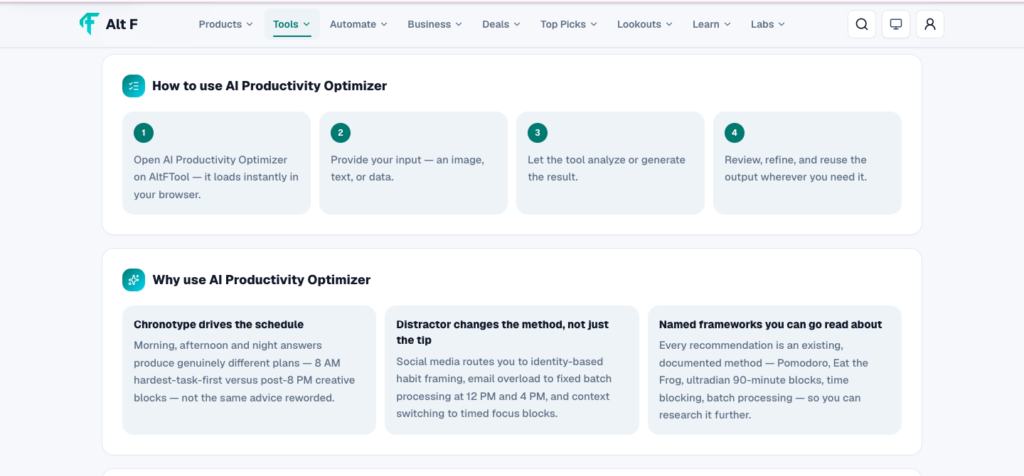
Once you’ve provided the four answers, AI Productivity Optimizer creates a named focus method specifically for your combination of preferences.
It also provides a practical daily schedule and a short tool list.

The interesting part is that the schedule can change significantly depending on your energy pattern.
For example, selecting Morning can lead to a structure built around 90-minute ultradian focus blocks, with an Eat-the-Frog approach that puts your most important task first.
In this type of schedule, your day might begin with your highest-priority work around 8 AM, before smaller tasks and distractions have a chance to take over.
On the other hand, selecting Night changes the structure.
Administrative work can be moved toward the morning, while deeper creative work can be scheduled later in the day, potentially after 8 PM, when your energy and concentration are stronger.
That’s the key difference: the tool isn’t simply giving you a popular productivity routine. It’s adapting the routine to the information you provide.
Morning Productivity: Start With Your Hardest Task
If your energy is highest in the morning, your schedule should take advantage of it.
Instead of spending your first hour answering random emails or scrolling through notifications, the optimizer can place your most important task at the beginning of the day.
This follows the Eat-the-Frog idea: tackle the task you are most likely to avoid before smaller tasks consume your attention.
A morning-focused structure can look something like this:
8:00 AM: Start your highest-priority task
9:30 AM: Short break and reset
9:45 AM: Continue focused work
Late morning: Handle lighter tasks and communication
Afternoon: Meetings, admin, and routine work
The exact schedule can vary, but the principle remains the same: protect your best mental hours for your most valuable work.
Night Productivity: Save Deep Work for Later
Not everyone does their best work in the morning.
Some people need time to warm up, deal with routine responsibilities, and settle into their day before they reach their strongest creative state.

For these users, a night-focused schedule can make more sense.
Instead of forcing deep work into the morning, the optimizer can place administrative tasks earlier in the day and reserve the evening for creative or mentally demanding work.
For example:
Morning: Emails, planning, admin
Afternoon: Meetings and routine tasks
Evening: Deep creative work
After 8 PM: Focused project time
This doesn’t mean everyone should work late at night. It simply recognizes that productivity can look different from person to person.
Why Fixed Rules Can Be Useful
The optimizer uses a fixed rule set rather than completely generic AI advice.
That may sound less exciting than an AI that generates a brand-new productivity philosophy every time, but there is a practical advantage.
A fixed framework makes the output more predictable.
Instead of receiving vague suggestions such as:
“Take breaks, prioritize tasks, and avoid distractions,”
you get a specific structure based on your selected inputs.
That makes the result easier to actually try.
You don’t have to spend another hour researching productivity systems. You can start with the suggested framework, see how it feels, and adjust it based on your real experience.
Who Can Benefit From AI Productivity Optimizer?
The tool can be useful for almost anyone who wants a more structured workday.
Students
Students can use it to organize study sessions around their strongest concentration periods and reduce common distractions such as phones and social media.
Writers and Creators
Writers, designers, and other creative professionals can benefit from protecting longer periods for uninterrupted creative work.
Marketers
Marketers often have to balance creative tasks, analytics, meetings, emails, and campaign management. A structured focus plan can help separate deep work from administrative responsibilities.
Developers
Developers frequently need uninterrupted time for coding and problem-solving. Scheduling deep-focus periods can make it easier to avoid constant context switching.
Remote Workers
Working from home can make distractions harder to control. A personalized schedule can create clearer boundaries between focused work, communication, and breaks.
It’s Not About Being Productive Every Minute
One important thing to remember is that productivity isn’t about filling every minute of your day with work.
A good productivity system should help you use your best energy more intentionally, not turn your entire day into a checklist.
Breaks still matter. Rest still matters. Personal time matters too.
The goal of AI Productivity Optimizer is to help you decide where your attention should go, especially when your time and energy are limited.
A Starting Point, Not a Perfect Formula
The optimizer is best viewed as a starting template.

Your energy can change. Your workload can change. Your responsibilities can change.
A schedule that works perfectly on Monday might not work on Friday when you have three meetings and a deadline.
That’s completely normal.
Try the suggested method for a few days. Pay attention to when you actually feel focused, what interrupts your work, and whether you’re making progress toward your goal.
Then adjust the routine.
The best productivity system isn’t necessarily the one that looks perfect on paper. It’s the one you can realistically follow.
FAQ’S
1. What are creative productivity tools?
Creative productivity tools are apps and platforms that help writers, designers, marketers, video creators, and other professionals plan, create, organize, and manage their creative work more efficiently.
2. Which creative productivity tools are useful for creators?
Useful tools can include design platforms, writing assistants, project-management apps, note-taking tools, AI content tools, video editors, and collaboration software.
3. How can creative tools improve productivity?
They can reduce repetitive work, organize ideas, simplify collaboration, speed up content creation, and help creators manage projects and deadlines more effectively.
4. Are AI creative tools useful for productivity?
Yes. AI tools can help with brainstorming, drafting, editing, image creation, research, content planning, and other repetitive tasks, allowing creators to focus more on creative decisions.
5. How should I choose the right creative productivity tool?
Choose a tool based on your type of work, workflow, budget, team requirements, ease of use, and the specific tasks you want to make faster or easier.

