
Look, let’s be completely honest for a second. AI has officially become that one workplace topic that either saves your bacon at 4:45 PM on a Friday or just gives you yet another annoying browser tab to close in absolute Productivity frustration.
We’ve all been there. You sign up for some shiny new app promising to “revolutionize your entire life,” spend 45 grueling minutes wrestling with settings, and end up just typing the document out yourself anyway because it was faster.
Getting your time back isn’t about downloading ten different apps and hoping for a miracle. It’s about picking two or three reliable workhorses that slice through the soul-crushing busywork—the endless draft emails, messy meeting notes, and mindless copy-paste routines.
Here is a plain-English guide to the best AI tools actually worth your time, built around how real humans work.
Which AI Tool Belongs in Your Real-World Workflow?
| Tool | What It Actually Does Best | The “Save Your Sanity” Moment | Honest Pricing Take |
| ChatGPT | Un-sticking your brain & drafting fast | Turning a chaotic brain dump into a polite client update | Free tier is great; Plus is worth it if you analyze huge files |
| Google Gemini | Living inside your Google Workspace | Asking your inbox: “Find Sarah’s flight info from last week” | Free for basic use; seamless if you live in Docs & Gmail |
| Microsoft Copilot | Taming heavy Office documents | Turning a boring 5-page Word doc into a 10-slide deck | Enterprise add-on, but basic web search chat is free |
| Notion AI | Finding stuff hidden in team notes | Digging up project updates buried across 50 team pages | Add-on pricing, but worth it for messy team brains |
| Grammarly | Real-time tone and editing safety net | Stopping you from sending a passive-aggressive email | Free covers basic typos; Pro handles complete rewrites |
| Otter.ai | Capturing live audio so you can listen | Sitting in on a meeting so you can grab a coffee | Free gives 300 mins/month; Pro for meeting-heavy roles |
| Zapier AI | App-to-app grunt work elimination | Turning lead form entries into Slack alerts automatically | Free for basic steps; paid for complex workflows |
5 Practical Tools That Actually Deliver

1. ChatGPT & Google Gemini: Your Everyday Co-Pilots
Think of these as ultra-capable virtual assistants who never sleep. If you’re staring at a blank screen wondering how on earth to start a project, opening a prompt box is the fastest way to get moving.
┌─────────────────────────────────────────────────────────────────────────┐
│ HOW TO USE A CHAT ASSISTANT EFFECTIVELY │
│ │
│ BAD PROMPT: “Write an email about the project delay.” │
│ │
│ GOOD PROMPT: “I need to tell a client our website launch is delayed │
│ by two weeks due to testing bugs. Keep the tone warm, │
│ professional, and offer a status call on Thursday.” │
└─────────────────────────────────────────────────────────────────────────┘
- The Secret: Stop using bad prompts like “Write an email about the project delay.” Instead, try: “I need to tell a client our launch is delayed by two weeks due to testing bugs. Keep the tone warm, highly professional, and offer a status call on Thursday.”
- When to use Gemini: If your company runs on Google Workspace. It references your real Drive files, summarizes messy Gmail threads, and drafts Docs natively.
- When to use ChatGPT: For pure creative brainstorming, heavy data analysis, or complex writing tasks.
2. Otter.ai: Stop Taking Manual Meeting Notes
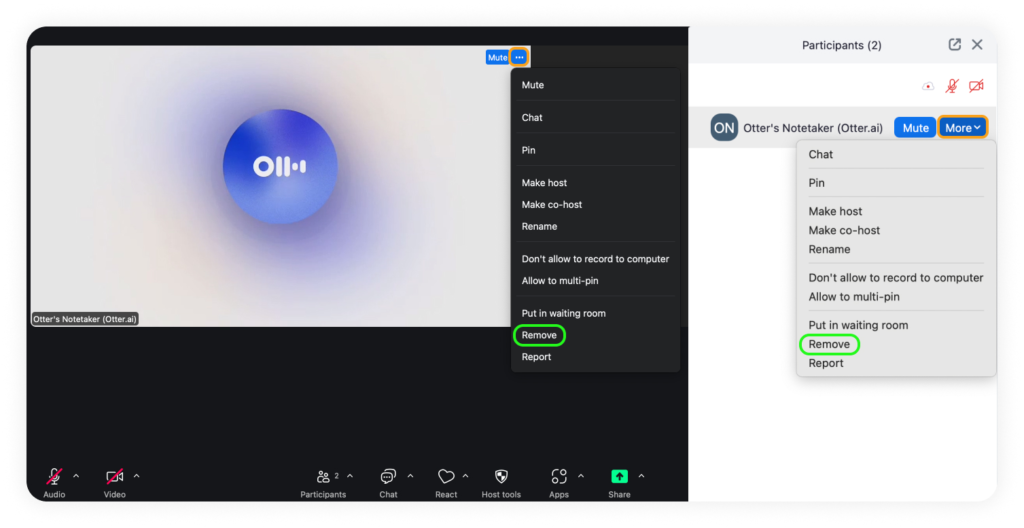
Trying to type frantic notes during a call means you’re only half-listening. Otter drops into your Zoom or Teams calls, transcribes the conversation live, and hands you a clean summary with action items right after.
- The Real Win: If you get dragged into a “this could have been an email” meeting, glance at the transcript, answer if your name gets called, and review the 30-second summary later.
3. Grammarly: Your Tone-Check Safety Net

We’ve all accidentally sent a message that sounded way harsher than intended. Grammarly acts like an editor sitting on your shoulder.
- The Real Win: It catches wordy phrasing, flags unintentional snark, and offers one-click rewrites so you sound like an approachable pro.
4. Zapier AI: Invisible Busywork Elimination
┌─────────────────────────────────────────────────────────────────────────┐ │ THE AUTOMATION PIPELINE │ │ │ │ [New Client Form Submitted] ──► [Zapier Summarizes Details via AI] │ │ │ │ │ ▼ │ │ [Creates Trello Card] ◄──────► [Drafts Intro Email in Gmail] │ └─────────────────────────────────────────────────────────────────────────┘
If your daily routine involves copying info from a form, pasting it into a spreadsheet, and pinging your team, you are doing robot work. Zapier connects your apps behind the scenes.
- The Real Win: You don’t need code. You literally type: “When a new response hits my Google Form, summarize it and send a Slack ping,” and Zapier builds it for you.
5. Notion AI: Eliminating the Internal Search Hunt
When teams grow, knowledge gets scattered everywhere. Notion AI acts as a search engine for your company’s internal memory.
- The Real Win: Instead of digging through 20 folders, ask Notion: “What’s our remote work stipend policy?” and it pulls the answer directly from your internal docs with sources.
Golden Rules to Avoid Burnout
- Don’t automate two-minute tasks: If a chore takes two minutes a week, setting up a complex AI pipeline is a waste of energy. Automate the daily drains.
- Always review before sending: AI tools are like eager interns—fast, but occasionally wrong. Never send AI output to a boss or client without a 10-second human sanity check.
- Protect sensitive data: Never paste personal financial info or confidential secrets into public AI models without enterprise privacy protections.
Simple Rules to Avoid AI Burnout

- Stop Trying to Automate Everything: If a manual task takes you two minutes once a week, setting up a complex AI workflow for it is a waste of time. Automate the tasks that happen every single day.
- Always Check the Output: AI tools are enthusiastic interns—they work fast, but they can occasionally invent facts or sound cheesy. Never send AI text to a boss or client without a quick 10-second human review.
- Protect Confidential Data: Never paste personal financial information, passwords, or confidential company secrets into public AI tools unless your company has an enterprise agreement with strict privacy policies.