

Modern browsers are powerful because of extensions. From productivity tools to security add-ons, extensions enhance how we work online. But as the number of installed extensions grows, so does the impact on browser speed, memory usage, and overall performance. What starts as a helpful toolkit can slowly turn into a cluttered and sluggish browsing experience.
This is exactly why you need an Extension Manager.
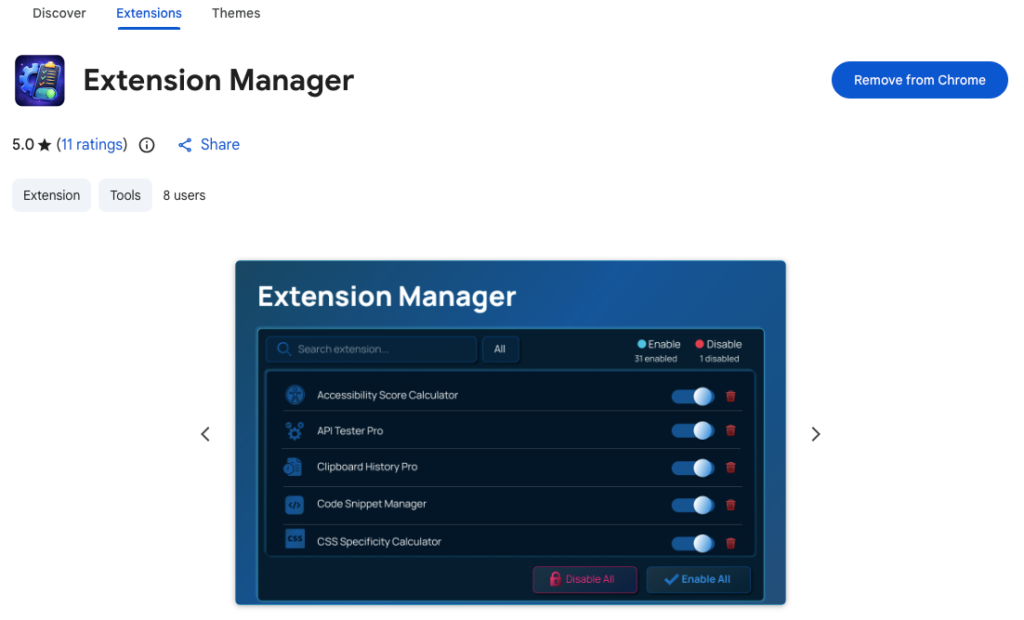
An Extension Manager provides a centralized dashboard where you can manage, enable, disable, and remove browser extensions quickly and efficiently. Instead of navigating through complex internal browser settings, you get a clean, lightweight interface built purely for control and performance.
The Hidden Cost of Too Many Extensions
Each extension consumes system resources. Even when you are not actively using them, many extensions remain enabled and can affect startup time, page loading speed, and memory usage. Over time, this leads to:
- Slower browser performance
- Increased memory consumption
- Reduced productivity
- Difficulty identifying problematic extensions
Without a proper management system, it becomes difficult to know which extensions are active and which ones you truly need.
Centralized Control in One Dashboard
An Extension Manager simplifies everything by giving you one organized space to manage all installed extensions.
Instead of digging into browser menus, you can:
- View all extensions instantly
- See which ones are enabled or disabled
- Take action without switching tabs or navigating complex settings
This centralized approach saves time and makes browser management far more efficient.
Enable and Disable with One Click
One of the most practical features is the ability to toggle any extension on or off instantly with a single click.
This is especially useful when:
- You need to temporarily disable extensions to improve speed
- You are troubleshooting a website issue
- You want to reduce background activity
Rather than uninstalling and reinstalling extensions repeatedly, you can simply enable or disable them as needed.
Bulk Actions for Instant Optimization
Managing extensions one by one can be time-consuming, especially if you have many installed. Bulk actions make it easier.
With options to enable all or disable all extensions at once, you can quickly:
- Test browser performance without extensions
- Troubleshoot conflicts
- Reset your browsing environment
This feature alone can significantly improve your workflow when diagnosing slow performance.
Real-Time Search and Smart Filtering
As your list of extensions grows, finding a specific one becomes harder. The real-time search function allows you to locate extensions by name or description instantly.
In addition, filtering options let you view extensions by status:
- All
- Enabled
- Disabled
This makes it easy to identify which extensions are currently active and which ones are not contributing to performance.
Remove Unwanted Extensions Easily
Over time, we install extensions for temporary needs and forget about them. These unused tools often remain enabled, quietly consuming resources.
An Extension Manager allows you to uninstall unwanted extensions directly from the dashboard. This encourages regular cleanup and helps maintain a lean, optimized browser environment.
System Protection for Stability
Some extensions are required by your organization or browser policies. The manager automatically identifies these protected extensions and prevents them from being disabled.
This ensures that critical tools remain active while still giving you control over the rest. It strikes a balance between flexibility and system integrity.
Keyboard Shortcuts for Faster Access
Efficiency is not only about features but also about speed of access.
The Extension Manager includes practical keyboard shortcuts:
- Open Manager: Ctrl + Shift + E (Windows/Linux) or Command + Shift + E (Mac)
- Focus Search: Press / or Ctrl + F
- Close: Press Esc
These shortcuts allow you to manage extensions without interrupting your workflow. Quick access leads to quicker decisions and smoother browsing.
Built for Performance and Privacy
Performance improvement is not just about disabling other extensions. The manager itself must be lightweight and efficient.
This Extension Manager is built using Manifest V3 and vanilla JavaScript. It has a minimal memory footprint and does not run in the background when not in use. Unlike default internal managers, it provides a faster way to handle large numbers of extensions without adding extra load.
Privacy is also a priority. The extension:
- Does not track browsing history
- Does not collect personal data
- Does not communicate with external servers
- Works entirely locally on your machine
The only permissions required are Management permission to control extensions and Storage permission to save user interface preferences. This ensures functionality without compromising privacy.
Why an Extension Manager Directly Improves Browser Performance
Better browser performance is not just about having fewer extensions. It is about having control.
When you can quickly:
- Disable unnecessary extensions
- Identify resource-heavy tools
- Remove outdated add-ons
- Troubleshoot conflicts
You actively reduce browser strain and improve efficiency. The result is faster page loads, smoother multitasking, and a more responsive browsing experience.
An Extension Manager turns extension chaos into organized control.
Final Thought
Your browser is one of your most important digital tools. When it becomes slow or cluttered, your productivity suffers. An Extension Manager gives you the power to take control of your browsing environment with simplicity and precision.
By centralizing management, enabling bulk actions, supporting real-time search, and maintaining strong privacy standards, it becomes more than just a utility. It becomes an essential performance tool.
If you value speed, organization, and privacy, managing your extensions properly is not optional. It is necessary.
This blog content is written for informational purposes based on the provided details about the Extension Manager features and functionality. Performance improvements may vary depending on the number and type of installed extensions. Users should review official extension documentation for the most accurate and updated information.
#ExtensionManager #BrowserPerformance #ManageExtensions #BrowserOptimization #ProductivityTools #TechEfficiency #DigitalProductivity #ManifestV3 #Anslation #Carrerbook

