
For web developers, designers, and digital marketers, previewing a website before it goes live is critical. Checking layouts, images, and overall design in real-time ensures that everything looks perfect for users. While opening multiple tabs is one way to do this, browser extensions now make the process faster and more efficient. One standout tool in this category is Website Preview Pro, a Chrome extension designed to streamline website previewing.
Why Use a Website Preview Extension
Website preview extensions save time and reduce workflow friction. Instead of opening a new tab for each URL or manually taking screenshots, these tools allow users to see how a website looks instantly within the browser toolbar. They are particularly useful for:
- Quickly verifying client websites before deliver
- Testing design responsiveness
- Comparing multiple URLs without cluttering your browser
- Keeping a history of recent previews for fast reference
Introducing Website Preview Pro
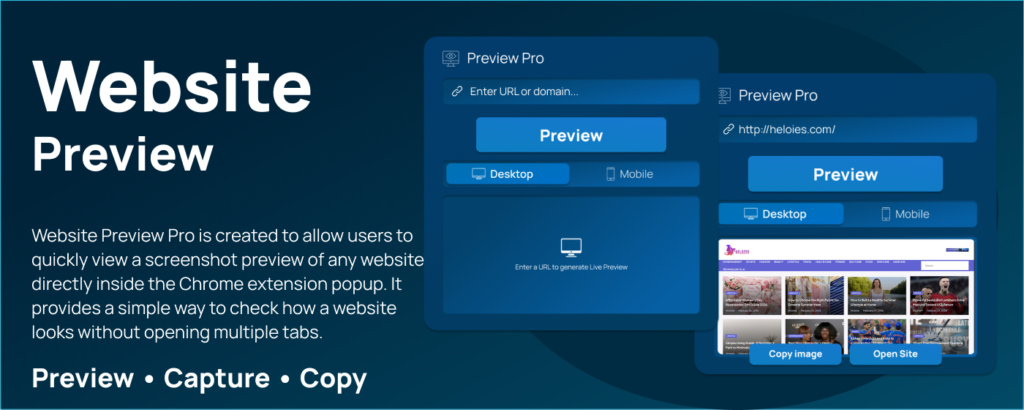
Website Preview Pro is created to make website previewing simple, quick, and efficient. Its main motive is to provide users with a screenshot preview of any website directly inside the Chrome extension popup. This means you can check a site’s appearance without navigating through multiple tabs.
Key Features:
- Generate Website Previews: Enter a URL and instantly see a screenshot preview.
- Extension Popup Display: The preview appears directly in the popup window for easy access.
- Recent History Management: Maintain a list of recently previewed URLs for quick reload.
- One-Click Reload: Reopen a website preview instantly from recent history.
- Open in New Tab: Option to open the full website in a separate tab if needed.
- Local Settings: All preferences are saved locally for convenience.
How to Use Website Preview Pro
The user flow is intuitive and beginner-friendly:
- Open the Extension Popup: Click the Website Preview Pro icon on your Chrome toolbar.
- Enter Website URL: Paste or type the URL in the input field.
- Generate Preview: Click the “Generate Preview” button.
- View Screenshot: The website screenshot appears instantly inside the popup.
- Access Recent History: The URL is saved for future quick access.
With this simple workflow, Website Preview Pro allows you to preview websites efficiently, save time, and ensure quality before any website goes live.
Why Website Preview Pro Stands Out
Many website preview tools require separate windows, tabs, or additional software. Website Preview Pro combines speed, simplicity, and practicality:
- Speed: Immediate previews without loading the full website in a new tab.
- Simplicity: Minimalist design makes it easy for anyone to use.
- Efficiency: Recent history allows fast access to previously checked URLs.
- Flexibility: Open the site fully in a new tab when needed for deeper testing.
For developers, designers, or marketers who constantly need to verify site appearances, Website Preview Pro reduces repetitive steps and keeps workflow organized.
The Ultimate Gmail Performance Dashboard by AltF
The Gmail Analytics Extension by AltF Tool is a productivity-focused browser extension designed to provide users with…
Final Thought
Previewing websites before launch has never been easier. Tools like Website Preview Pro empower users to work smarter, not harder, by combining speed, convenience, and usability in one extension. Whether you are managing client websites, testing your own projects, or handling multiple URLs, having a reliable preview tool in your browser can save time and prevent errors before going live.
This article is for informational purposes only. Features, functionality, and user experience of Website Preview Pro may change over time. Users should always verify the latest version of the extension from official sources before installation or use.
#WebsitePreviewPro #WebDevelopmentTools #ChromeExtensions #WebsiteTesting #ProductivityTools #Anslation #Carrerbook #WebDesignTips #DigitalMarketingTools #AltfTool

