
If you are someone who regularly works with dozens of open tabs, you already know how quickly your browser can become overwhelming. Important pages get buried, duplicate tabs pile up, and your system starts slowing down. Managing tabs manually becomes frustrating and time-consuming.
Tab Manager Pro for Chrome is built to solve exactly this problem. It is designed to help users efficiently manage multiple open tabs with powerful tools that allow you to search, filter, group, sort, suspend, and close tabs in seconds. Before installing it, here is everything you should know about how it works and why it might be the productivity upgrade your browser needs.
The Motive Behind Tab Manager Pro
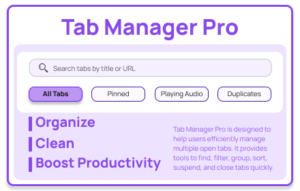
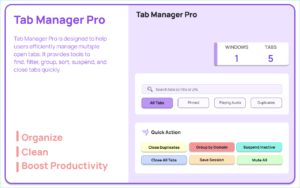
The main purpose of Tab Manager Pro is simple: reduce clutter and make tab navigation faster and more organized.
Instead of manually scanning through dozens of tabs, the extension gives you structured control over everything that is open in your browser. It also detects duplicate tabs, saves browsing sessions, and displays helpful statistics so you can better understand and manage your browsing habits.
For students, researchers, developers, marketers, and heavy multitaskers, this can dramatically improve workflow efficiency.
Auto Suspend Inactive Tabs
One of the most practical features is automatic tab suspension. Tabs that remain inactive for 30 minutes are automatically discarded using Chrome’s tab discard functionality.
This helps free up memory without permanently closing your tabs. The page remains in your tab bar, but it no longer consumes unnecessary system resources. When you return to it, the tab reloads automatically.
If your browser often slows down due to heavy tab usage, this feature alone can make a noticeable difference.
Full Tab Management Interface
The extension provides a complete tab management interface inside a clean popup window.
When you open it, all your current tabs are displayed in an organized list. From there, you can:
- Search specific tabs instantly
- Filter tabs based on different categories
- Sort them according to your preference
- Perform actions without switching between windows
This centralized control panel eliminates the chaos of scrolling through endless tabs.
Smart Tab Filters
Tab Manager Pro allows you to filter your tabs into specific categories:
- All Tabs
- Pinned Tabs
- Audio Playing Tabs
- Duplicate Tabs
This makes it much easier to locate what you need. For example, if a video is playing in the background and you cannot find the source, filtering by audio-playing tabs solves the problem immediately.
Duplicate detection is especially useful for people who frequently open the same links multiple times.
Flexible Sorting Options
Sorting tabs improves visibility and organization. You can arrange your open tabs by:
- Title
- Domain
- Newest
- Oldest
Sorting by domain is particularly useful for grouping research materials or work-related websites together. Sorting by newest or oldest helps track your browsing timeline more efficiently.
Multi-Select Actions for Better Control
Instead of closing tabs one by one, you can select multiple tabs and perform bulk actions.
You can:
- Close selected tabs
- Pin or unpin them
- Group them together
This feature is ideal when cleaning up after a long browsing session or organizing tabs for a specific task.
Powerful Quick Actions
The extension includes one-click quick actions that save significant time:
- Close duplicate tabs instantly
- Group tabs by domain
- Suspend inactive tabs
- Mute all tabs
- Close all tabs
These actions eliminate repetitive manual work and make large-scale tab management effortless.
Save and Restore Sessions
One of the most valuable features is session saving. You can save your current tab session to local storage and restore it later.
This is especially helpful when:
- You are switching between projects
- You need to shut down your browser but continue later
- You want to archive research sessions
The saved sessions can be restored at any time, giving you flexibility and peace of mind.
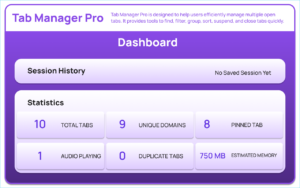
Dashboard View with Insights
The Dashboard provides more than just session storage. It shows:
- Session history
- Tab statistics
- Memory usage estimates
- Restore and delete options
This overview helps you understand how many tabs you typically keep open and how they impact your system performance.
Having access to statistics allows for smarter browsing habits over time.
Clean and Modern User Interface
A tool should not only be functional but also easy to use. Tab Manager Pro features a modern interface with:
- Gradient background design
- Tab list with favicons for quick recognition
- Loading overlays
- Notifications for actions performed
The interface is intuitive and responsive, making navigation smooth even when managing a large number of tabs.
How It Works: User Flow
Using Tab Manager Pro is straightforward.
First, open the extension popup. It automatically loads all open tabs.
Next, you can search, filter, or sort your tabs based on your needs.
You can then select one or multiple tabs to group, pin, close, or mute.
If you want to perform broader actions, use quick actions such as Close Duplicates or Save Session.
Finally, open the Dashboard to view saved sessions and statistics. From there, you can restore a saved session or delete it permanently.
The entire workflow is designed to be fast and efficient.
Who Should Install Tab Manager Pro?
This extension is ideal for:
- Students handling research across multiple sources
- Developers working with documentation and testing tabs
- Content creators managing references
- Remote workers juggling multiple tools
- Anyone who regularly keeps more than 10 tabs open
If your browser often feels cluttered or slow, this extension offers a structured solution.
Final Thoughts
Tab Manager Pro for Chrome is more than just a tab organizer. It is a productivity tool designed to bring order to digital chaos. By combining automatic tab suspension, powerful filtering and sorting, bulk actions, session saving, and insightful dashboard statistics, it transforms the way you interact with your browser.
If you often feel overwhelmed by too many open tabs, installing Tab Manager Pro could significantly improve your workflow, reduce distractions, and optimize system performance.
Tab Manager Pro uses Chrome’s built-in tab management and storage APIs to perform its functions. Memory estimates are approximate and may vary depending on system configuration and browser behavior. Users are responsible for reviewing permissions before installation and ensuring compatibility with their Chrome version.
#TabManagerPro #ChromeExtension #ProductivityTools #BrowserManagement #TabOrganizer #WorkSmart #DigitalProductivity #Anslation #Carrerbok

