

In a digital world driven by data, the ability to collect structured information quickly and efficiently has become essential. Whether you are a marketer analyzing competitors, a researcher gathering references, or a business owner tracking product details, manual copy-pasting is time-consuming and inefficient.
This is where Quick Web Scraper – U-Scrap steps in. Designed as a browser-based scraping tool, U-Scrap allows users to extract structured data from any website without writing a single line of code. But the real question is: Is U-Scrap Extension worth it?
Let’s take a closer look at its features, strengths, limitations, and expert insights.
What Is U-Scrap Extension?
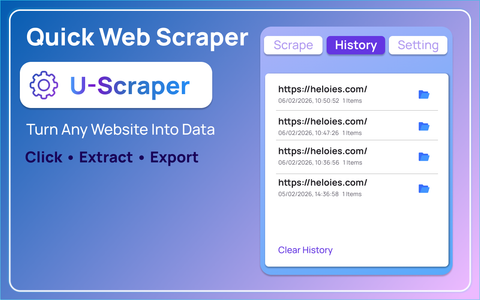
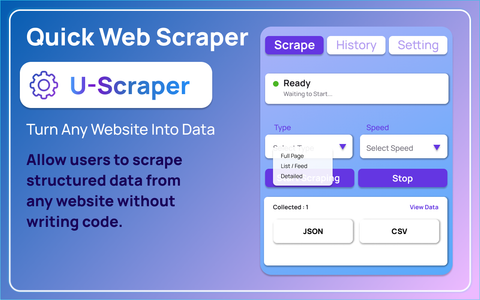
Quick Web Scraper – U-Scrap is a browser extension built to simplify web data extraction. Its main objective is straightforward: allow users to scrape structured data from websites directly inside their browser.
Instead of relying on scripts or technical setups, users can extract headings, paragraphs, images, links, tables, forms, videos, metadata, and overall page structure with just a click. Everything happens locally in the browser, and the extracted data can be previewed and exported instantly.
This makes it especially useful for non-technical users who need organized data without learning programming.
Key Features of U-Scrap Extension
1. One-Click Scraping
The core strength of U-Scrap lies in its simplicity. After opening the extension popup, users only need to press the scrape button to extract data from the active webpage.
There is no coding, no complex setup, and no technical configuration required to get started.
2. Full Page Data Extraction
Unlike basic scrapers that only collect visible text, U-Scrap captures:
- Headings
- Paragraphs
- Lists
- Tables
- Links
- Forms
- Images and videos
- Metadata
- Overall page structure
This comprehensive capture ensures users get both content and structural insights from a page.
3. Data Preview Dashboard
After scraping, the extension opens a preview dashboard divided into organized sections:
- Overview
- Content
- Media
- Structure
- Raw Data
This separation makes it easier to analyze specific elements without being overwhelmed by unstructured information.
4. Multiple Export Options
Users can export the scraped data in JSON or CSV formats. This flexibility supports different workflows, from spreadsheet analysis to developer integrations.
5. Refresh and Close Controls
The extension allows users to refresh the scraped content if the webpage changes or close the preview screen at any time. This adds a level of control that many simple scraping tools lack.
6. Customizable Options Page
The extension includes settings such as:
- Auto-scroll
- SPA (Single Page Application) wait time
- Scraping behavior preferences
These options help improve accuracy, especially for dynamic websites that load content asynchronously.
7. Local Processing
All scraping and data handling happen locally in the browser. This means:
- No external servers process your data
- Faster response times
- Reduced privacy concerns
For users who prioritize data security, this is a significant advantage.
Pros of U-Scrap Extension
1. Beginner-Friendly
One of the strongest advantages of U-Scrap is accessibility. Anyone can use it without technical knowledge. This lowers the barrier for researchers, students, marketers, and business owners.
2. Time-Saving
The one-click approach significantly reduces manual effort. Tasks that would normally take hours of copying and formatting can be completed in minutes.
3. Organized Output
The preview dashboard separates content into meaningful sections, making data review structured and manageable.
4. Export Flexibility
JSON and CSV exports make it practical for both technical and non-technical workflows.
5. Privacy-Focused
Since all processing happens locally in the browser, users maintain better control over their data.
Cons of U-Scrap Extension
1. Browser-Based Limitations
Because it operates entirely within the browser, performance may depend on the complexity of the webpage and system resources.
2. Not a Full Automation Tool
U-Scrap focuses on manual one-click scraping. It is not built as a large-scale automated crawler for scraping thousands of pages continuously.
3. Dynamic Website Challenges
Although it includes SPA wait time and auto-scroll settings, some highly dynamic websites may still require fine-tuning for optimal results.
Expert Insights: Who Should Use U-Scrap?
After reviewing its features and workflow, U-Scrap appears best suited for:
- Content researchers
- SEO professionals
- Competitive analysts
- Academic researchers
- E-commerce product reviewers
- Bloggers collecting structured references
Experts would likely describe U-Scrap as a productivity tool rather than a large-scale data mining system. It fills the gap between manual scraping and complex programming-based solutions.
Its local processing approach is particularly appealing in environments where data privacy and speed are important.
Is U-Scrap Extension Worth It?
If your goal is to extract structured data quickly, review it immediately, and export it in a usable format without coding, then yes, U-Scrap is worth it.
It delivers on its core promise: simple, organized, and local web scraping. However, if you are looking for enterprise-level automation or large-scale crawling, you may need a more advanced solution.
For everyday data collection tasks, research, and analysis, U-Scrap offers strong value with minimal complexity.
Final Thoughts
U-Scrap Extension stands out for its simplicity, clarity, and privacy-first approach. It does not attempt to be overly complicated or technical. Instead, it focuses on making web data extraction accessible to everyone.
The one-click scraping, structured dashboard, and export flexibility make it a practical solution for users who need results quickly. While it may not replace high-end scraping systems for enterprise operations, it successfully serves its intended audience.
In short, U-Scrap is a smart tool for structured web data extraction without the technical burden.
This article is based solely on the provided information about Quick Web Scraper – U-Scrap. Performance may vary depending on browser compatibility, website structure, and user configuration. Users should always ensure that their web scraping activities comply with website terms of service and applicable laws in their region.
#UScrapExtension #WebScrapingTool #DataExtraction #BrowserExtension #DigitalResearch #SEOResearch #StructuredData #ProductivityTools #Anslation #Carrerbook

