
Introduction
If you work with APIs, backend responses, or raw data files regularly, you already know how messy JSON can look at first glance. I’ve personally dealt with API responses that looked like a wall of unstructured text — nested objects inside arrays inside more objects. It’s overwhelming, especially when you’re debugging something under a deadline.
That’s where DataFormat Pro genuinely changed my workflow.
DataFormat Pro is built to help users format, validate, convert, and analyze JSON and XML data directly inside the browser. What I appreciate most is that everything runs locally. No uploads. No third-party servers. No risk of exposing sensitive API data. It feels safe, fast, and practical.
Let me walk you through how I use it to decode complex JSON structures and why it has become part of my everyday toolkit.
My First Experience Formatting Complex JSON

The first time I opened DataFormat Pro, I had a raw API response copied from a testing environment. It was a single-line JSON string with deeply nested keys. Normally, I would paste it into an online formatter, wait for it to process, and hope nothing sensitive was exposed.
Instead, I opened the extension popup directly in my browser.
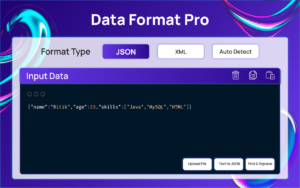
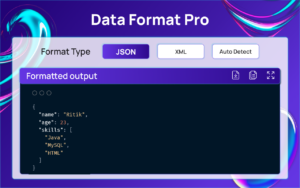
I pasted the raw JSON into the input area. Within seconds, the extension auto-detected that it was JSON. I clicked the Format option, and instantly the entire structure was transformed into a clean, indented, readable layout. Nested objects were clearly separated. Arrays were aligned properly. It felt like turning chaos into clarity.
That immediate readability is what makes decoding complex structures manageable.
Decoding Deeply Nested Structures
When working with large API responses, the challenge isn’t just formatting — it’s understanding relationships between keys and values.
With DataFormat Pro, once the JSON is formatted, syntax highlighting makes it much easier to differentiate between strings, numbers, booleans, and keys. I personally use the indentation control settings to adjust spacing based on the depth of nesting. Sometimes increasing indentation makes deep structures visually clearer.
Another feature I rely on heavily is validation. If there’s a missing bracket or comma somewhere inside a huge file, manually finding it can waste hours. With a single click, the validation tool immediately highlights whether the structure is valid or broken. That alone has saved me countless debugging sessions.
Converting and Cleaning Data
One feature that surprised me was converting plain text into structured JSON. There have been times when I received raw text logs or semi-structured data from a teammate. Instead of manually restructuring it, I used the Text → JSON option to organize it into a cleaner format.
The conversion between JSON and XML is also seamless. I tested it while comparing API responses between two systems — one returning XML and the other JSON. Switching formats inside the same extension made cross-verification much easier.
The built-in find and replace panel is another underrated tool. When you’re working with repetitive keys or need to rename something across a large dataset, it simplifies the process without exporting the file elsewhere.
Working Directly on Webpages
One of my favorite moments using DataFormat Pro was when I opened an API endpoint in the browser, and the raw JSON automatically appeared formatted and highlighted. No copying. No pasting. It detected the structure instantly.
The one-click popup format button makes it even faster when inspecting API responses during development. It feels like having a debugging assistant built directly into the browser.
Customization That Actually Matters
Not all formatting tools consider usability, but this one does.
The theme options may sound minor, but when you work long hours with data, choosing between Light, Indigo Night, Mint Teal, Violet Glow, Sky Gradient, or Ocean Blue actually reduces visual strain. I personally prefer darker themes for late-night debugging sessions.
Indentation control, key sorting, auto-format settings, and line number toggles give you flexibility depending on how you prefer to analyze data.
The background system that stores recent formatting logs is also helpful. If I accidentally close the popup, I can quickly access recent entries without starting over.
The Overall Workflow
The workflow feels natural. I open the extension, paste or upload my JSON or XML file, let it auto-detect the format, and then choose whether I want to format, validate, minify, convert, or restructure text into JSON. The output appears clean and highlighted, and from there I can copy or download it.
Everything happens in the browser. Everything is local. And everything is fast.
Final Thoughts
From personal experience, DataFormat Pro has made handling complex JSON structures less stressful and far more efficient. It eliminates the need for switching between multiple websites or tools. Whether I’m debugging APIs, cleaning raw text, validating data structures, or converting between JSON and XML, it handles everything in one place.
If you regularly deal with structured data, especially large or deeply nested JSON files, this extension can significantly simplify your workflow. It’s practical, secure, and genuinely useful in real development scenarios.
The Ultimate Gmail Performance Dashboard by AltF
The Gmail Analytics Extension by AltF Tool is a productivity-focused browser extension designed to provide users with…
How to Organize Your Favorite Websites with Altftool Bookmark Manager
In today’s digital world, we visit dozens of websites every day for work, learning, shopping,…

How to Shorten Long URLs Easily Using Altftool URL Shortener
In today’s digital world, sharing links has become a daily activity. Whether you are sharing…

Master Your Precision: Play Aim Trainer Pro Now
Aim Trainer Pro is a web-based utility hosted on AltFTool designed to help users test and…

Top Email Extractor Extensions for Fast and Easy Email Collection
In today’s digital world, collecting contact information efficiently is essential for marketers, researchers, business owners,…

How to Record Your Screen in One Click Using a Lightweight Chrome Extension
Screen recording has become an essential tool for professionals, educators, developers, and content creators. Whether…

Disclaimer : This extension is provided “as is” for general use and informational purposes. The author and publisher are not responsible for any data loss, errors, or issues arising from its use. Features, performance, and availability may change over time without notice. Always back up your data before use.
#DataFormatPro #JSONFormatter #DeveloperTools #WebDevelopment #APITesting #JSONValidation #Carrerbook #Anslation

