

Building new product features always sounds exciting. But behind every feature idea lies a serious question: Is it worth the investment? Time, development cost, and expected returns all play a role in determining whether a feature should move forward.
Feature ROI Pro is designed to remove guesswork from this decision-making process. Instead of relying on assumptions, this lightweight browser extension converts feature development data into a clear, measurable ROI score. It helps product managers, founders, developers, and decision-makers evaluate whether a feature will truly generate value.
Let’s explore how it works and why it can transform your product planning process.
Motive Behind Feature ROI Pro
Every product team faces limited resources. Budgets are finite. Development hours are limited. Prioritization becomes critical.
Feature ROI Pro was created to simplify this prioritization process. By calculating development cost, projected gain, net profit, and ROI percentage, the extension provides a clear financial perspective on feature planning.
Rather than debating opinions, teams can rely on numbers. And since all calculations happen locally within the browser, the tool remains fast, private, and secure.
Core Features Explained

1. ROI Calculation Engine
At its core, Feature ROI Pro performs three essential calculations:
- Feature Cost = Development Hours × Hourly Rate
- Net Profit = Expected Annual Gain – Feature Cost
- ROI Percentage = (Net Profit ÷ Feature Cost) × 100
These calculations give you a direct understanding of whether a feature will generate positive or negative returns.
2. Simple and Structured Input Support
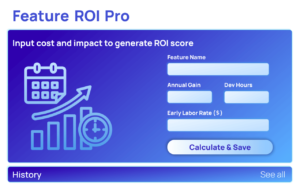
The extension accepts four main inputs:
- Feature Name
- Expected Annual Gain
- Development Hours
- Hourly Labor Rate
This keeps the process focused and efficient. No unnecessary complexity, just the numbers that matter.
3. Clear Result Summary
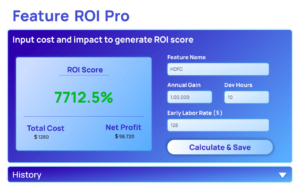
Once calculated, Feature ROI Pro displays:
- Total Development Cost
- Net Profit
- ROI Score Percentage
To make interpretation easier, the ROI result uses positive and negative color indicators. This visual cue allows you to instantly identify high-performing features versus risky investments.
4. Local History Tracking
Decision-making rarely happens in isolation. Teams often compare multiple feature ideas.
Feature ROI Pro stores up to the last five ROI calculations locally using browser storage. This makes it easy to:
- Compare multiple features
- Review past estimates
- Track decision logic
If needed, the history can be cleared anytime.
5. Clean and Lightweight Interface
The extension is intentionally designed with simplicity in mind. The interface includes:
- Clear input fields
- A results display box
- A small history section
There are no distractions, no unnecessary dashboards, and no learning curve. It works instantly.
6. Fully Offline and Private
All calculations run entirely within the browser. There are:
- No external API calls
- No cloud storage
- No data sharing
Your feature data stays on your device, ensuring privacy and security.
How Feature ROI Pro Improves Product Strategy
Feature prioritization often becomes emotional. Teams may push features based on trends, competitor moves, or personal preferences. While creativity matters, financial clarity is essential.
With Feature ROI Pro, decisions become data-driven. You can:
- Identify high-impact features quickly
- Avoid investing in low-return ideas
- Compare opportunities objectively
- Support roadmap discussions with real numbers
This approach helps balance innovation with financial responsibility.
User Flow
Using Feature ROI Pro is straightforward:
- Open the extension popup.
- Enter the feature name, expected annual gain, development hours, and hourly rate.
- Click the Calculate & Save button.
- The extension instantly calculates development cost, net profit, and ROI percentage.
- Results appear in a structured summary box.
- The feature is automatically saved in local history (up to five entries).
- Review or clear history whenever needed.
The entire process takes less than a minute.
Who Should Use Feature ROI Pro?
Feature ROI Pro is ideal for:
- Product managers
- Startup founders
- SaaS teams
- Developers evaluating feature requests
- Business analysts
- Students learning product strategy
Anyone responsible for deciding what to build next can benefit from clear ROI visibility.
Final Thought
Building features without evaluating ROI is like investing without checking potential returns. Feature ROI Pro helps you move from assumptions to informed decisions.
It doesn’t replace creativity or vision — it strengthens them. By grounding feature ideas in financial clarity, you ensure that your product grows not only in functionality but also in sustainable value.
Smarter features lead to smarter products, and smarter products lead to stronger businesses.
Disclaimer
Feature ROI Pro provides estimated ROI calculations based on user-provided inputs. Actual business results may vary depending on market conditions, user adoption, operational costs, and other external factors. Always combine financial projections with strategic and market analysis before making final development decisions.
#ProductManagement #ROI #StartupTools #FeaturePlanning #SaaSTools #BusinessStrategy #Anslation #Carrerbook #ALTFTOOL #Extension

