

If you’re like most people, your browser probably has more extensions installed than you realize. Some were added to solve a quick problem. Others were recommended by a friend. A few may have been installed months ago and forgotten entirely.
While extensions can make browsing more productive, too many active add-ons can quietly slow down your browser and even create security risks. That’s where an Extension Manager becomes essential.
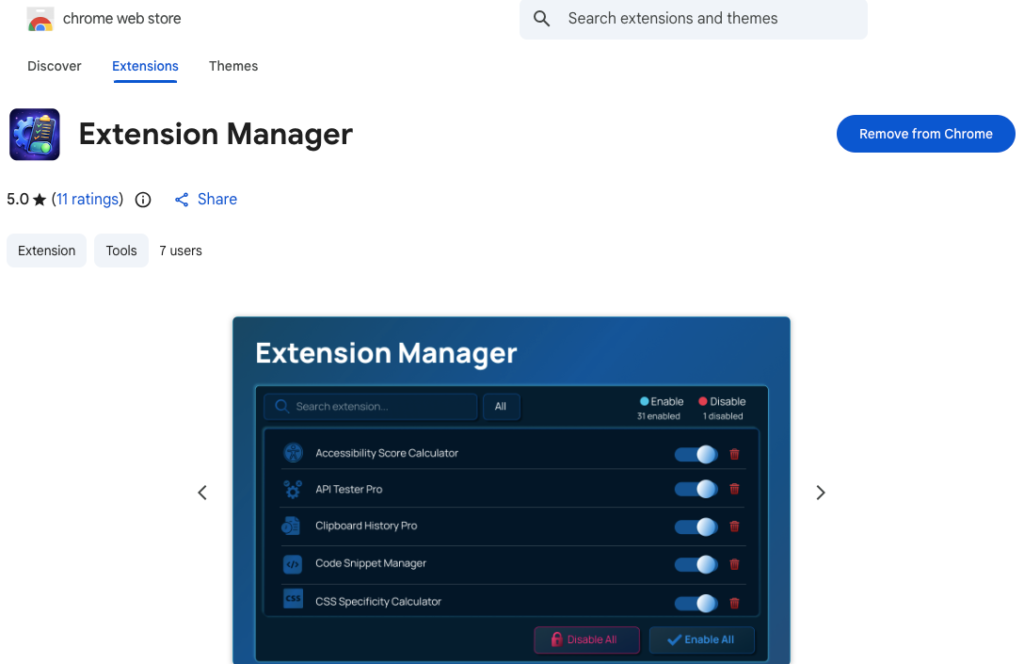
Built to provide a simple, fast way to manage all installed browser extensions from a single popup, Extension Manager eliminates the need to dig through the Chrome extensions page. With one click, you can enable, disable, search, remove, or refresh extensions instantly. The result is a faster, cleaner, and more secure browsing experience.
Let’s break down how it works and why it matters.
The Hidden Impact of Too Many Extensions
Browser extensions run in the background. Even when you’re not actively using them, many continue consuming memory and processing power. Over time, this can lead to:
- Slower page loading
- Increased RAM usage
- Browser crashes
- Reduced overall performance
Beyond speed, there’s another concern: security. Every installed extension has permissions. Some can read and change data on websites you visit. If you’re not actively managing them, you may be giving unnecessary access without realizing it.
This is exactly the problem Extension Manager is designed to solve.
One-Click Control Saves Time and System Resources
The core motive behind Extension Manager is simplicity. Instead of opening Chrome’s extensions page and scrolling through a long list, everything is accessible from a single popup.
When you open the Extension Manager:
- All installed extensions load instantly using the Chrome Management API.
- Each extension displays its status and available controls.
- You can manage everything in seconds.
This immediate access encourages users to actively manage their extensions instead of ignoring them. And that habit alone can dramatically improve browser performance.
Enable or Disable Extensions Instantly
One of the biggest contributors to browser slowdowns is leaving unnecessary extensions enabled.
With Extension Manager, you can toggle any allowed extension on or off instantly. This gives you complete control over what runs in your browser at any given time.
For example:
- Disable work-related extensions when browsing casually.
- Turn off shopping add-ons when not needed.
- Temporarily disable heavy extensions while working on performance-sensitive tasks.
Reducing the number of active extensions means fewer background scripts running, which directly improves browser speed.
Bulk Enable and Disable for Maximum Efficiency
Sometimes you don’t want to toggle extensions one by one. Extension Manager solves this with bulk enable and bulk disable buttons.
This feature is especially useful if:
- You want to quickly disable everything for troubleshooting.
- You need a “clean browser mode” for sensitive work.
- You want to temporarily improve speed with a single action.
Instead of spending several minutes manually switching each extension, you can reset your environment in seconds. Fewer active extensions equal faster load times and smoother browsing.
Remove Extensions You No Longer Use
Unused extensions are more than clutter. They are potential security risks.
Extension Manager allows you to uninstall extensions directly from the popup, using a confirmation dialog to prevent accidental removal. This makes it easy to clean up outdated or unnecessary add-ons.
Removing unused extensions:
- Reduces security exposure
- Decreases memory usage
- Improves browser stability
- Simplifies your digital environment
Regular cleanup is one of the simplest ways to improve both speed and safety.
Search and Filter for Better Control
As your extension list grows, finding a specific add-on can become frustrating. Extension Manager includes live search that filters extensions by name or description.
It also offers filtering options:
- View All extensions
- View Enabled extensions
- View Disabled extensions
These filters help you quickly identify what’s currently active. If your browser feels slow, switching to the “Enabled” filter instantly shows what might be causing the issue.
Clarity leads to smarter decisions, and smarter decisions lead to better performance.
Refresh for Real-Time Updates
Extension Manager includes a refresh option that updates the extension list instantly. Any changes made are applied in real time through Chrome APIs.
This ensures:
- Immediate feedback
- Accurate status tracking
- Smooth troubleshooting
No need to reload pages or navigate through multiple tabs. Everything updates instantly within the popup.
Keyboard Shortcuts and Clean Interface
Speed isn’t just about system performance. It’s also about user efficiency.
Extension Manager includes keyboard shortcuts for quick search focus and closing the window. Small features like this reduce friction and save time during daily use.
The clean, modern dark interface with smooth toggles, animations, and clear stats makes management intuitive. When a tool feels easy to use, you’re more likely to use it regularly. And regular management is the key to maintaining browser speed and security.
How Extension Manager Improves Security
Security improvements happen in three major ways:
- Reduced active permissions
Disabling extensions removes their active access to websites. - Easy removal of risky extensions
Suspicious or outdated add-ons can be uninstalled immediately. - Better visibility and awareness
Seeing all installed extensions in one place helps users stay informed.
The more aware you are of what’s installed and running, the lower your risk of malicious activity.
Real-World User Flow
The experience is straightforward:
- Open the Extension Manager popup.
- Instantly view all installed extensions with status indicators.
- Search or filter to find specific extensions.
- Enable, disable, or remove as needed.
- Use bulk actions or refresh when necessary.
- Changes apply immediately.
No complicated steps. No unnecessary pages. Just fast, focused control.
Final Thoughts
A cluttered browser is a slow and potentially unsafe browser. Extensions are powerful tools, but without proper management, they can quietly reduce performance and increase security risks.
Extension Manager simplifies everything. With one-click toggles, bulk controls, live search, filtering, removal options, and real-time updates, it transforms how users interact with their browser extensions.
By making extension management fast and accessible, it encourages regular cleanup and smarter usage. The result is a browser that runs faster, feels lighter, and stays more secure.
If you value performance and digital safety, managing your extensions should not be optional. It should be part of your routine.
This article is based on the documented features and functionality of Extension Manager. Actual performance improvements may vary depending on the number and type of extensions installed, system specifications, and browser usage patterns. Users should always review extension permissions and install add-ons from trusted sources only.
#ExtensionManager #BrowserSpeed #CyberSecurity #ChromeExtensions #DigitalProductivity #SafeBrowsing #TechTools #Anslation #Carrerbook #ALTFTOOL #Extansion

