
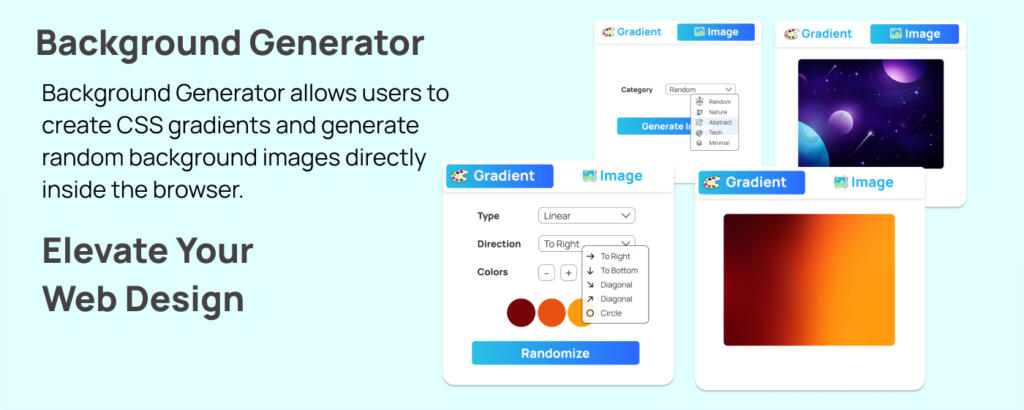
In modern web design, backgrounds are no longer just a simple color fill. They define mood, improve branding, and instantly elevate user experience. As someone who constantly experiments with UI designs and landing pages, I’ve realized how time-consuming it can be to manually write gradient code or search for the perfect background image. That’s where a CSS Background Generator becomes a real game-changer.
This tool is designed to help users create CSS gradients and generate random background images directly inside the browser. The best part? Everything runs locally within the popup, meaning it’s fast, secure, and doesn’t rely on external processing.
The Motive Behind the Tool
The main purpose of this Background Generator is to simplify the design workflow. Instead of switching between multiple websites or manually editing CSS, users can instantly generate, preview, and copy ready-to-use background styles. Whether you’re a beginner learning CSS or a professional designer working on tight deadlines, this tool saves time and boosts creativity.
Gradient Mode: Creative Control at Your Fingertips
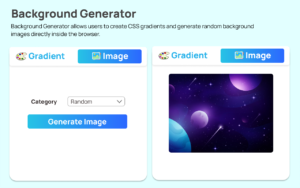
One of the most powerful features of this tool is Gradient Mode. It supports three popular gradient types:
- Linear Gradients
- Radial Gradients
- Conic Gradients
Users can control direction (where applicable) and adjust dynamic color stops. You can add or remove color stops — with a minimum of two and a maximum of four — giving you flexibility without overwhelming complexity.
I personally love the Randomize Colors option. With just one click, the generator creates fresh, unique color combinations. It’s perfect when you’re feeling stuck or looking for inspiration.
Live Preview for Instant Feedback
One of the most satisfying parts of using this generator is the live preview feature. As soon as you change the gradient type, direction, or color stops, the preview updates automatically. There’s no need to refresh or reapply settings. This real-time feedback helps you experiment freely and see exactly how your design will look before copying the code.
Ready-to-Copy CSS Output
Once you’re happy with the design, the generated CSS gradient code is displayed instantly. It’s clean, formatted, and ready to copy. Using the Clipboard API, you can copy the CSS with a single click and paste it directly into your project. No manual typing. No formatting errors. Just smooth workflow.
Image Mode: Random Backgrounds Made Easy
Beyond gradients, the tool also includes an Image Mode. This feature generates random background images by category using LoremFlickr as the source.
The process is simple:
- Select an image category
- Click “Generate Image”
- A loader appears while the image loads
- The preview updates automatically
You can then copy the image URL or open it in a new tab. This is incredibly helpful when creating mockups, prototypes, or placeholder designs.
Smooth User Experience & Modern UI
The interface follows a modern glass-style design with subtle animations and a responsive popup layout. It feels lightweight, intuitive, and visually pleasing. Switching between Gradient Mode and Image Mode is seamless, and the entire experience feels optimized for speed.
The clean structure ensures that even first-time users can understand the workflow instantly:
- Open the extension popup
- Choose Gradient or Image Mode
- Customize settings
- Preview instantly
- Copy and use
Why This Tool Stands Out
What truly makes this CSS Background Generator impressive is its simplicity combined with powerful functionality. It eliminates repetitive coding tasks, encourages creativity with randomization features, and provides instant results without leaving the browser.
For designers, developers, students, and content creators, this tool makes background design faster, smarter, and more enjoyable.
Final Thought
In today’s fast-paced digital world, efficiency matters. A tool like this CSS Background Generator doesn’t just save time — it inspires creativity. Whether you’re designing a portfolio, landing page, or experimental UI concept, creating beautiful gradients and background images in seconds feels incredibly satisfying. Once you start using it, going back to manual background coding feels unnecessary.
FAQ – CSS Background Generator
Disclaimer : This blog is written for informational purposes based on the provided feature details. Background images are generated using LoremFlickr, and usage should comply with their respective content policies. Always test generated CSS in your project environment before deploying to production.
#CSS #WebDesign #AltFTool #FrontendDevelopment #UIDesign #CSSGradients #WebDeveloperTools #DesignTools #BackgroundGenerator #Carrerbook #Anslation

