
In 2026, online privacy is not optional — it’s essential. Whether you are sharing confidential work details, private conversations, or sensitive notes, you need a secure way to protect your text. That’s where the Message Encryptor & Decryption extension by Altftool.com becomes extremely useful.
This lightweight Chrome extension allows you to encrypt and decrypt messages securely using modern encryption standards — directly inside your browser. No external servers. No data tracking. No complicated setup.
What Makes This Extension Special?
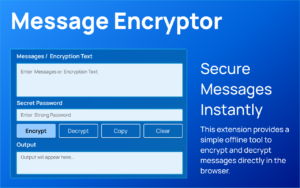
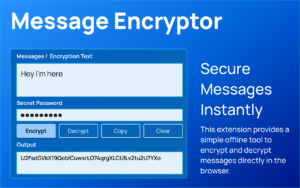
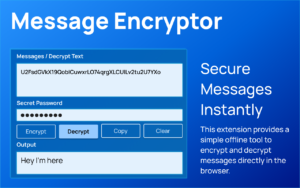
Unlike many online encryption tools that process data on servers, this extension works completely offline. All encryption and decryption happen locally on your device using the Web Crypto API.
It uses AES-GCM for strong encryption and PBKDF2 (SHA-256 with 100,000 iterations) for secure password-based key generation. Each message includes a random salt and IV, which ensures stronger security every time you encrypt text.
Because of this design, your messages never leave your browser.
Why It’s One of the Best Free Options in 2026
There are many privacy tools available, but this extension stands out because it is simple, secure, and truly private.
• Works 100% offline
• No data collection
• No special permissions required
• Password-based encryption
• Fast and lightweight
• Clean, easy interface
It’s ideal for bloggers, business professionals, students, and anyone who needs secure communication.
How It Works
When you enter a password, the extension processes it using PBKDF2 to derive a secure encryption key. The message is then encrypted using AES-GCM, which is a trusted and widely used encryption standard.
The final encrypted output is generated in Base64 format, making it easy to copy and share safely. To decrypt, the same password must be used. Without the correct password, the message cannot be recovered.
How to Use It
Using the extension is very simple:
- Install it in Chrome.
- Open the extension from your browser toolbar.
- Enter your message.
- Add your secret password.
- Click Encrypt.
To decrypt, paste the encrypted text, enter the same password, and click Decrypt.
No technical knowledge is required.
Is It Safe?
Yes. The extension does not store, collect, or transmit your personal data. Since everything happens locally in your browser, your information remains fully under your control.
However, always remember: if you forget your password, the encrypted message cannot be decrypted.
Final Thoughts
If you’re looking for the best free Message Encryptor & Decryptor extension for Chrome in 2026, this tool by Altftool.com is a reliable and secure choice.
It combines strong encryption, privacy-focused design, and ease of use — all in one lightweight extension. For anyone serious about protecting digital communication, this tool is definitely worth trying.
The Ultimate Gmail Performance Dashboard by AltF
The Gmail Analytics Extension by AltF Tool is a productivity-focused browser extension designed to provide users with…
How to Organize Your Favorite Websites with Altftool Bookmark Manager
In today’s digital world, we visit dozens of websites every day for work, learning, shopping,…

How to Shorten Long URLs Easily Using Altftool URL Shortener
In today’s digital world, sharing links has become a daily activity. Whether you are sharing…

Master Your Precision: Play Aim Trainer Pro Now
Aim Trainer Pro is a web-based utility hosted on AltFTool designed to help users test and…

Top Email Extractor Extensions for Fast and Easy Email Collection
In today’s digital world, collecting contact information efficiently is essential for marketers, researchers, business owners,…

How to Record Your Screen in One Click Using a Lightweight Chrome Extension
Screen recording has become an essential tool for professionals, educators, developers, and content creators. Whether…

#MessageEncryptor #ChromeExtension #OnlinePrivacy #EncryptionTool #CyberSecurity #SecureMessages #Altftool #DigitalSecurity #Carrerbook #Anslation

