
Building a modern website is no longer just about visual appeal or fast performance. Accessibility has become a core requirement. If a website cannot be used by people with disabilities, it fails a significant portion of its audience. Beyond ethics, accessibility also affects legal compliance, user trust, and overall brand credibility.
An Accessibility Audit Extension, powered by an Accessibility Score Calculator, aims to solve this challenge in a practical way. It gives developers and designers a fast, clear understanding of how accessible their webpage is and what needs improvement. But what makes it such a powerful tool for WCAG compliance? Let’s explore.
Why Accessibility Audits Matter
Accessibility ensures that people with visual, auditory, motor, or cognitive disabilities can navigate and interact with websites effectively. Standards such as the Web Content Accessibility Guidelines (WCAG) 2.1 provide a structured framework to measure accessibility.
However, manually checking compliance against WCAG guidelines can be time-consuming and complex. That is where an Accessibility Audit Extension becomes invaluable. Instead of reviewing every element manually, the extension scans the page instantly and identifies issues that require attention.
What Is the Accessibility Score Calculator?
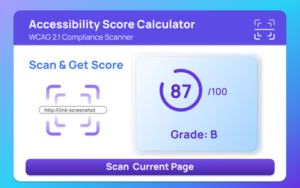
The Accessibility Score Calculator is the core engine behind the extension. Its main purpose is simple: analyze a webpage and provide a measurable accessibility score between 0 and 100, along with a clear grade.
Rather than leaving developers guessing, it translates technical compliance checks into a straightforward result. You immediately know whether your page performs well or needs urgent fixes.
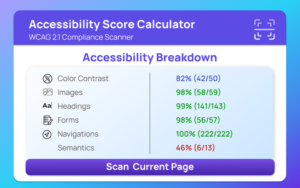
This score is not just a number. It reflects real usability barriers such as poor color contrast, missing alternative text, incorrect heading structure, and navigation problems.
Core Accessibility Scanning Features
At the heart of the extension is automated accessibility scanning. With a single click, the tool checks critical accessibility components, including:
- Color contrast issues
- Missing or incorrect alt text
- Improper heading structure
- Labeling problems
- Navigation barriers
The extension evaluates the page using WCAG 2.1 guidelines, ensuring that the audit aligns with widely accepted accessibility standards.
This automation saves time and reduces human error. Instead of manually inspecting code and design elements, developers receive immediate, structured feedback.
Accessibility Score and Grading System
One of the most practical features is the scoring system. After scanning, the extension provides:
- A numerical score from 0 to 100
- An accessibility grade
- A list of identified issues
- Improvement suggestions
This format makes it easier to prioritize fixes. A low score signals critical issues that must be addressed immediately, while a higher score confirms stronger compliance.
For agencies and teams, the score also becomes a measurable benchmark. It can be used to track progress over time and demonstrate improvements to stakeholders or clients.
Smart Suggestions for Improvement
Identifying problems is only half the job. Fixing them is what truly improves accessibility.
The built-in suggestion system provides clear recommendations based on detected issues. For example, if the scan finds low color contrast, it alerts you and encourages adjustments to meet accessibility standards. If images lack alt text, it highlights the need for descriptive alternatives.
This guidance helps both experienced developers and beginners understand what needs to change and why it matters.
Reporting and Data Storage
Accessibility work is rarely a one-time task. Continuous monitoring is essential.
The extension supports:
- Saving up to 50 recent accessibility reports
- Tracking the last scan time
- Viewing detailed reports through a dedicated dashboard
This history feature allows users to compare previous results and measure improvements. If a website update introduces new accessibility issues, the stored reports make it easier to identify when the change occurred.
The background service manages report saving, clearing, and data handling automatically, keeping the process smooth and organized.
Simple Interface and User Controls
Ease of use plays a significant role in adoption. The extension offers:
- A popup interface for quick scanning
- A full dashboard for detailed reports
- A keyboard shortcut (Ctrl+Shift+A or Cmd+Shift+A) to instantly open the scanner
This design ensures that accessibility testing becomes part of the development workflow rather than an afterthought. With quick access and minimal friction, teams are more likely to run regular audits.
Additionally, an auto-scan mode stored in settings allows the extension to check pages automatically, further streamlining compliance efforts.
Step-by-Step User Flow
The extension is designed to be straightforward:
- Open the extension popup.
- Click “Scan Current Page” or use the keyboard shortcut.
- The extension analyzes the webpage for accessibility issues.
- Results display the score, grade, issue list, and suggestions.
- The report is automatically saved in history.
- Open the dashboard for detailed insights.
- Clear reports or adjust settings anytime.
This simple process removes complexity from WCAG compliance and encourages consistent auditing.
Who Should Use an Accessibility Audit Extension?
This tool is especially valuable for:
- Front-end developers
- UX and UI designers
- Digital agencies
- Website owners
- QA testers
- Compliance teams
Whether building a new website or maintaining an existing one, accessibility audits should be ongoing. This extension helps integrate compliance checks directly into daily workflows.
Final Thoughts
Accessibility is no longer optional. It is a responsibility and, in many regions, a legal requirement. An Accessibility Audit Extension powered by an Accessibility Score Calculator simplifies the process of meeting WCAG 2.1 guidelines.
By offering automated scanning, a clear scoring system, improvement suggestions, and detailed reporting, it transforms accessibility from a complex technical task into a manageable routine. Instead of guessing whether your site is compliant, you receive measurable insights and practical steps to improve.
For teams that value inclusive design and long-term usability, this extension is not just helpful. It is essential.
This article is based solely on the provided information about the Accessibility Score Calculator extension. Actual results may vary depending on website structure, browser environment, and implementation practices. While automated tools significantly improve accessibility evaluation, they should complement manual testing and expert review to ensure full WCAG compliance.
#AccessibilityAudit #WCAGCompliance #WebAccessibility #InclusiveDesign #AccessibilityScore #UXDesign #WebDevelopment #DigitalCompliance #Anslation #Carrerbook

