
In today’s digital world, passwords are the first line of defense against cyber threats. From social media accounts to online banking and business dashboards, everything depends on secure authentication. Yet many users still rely on weak or repeated passwords, putting their data at risk.
That is where Random Password Generator comes in. Designed as a lightweight Chrome extension, this tool allows users to instantly generate secure and customizable passwords directly from the browser popup. There is no need to visit external websites or depend on third-party services. Everything happens locally within your browser, ensuring speed, privacy, and convenience.
The Motive Behind Random Password Generator
The primary goal of Random Password Generator is to simplify password creation while maintaining strong security standards. Many online password tools require visiting websites, which may track user activity or expose generated passwords to external systems.
This extension eliminates that concern by generating passwords locally inside the browser. Since it does not rely on background scripts or external APIs, the entire process remains self-contained. Users get a secure, quick, and distraction-free experience every time they need a strong password.
Key Features That Make It Powerful
Customizable Password Length
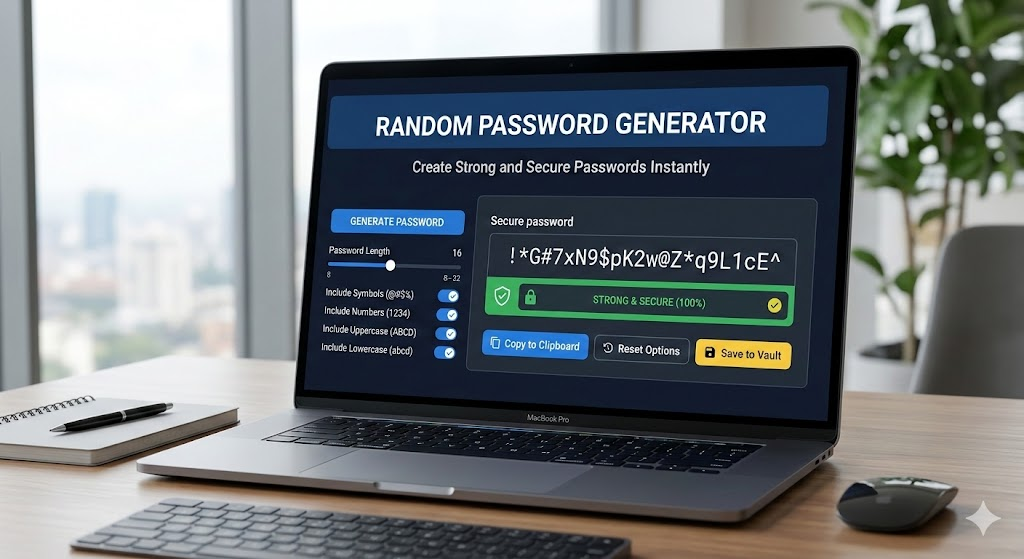
Not all platforms require the same password length. Some websites demand at least 8 characters, while others recommend 12, 16, or even more. With this extension, users can select their desired password length based on specific requirements. Whether you need a short password for a basic login or a long, highly secure one for sensitive accounts, customization is easy.
Character Type Selection
Security increases when you mix different character types. This tool allows users to toggle:
- Uppercase letters
- Lowercase letters
- Numbers
- Symbols
By selecting different combinations, users can generate passwords that meet even the strictest security policies.
Smart Random Generation Logic
The extension uses a randomized character pool based on your selections. This ensures that each password is unique and unpredictable. Since it does not follow patterns or pre-defined sequences, the generated passwords are much harder to guess or crack.
Password Strength Indicator
One of the most helpful features is the built-in password strength indicator. After generating a password, the tool evaluates it and displays whether it is Weak, Medium, or Strong.
This visual feedback helps users understand how secure their password is and encourages them to increase length or complexity if necessary.
One-Click Copy Functionality
Convenience matters. Instead of manually selecting and copying the password, users can click a simple Copy button. The extension uses the clipboard API to instantly copy the password, saving time and reducing errors.
Popup-Based and Self-Contained Design
The extension runs entirely within the Chrome popup interface. There are no background scripts running constantly and no external servers involved. This design keeps the tool lightweight, fast, and privacy-focused.
User Flow: How It Works
Using the Random Password Generator is straightforward and intuitive.
Step 1: Click the extension icon in the Chrome toolbar.
Step 2: Select your preferred password length.
Step 3: Choose the character types you want to include, such as uppercase, lowercase, numbers, or symbols.
Step 4: Click the Generate Password button.
Step 5: Review the strength indicator to see if the password meets your needs.
Step 6: Click Copy to instantly copy the password to your clipboard.
The entire process takes only a few seconds, making it perfect for users who need quick and secure password creation.
Why This Extension Is Better Than Online Generators
Many online password generators require you to trust external platforms. While some are safe, others may log data or expose you to unnecessary risks. With this Chrome extension:
- Passwords are generated locally
- No external APIs are used
- No account sign-up is required
- No data leaves your browser
This gives users full control and peace of mind.
Who Should Use Random Password Generator?
This extension is ideal for:
- Everyday internet users
- Developers and IT professionals
- Business owners managing multiple accounts
- Students creating secure academic logins
- Anyone serious about online security
Strong passwords are not optional anymore. They are essential.
Final Thought
Random Password Generator is a simple yet powerful tool that combines convenience, customization, and security. By generating passwords locally within the browser and offering instant copy functionality, it removes common barriers to strong password usage. In a time when digital security is more important than ever, using a reliable password generator is a smart and responsible choice.
AI Automation Guide 2026: Work Smarter, Faster & Better
Artificial intelligence and automation are changing the way people work, manage information, communicate, and complete…

Disclaimer
This article is for informational purposes only. While the extension is designed to enhance password security, users are responsible for safely storing their passwords and following best cybersecurity practices, such as enabling two-factor authentication where available.
#RandomPasswordGenerator #ChromeExtension #CyberSecurity #StrongPasswords #OnlineSafety #TechTools #Anslation #Carrerbook #AltfTools #Extension

