

In a world where quick answers matter, switching between tabs just to convert kilometers to miles or Celsius to Fahrenheit can feel unnecessarily time-consuming. Whether you’re a student solving math problems, a developer working with number systems, or simply someone cooking in the kitchen, unit conversions are part of everyday life.
ConvertAll was built to eliminate friction. It provides a fast, convenient, and fully offline way to handle unit conversions directly inside your browser. No extra searches. No complicated interfaces. Just clean, accurate results in seconds.
Motive Behind ConvertAll

The idea behind ConvertAll is simple: make everyday conversions effortless.
Instead of opening search engines, typing queries repeatedly, and sorting through ads or calculator pages, users can access instant conversions within one compact interface. The goal is to offer accuracy, speed, and simplicity — all without relying on external APIs or internet connectivity.
It is designed to be practical, lightweight, and accessible for daily use.
Key Features of ConvertAll
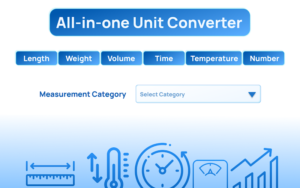
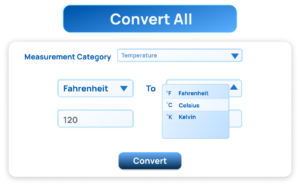
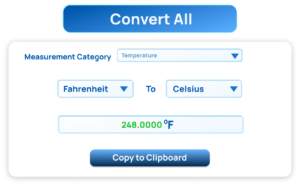
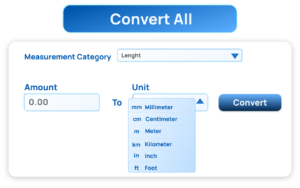
ConvertAll combines multiple powerful features in one modern interface. Here’s what makes it stand out:
1. Multi-Category Conversion
ConvertAll supports a wide range of categories, including:
- Length
- Weight
- Volume
- Temperature
- Time
- Number Base
This broad coverage ensures users don’t need separate tools for different types of conversions.
2. Instant Conversion
As soon as you type a value, the result updates automatically. There’s no need to press a calculate button. This real-time conversion makes the experience smooth and efficient, especially when testing different values.
3. Swap Units
With one click, you can instantly reverse the conversion direction. For example, switch from meters to feet — or feet to meters — without re-entering data. It saves time and reduces repetitive steps.
4. Copy Result
Need to paste the result into a document, spreadsheet, or code editor? ConvertAll includes a quick copy function that sends the final converted value directly to your clipboard.
This small feature makes a big difference in productivity.
5. Temperature Conversion
ConvertAll handles conversions between:
- Celsius
- Fahrenheit
- Kelvin
This is especially helpful for students, scientists, developers, and travelers dealing with international standards.
6. Number System Conversion
For developers and technical users, ConvertAll includes number base conversion between:
- Decimal
- Binary
- Hexadecimal
- Octal
This makes it a useful tool not only for everyday measurements but also for programming and system-level tasks.
7. Offline Support
One of ConvertAll’s strongest advantages is that it works fully offline. There are no external API calls or internet dependencies. This ensures:
- Faster performance
- Better privacy
- Reliable access anytime
Whether you’re traveling or working in a low-connectivity area, the tool remains fully functional.
8. Clean and Modern UI
The interface is intentionally minimal and easy to navigate. It includes:
- Smooth dropdown menus
- Styled input fields
- Clear layout
- Distraction-free design
The goal is to focus on usability without overwhelming the user.
9. Smart Settings System
ConvertAll includes customizable settings to improve precision and readability.
Users can:
- Set decimal precision
- Toggle thousands separator
Preferences are saved automatically, ensuring the tool adapts to your needs over time.
Simple and Efficient User Flow
ConvertAll is designed with simplicity in mind. The process is intuitive:
- Open the extension popup.
- Select a unit category (Length, Weight, etc.).
- Enter the amount to convert.
- Choose the “From” and “To” units from dropdown menus.
- The result appears instantly.
- Swap units, copy the result, or adjust settings as needed.
- Your preferences remain saved for future sessions.
No unnecessary steps. No learning curve.
Who Can Benefit from ConvertAll?
ConvertAll is useful for:
- Students solving math and science problems
- Engineers working with measurements
- Developers handling number systems
- Travelers converting temperature and distance
- Everyday users needing quick calculations
Its versatility makes it more than just a basic converter — it’s a practical productivity tool.
Why ConvertAll Stands Out
Many online converters exist, but few combine speed, offline functionality, multi-category support, and customization in one lightweight tool.
ConvertAll eliminates dependency on internet searches and third-party websites. It keeps everything centralized, accurate, and instantly accessible inside your browser.
For anyone who performs regular conversions, this tool simplifies daily tasks significantly.
Final Thought
ConvertAll proves that small tools can deliver powerful convenience. By combining multi-category conversions, instant results, offline support, and a clean interface, it transforms what is usually a repetitive task into a seamless experience.
If you value speed, accuracy, and simplicity, ConvertAll is a smart addition to your workflow. One click, one interface, complete control.
Disclaimer
This article is for informational purposes only. Features and functionality may vary depending on version updates or platform compatibility. Always verify tool settings and calculations for critical professional or academic work.
#ConvertAll #UnitConverter #ProductivityTool #BrowserExtension #OfflineTools #SmartUtilities #Anslation #Carrerbook #Extansion #ALTFTOOL

