Data drives everything — from business reports and spreadsheets to APIs and modern web applications. Among the most widely used data formats, CSV remains the go-to choice for structured reports and spreadsheet exports, while JSON powers dynamic web apps and real-time APIs. Switching between these two formats is no longer optional; it has become an essential and frequent task for developers, data analysts, marketers, and students who work with structured information daily.
That’s where CSV ⇄ JSON Converter by AltFTool comes in.
This lightweight Chrome extension allows you to instantly convert CSV to JSON and JSON to CSV directly inside your browser — without uploading files to any server. Everything runs locally, ensuring complete privacy and fast performance.
Why This Extension Is So Useful
Many online converters require file uploads, stable internet connections, and sometimes even account registration. This not only slows down workflow but can also raise privacy concerns.
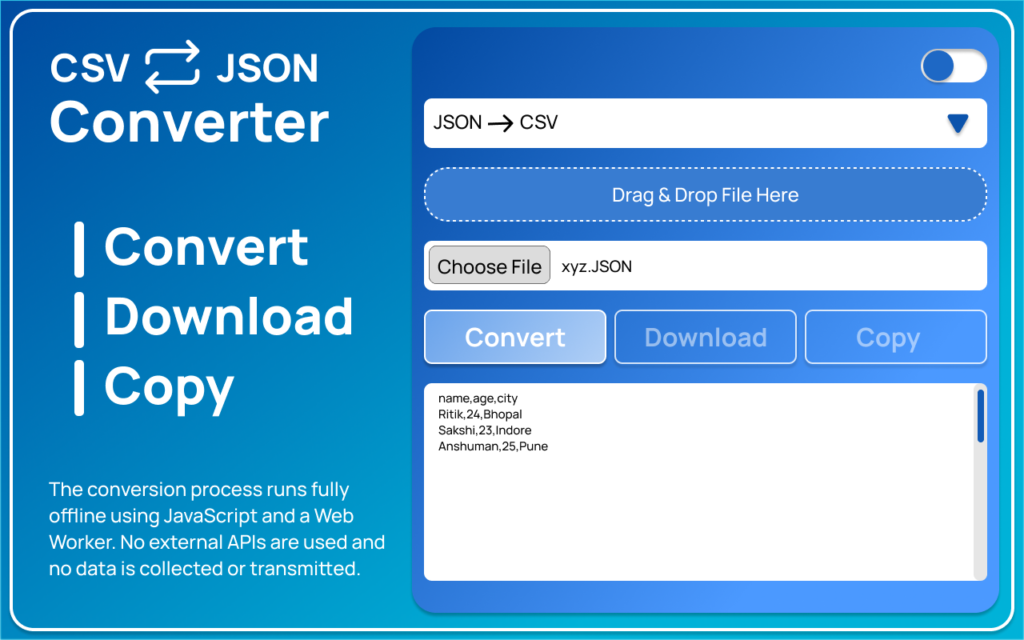
CSV ⇄ JSON Converter removes those limitations. You simply open the extension, drag and drop your file, choose the conversion type, and download or copy the result. The entire process feels smooth and distraction-free.
Because it uses Web Worker technology, file processing happens efficiently in the background. Even larger files can be converted without freezing the browser.
Privacy & Security – A Major Advantage
Data privacy is a serious concern today, especially when handling business reports, CRM exports, or client datasets.
This extension does not upload files, connect to external APIs, collect user data, or track usage. It does not require login or unnecessary permissions. All file processing happens locally inside your browser, meaning your data never leaves your device.
Compared to many online tools that rely on server-based processing, this offline functionality offers stronger control and security.
How It Works
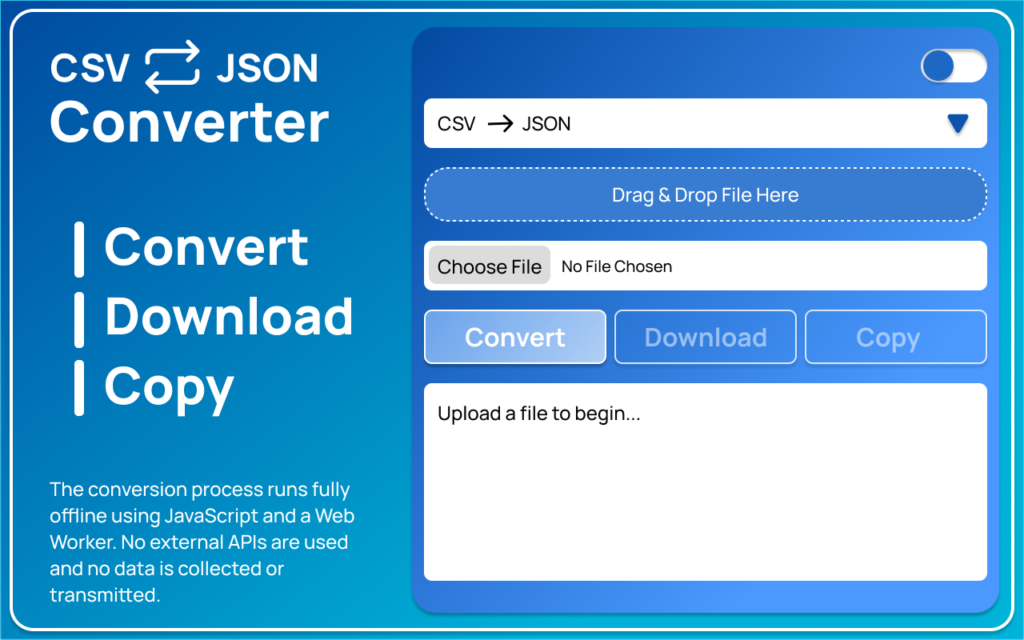
STEP 1: Open the AltFtool.com website then search CSV ⇄ JSON Converter Extension
Click on the CSV ⇄ JSON Converter icon from your Chrome toolbar. The extension opens instantly with a simple and distraction-free interface, ready for file conversion.
STEP 2: Upload Your File
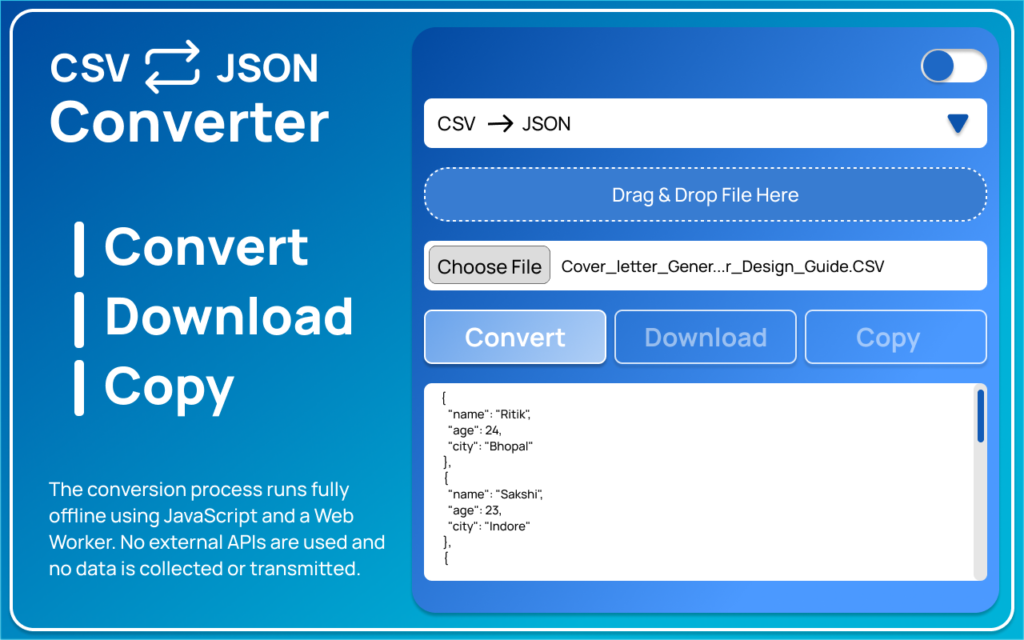
Drag and drop your CSV or JSON file directly into the extension window. You can also choose the file manually from your device. The tool automatically detects the file format once uploaded.
STEP 3: Select Conversion Mode
Choose the conversion direction based on your need — either CSV to JSON or JSON to CSV. This ensures the output matches your required format.
STEP 4: Click Convert
Press the Convert button to start the process. The extension processes your file locally inside the browser using Web Worker technology, ensuring smooth and fast performance.
STEP 5: Preview and Download
You can instantly preview the converted result. After reviewing it, either download the file to your device or copy the output with one click.
Who Can Benefit From It?
Developers can quickly format API data or convert test files without writing additional scripts.
Data analysts can restructure datasets efficiently for dashboards and reporting.
Marketers and business professionals can transform exported data into the required format for automation tools.
Students can better understand structured data formats while working on projects.
It saves time, reduces manual formatting errors, and simplifies repetitive tasks.
Feature Overview
Below is a clear breakdown of what the extension offers:
| Feature | Description |
|---|---|
| CSV to JSON Conversion | Instantly converts structured CSV files into clean JSON format |
| JSON to CSV Conversion | Converts JSON data into spreadsheet-ready CSV files |
| Drag & Drop Support | Easily upload files by dragging them into the extension |
| Instant Preview | View converted output before downloading |
| One-Click Copy | Copy converted data directly to clipboard |
| File Download Option | Download the converted file instantly |
| Light & Dark Mode | Comfortable interface for different preferences |
| Web Worker Processing | Smooth background processing without browser lag |
| 100% Offline Operation | Works without internet connection |
| No Data Collection | No tracking, no uploads, no external API connections |
Comparison With Paid Online Converters
Many premium tools provide similar conversion features but often charge subscription fees or process files on external servers. Server-based tools depend on internet speed and may expose sensitive data during uploads.
CSV ⇄ JSON Converter eliminates these concerns by processing everything locally. It is free to use, faster due to local execution, and significantly more privacy-focused. For professionals who handle confidential information, this is a major advantage.
User Experience
CSV ⇄ JSON Converter offers a clean and distraction-free interface that makes file conversion simple and fast. The drag-and-drop support allows quick uploads, while the instant preview lets you check results before downloading. You can copy the converted output with one click or download it directly to your device. With Light and Dark mode support and a lightweight design, the extension runs smoothly without slowing down your browser.
Review & Rating
CSV ⇄ JSON Converter by AltFTool is a fast, secure, and privacy-focused tool that delivers exactly what it promises. Its offline functionality and simple interface make it highly reliable for daily use.
Rating: ⭐⭐⭐⭐⭐ (5/5)
A must-have extension for anyone who frequently works with CSV and JSON files.
CSV ⇄ JSON Converter by AltFTool is more than just a basic conversion tool. It is designed for speed, simplicity, and privacy. Whether you work in development, analytics, marketing, or education, it helps streamline data formatting tasks without compromising security.
If you frequently work with CSV and JSON files, this extension can become a reliable part of your productivity toolkit.
FAQs
#CSVtoJSON #JSONtoCSV #DataConversion #ChromeExtension #AltFtool #Carrerbook #Anslation #DeveloperTools #DataTools #OfflineTool #PrivacyFirst #WebDevelopment