

Gmail Analytics – Documentation
Managing emails efficiently has become essential in both personal and professional life. Constantly switching tabs just to check unread emails can interrupt workflow and reduce productivity. Gmail Analytics is designed to solve this problem by allowing users to monitor their Gmail activity directly from the browser toolbar — without opening the Gmail website.
This documentation explains the purpose, features, and user flow of the Gmail Analytics extension in a clear and structured way.
Motive
The core objective of Gmail Analytics is simple:
To help users quickly check their Gmail activity without manually opening their inbox.
Instead of repeatedly visiting Gmail, the extension displays unread email counts and previews recent messages directly inside the browser. The goal is to make inbox monitoring:
- Faster
- More convenient
- Less distracting
- More productivity-focused
It provides essential information at a glance while keeping the user’s workflow uninterrupted.
Key Features
Gmail Analytics includes several smart features designed to simplify inbox monitoring.
1. Background Email Checking
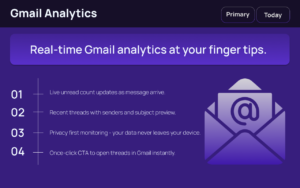
The extension automatically fetches the unread email count at regular intervals using Gmail’s Atom feed. This allows real-time updates without requiring manual refresh.
2. Unread Count Badge
The unread email count appears directly on the browser toolbar icon. Users can instantly see how many unread messages they have without opening any tabs.
3. Recent Email Preview
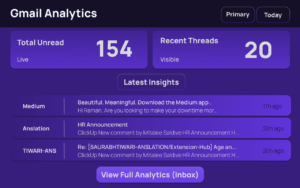
With a single click, the popup displays:
- Sender name
- Email subject
- Short message snippet
- Time received (shown as time ago)
This preview helps users decide whether an email needs immediate attention.
4. Login Detection
If the user is not logged into Gmail, the extension automatically displays a “Connect Gmail” button. This ensures smooth onboarding and avoids confusion.
5. Live Syncing
While the popup is open, the extension refreshes email data every 10 seconds. This keeps the displayed information accurate and up to date.
6. XML Feed Parsing
The extension safely parses Gmail’s Atom XML feed using an offscreen document. This approach ensures secure and efficient processing of email metadata.
7. Local Storage
Unread counts, recent emails, and login status are stored locally within the browser. This improves performance and reduces unnecessary network calls.
8. Inbox Shortcut
A dedicated button allows users to instantly open their Gmail inbox in a new tab. This provides quick access when deeper email interaction is required.
User Flow
The extension is built around a simple and intuitive workflow.
Step 1: Background Monitoring
Once installed, the extension continuously checks the Gmail inbox in the background.
Step 2: Toolbar Notification
The unread email count appears on the extension icon in the browser toolbar.
Step 3: Opening the Popup
When the user clicks the extension icon:
- If logged in → The popup displays unread count and recent email previews.
- If not logged in → The popup shows a “Connect Gmail” button.
Step 4: Opening Individual Emails
Users can click on any email in the preview list to open it directly in Gmail.
Step 5: Opening Full Inbox
The Inbox button instantly redirects the user to their full Gmail inbox.
Step 6: Live Refresh
While the popup remains open, email data refreshes every 10 seconds to ensure real-time accuracy.
Security and Privacy Approach
Gmail Analytics focuses on secure data handling. Since it uses Gmail’s official Atom feed and processes information locally within the browser, it avoids storing sensitive email content externally.
Only essential metadata is fetched and displayed:
- Sender
- Subject
- Snippet
- Timestamp
This design prioritizes convenience while maintaining responsible data handling practices.
Productivity Benefits
Gmail Analytics improves productivity by:
- Reducing unnecessary tab switching
- Providing instant visibility of unread emails
- Helping users prioritize messages
- Minimizing distractions
- Offering fast inbox access
For professionals, students, and remote workers, this streamlined monitoring approach can save valuable time throughout the day.
Final Thought
Gmail Analytics is a lightweight yet powerful extension built to simplify email monitoring. By showing unread counts and recent email previews directly in the browser, it eliminates the need for constant inbox checking. Its background syncing, local storage system, and real-time updates create a seamless and efficient experience. For anyone who wants quicker access to essential email information without disrupting workflow, Gmail Analytics offers a practical and user-friendly solution.
AI Automation Guide 2026: Work Smarter, Faster & Better
Artificial intelligence and automation are changing the way people work, manage information, communicate, and complete…

Disclaimer
This documentation is for informational purposes only. Features and functionality may vary depending on browser compatibility, Gmail updates, and extension versions. Users should review official extension permissions and privacy policies before installation.
#GmailAnalytics #EmailProductivity #InboxManagement #BrowserExtension #WorkSmart #DigitalTools #Extension #ALTFTOOL #Anslation #Carrerbook

