
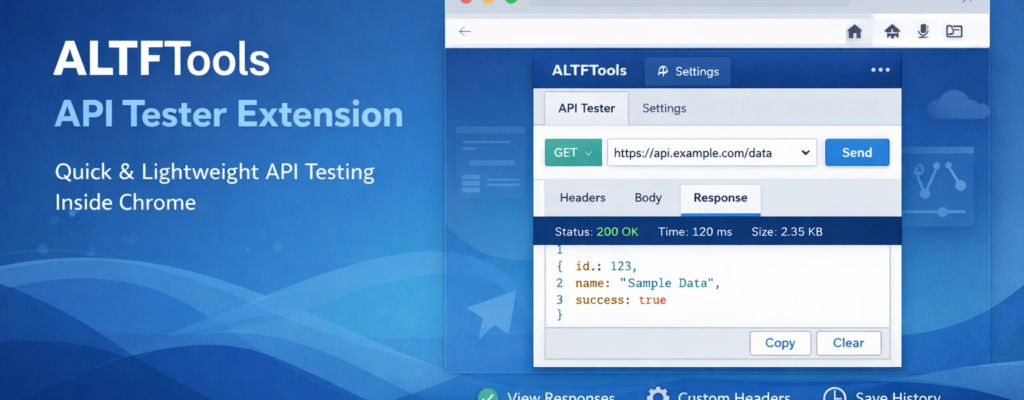
API Tester Pro is designed to provide a fast, lightweight, and browser-based solution for testing REST APIs directly inside Chrome. Developers often rely on heavy desktop applications for API testing, but sometimes all you need is a quick and efficient tool that works instantly without slowing down your system.
API Tester Pro eliminates unnecessary complexity. It allows users to send API requests, inspect responses, analyze status codes, check response time and size, and manage headers and body inputs — all within a clean and intuitive popup interface. No large installations, no switching between multiple apps, and no cluttered dashboards.
The goal is simple: make API testing faster, cleaner, and more accessible for everyday development tasks.
Features
Core Features
1. Send REST API Requests
Supports all major HTTP methods:
- GET
- POST
- PUT
- DELETE
- PATCH
This ensures compatibility with most RESTful services and backend workflows.
2. Custom Request Headers
Users can manually add headers such as:
- Authorization tokens
- Content-Type
- Accept
- Custom API keys
Headers can be edited or removed easily before sending the request.
3. Flexible Request Body Input
For methods like POST, PUT, or PATCH, users can enter:
- JSON data
- Plain text
- Form-data
This makes it suitable for testing authentication APIs, CRUD operations, and webhook endpoints.
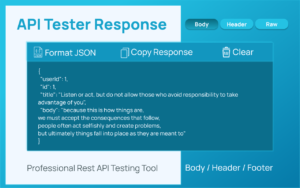
4. Formatted Response Viewer
Responses are displayed in a structured and readable format. JSON responses can be auto-formatted for better clarity.
5. Response Headers & Raw Output
View complete response headers and raw server output for debugging and verification.
6. Response Insights
API Tester Pro displays:
- Status code
- Response time
- Response size
These metrics help developers quickly evaluate performance and correctness.
7. Built-in JSON Formatter
Automatically beautifies JSON responses to improve readability and debugging efficiency.
8. Copy Response Button
With a single click, users can copy the response body for documentation, testing, or sharing.
9. Local Request History
Requests are saved locally in the browser. Users can reopen previous API calls instantly without retyping everything.

Settings Page
API Tester Pro includes a customizable settings panel to adapt the tool to different workflows.
Auto-Format JSON
Automatically formats JSON responses upon receiving them.
Show Response Time
Toggle visibility of response timing details.
Auto-Copy Successful Responses
Automatically copies the response body when the request succeeds.
Set Request Timeout
Define how long the extension should wait before canceling a request.
Set History Limit
Control how many previous requests are stored locally.
Default Content-Type Selection
Choose a default content type for faster request setup.
User Flow
API Tester Pro is designed to be straightforward and efficient.
- The user opens the API Tester Pro popup inside Chrome.
- Selects the desired HTTP method (GET, POST, PUT, DELETE, PATCH).
- Enters the API request URL.
- Adds custom headers if required.
- Inputs request body data when applicable (JSON, text, or form-data).
- Clicks the Send button to execute the request.
- The response appears instantly, showing status code, response time, size, headers, and formatted body.
- The user can format, copy, or clear the response.
- The request is automatically saved in history for quick reuse.
- Users can adjust behavior from the Settings page, including timeout duration, formatting preferences, and history limits.
Why Choose API Tester Pro?
- Lightweight and fast
- No external accounts required
- Runs entirely inside the browser
- Clean and distraction-free interface
- Ideal for quick debugging and API validation
API Tester Pro is built for developers who value speed and simplicity. Whether you are testing endpoints during development, debugging APIs, or validating backend responses, the extension keeps the process smooth and efficie
Conclusion
API Tester Pro simplifies API testing by bringing essential tools directly into your browser. With powerful request controls, response analysis, customizable settings, and local history management, it offers a practical solution for everyday API workflows.
If you need a fast and reliable way to test REST APIs without relying on bulky software, API Tester Pro is built to meet that need.
Final Thought
The ALTFTools API Tester Extension is a practical and time-saving solution for developers who want to test, validate, and troubleshoot APIs directly from their browser without switching between multiple platforms. With its clean interface, instant request testing, and simplified workflow, it helps streamline development and debugging processes. Whether you are a beginner exploring APIs or an experienced developer optimizing endpoints, this extension can significantly improve efficiency and productivity.
Disclaimer
This article is for informational and educational purposes only. Features and functionality of the ALTFTools API Tester Extension may change over time. Users should refer to the official documentation and ensure proper security practices while testing live APIs or handling sensitive data.
#ALTFTools #APITester #WebDevelopment #DeveloperTools #APIIntegration #CodingTools #SoftwareDevelopment #Anslation #Carrerbook #ALTFTOOL #Extension

